Shared folder no longer accessible

danj

New Member
Hi folks,

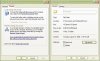
The name of my shared folder has recently changed to "documents" and the folders in it are no longer accessible to me. I did not change the name. I searched around for a solution but have yet to find one. I've attached a picture showing the message I get when I try to access one of the folders and other info.

thanks,

-dan
 
Last edited:
>The name of my shared folder has recently changed to "documents" and the folders in it are no longer accessible to me. I did not change the name. I searched around for a solution but have yet to find one. I've attached a picture showing the message I get when I try to access one of the folders and other info.

When did this problem start? Is it possible you inadvertently did something without realizing it? Do you have separate accounts on your system? If so, is it possible you changed it from one of the other accounts? Sorry if this is Basic, but have you tried changing the name back to 'Shared Documents'? When you right-click on that folder as it is now and then select Sharing and Security, what is there? Is it possible to get a screenshot of that window?
 
It's probably because the files in the folder no longer exist and the computer cannot find it. Try creating the folder again and uploading your music again.
 
Thanks for the replies,

I don't have any separate accounts on my system. The picture below is what you asked for imsati. LukeAge, there are no files in those folders - i can check by waving the mouse over them. I would like to keep those folders empty, I would just like to access them once again.
 

Attachments

  • shared folder.JPG
    shared folder.JPG
    65.1 KB · Views: 24
Thanks for the replies,

I don't have any separate accounts on my system. The picture below is what you asked for imsati. LukeAge, there are no files in those folders - i can check by waving the mouse over them. I would like to keep those folders empty, I would just like to access them once again.

Ok, where it says 'If you understand the security risks...' click on it. Now click both options that appear and Apply the changes. Do a restart just for safe measure and post up what happened.

Heading to bed in a bit so I may not get to you until tomorrow.

--Jay
 
thanks - seems to be working now. Your instructions didn't work for the documents folder, but it did kind of work for the folders within it that I previously couldn't access. When I right clicked on each of them and clicked sharing and security, the dialog was different then the dialog for the documents folder. They contained an option to "share this folder on the network", and when I clicked on that and hit OK it said access denied. But then the folder, in the case of the my music folder, changed from a generic folder to the one with the note on it, and it was then accessible. Same for "my pictures" and "my movies". So it seems the folder lost its identity somehow and hence function.

thanks again for your help!

-dan
 
Back
Top