I'm sorry if this has been posted already but I wasn't sure how to search it or how to explain it.
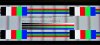
Please look at the picture.
Specs:
Video: Nvidia 7600GT (with latest drivers)
Monitor: Akai LCD TV
Connected via VGA
Set to native resolution - 1360x768
(I have even fiddled with custom resolutions around the native, and changed refresh rates)
So here is what's up.
As you can see I am in the Nvidia Screen Adjustment program and I have several lines on the screen. They are only that visible in that program. The problem is that where ever you see a line the text on the screen is fuzzy or darker than the rest. I was wondering if I could get rid of those lines, in some situations they are not noticeable at all and in others they are as plain as day. I'm not sure what to do anymore. Please help.
Please look at the picture.
Specs:
Video: Nvidia 7600GT (with latest drivers)
Monitor: Akai LCD TV
Connected via VGA
Set to native resolution - 1360x768
(I have even fiddled with custom resolutions around the native, and changed refresh rates)
So here is what's up.
As you can see I am in the Nvidia Screen Adjustment program and I have several lines on the screen. They are only that visible in that program. The problem is that where ever you see a line the text on the screen is fuzzy or darker than the rest. I was wondering if I could get rid of those lines, in some situations they are not noticeable at all and in others they are as plain as day. I'm not sure what to do anymore. Please help.