Two copies of XP on my desktop.

firefrost

New Member
I have two hard drives in my computer. One has XP sp3 and the other has Windows 7 dual booted. I have a free partition on the Win 7 drive and would like to copy the XP operating system onto it giving me two copies of XP.
One would be the existing sp3 copy and the other sp2.
I need no more than sp2 to run a car spares CD, it won't work with sp3.
Can I do this ? Would I have to unplug the existing XP during the install ?
All help appreciated.
 
Why don't you simply install XP SP2 on that free partition of Windows 7 drive?

You can always use Linux Ubuntu to copy XP SP3 on that Windows 7 drive on that blank partition and then use the XP SP2 disk and perform the repair process to make it from XP SP3 to XP SP2,but that is not a very good way of doing that anyway so why not simply install XP SP2 on that blank partition of Windows 7 drive?
 
Last edited:
One problem you would face in order to do what you're asking would be that you would need a 2nd XP license. You can't legally install the same license twice.

Are you running Win 7 Pro or Ultimate? If so, you could download and install XP Mode which is a virtual machine that includes a licensed copy of XP.
 
Well as long as he is doing that all on the same machine,I dont think it should be a problem.
You may not think so but Microsoft (and the law) think differently. That's why MS supplies a fully licensed version of XP with it's XP Mode virtual machine.
 
Thanks for the replies. To answer your questions, I have Windows 7 home premium so no access to XP as a Virtual m/c inside 7.
I thought I might be able to run another copy of XP off the original installation disk as if the original HD had failed or been corrupted. That 's why I suggested unplugging the XP hard drive. Surely Microsoft would not have to be involved for a failed hard drive?
I could try this but don't want to foul up the booting sequence I have at present.
 
You most assuredly can run the installer again but your license only allows for 1 install if the 2 installs go thru validation from MS, one is going to be invalid.
 
OK, Is there an easy way to downgrade my XPsp3 to XPsp2 so that I can use my spares CD and would XP be seriously compromised in normal use.?
 
Thank you, Method 2 worked but unfortunately I am no further on. I now have XP2 on my computer and thought that would have uninstalled Internet Explorer 8. However IE8 is still there and my CD won't work with it. I tried Control Panel to uninstall it but half way thro' the procedure it halts and says some library file Mui is missing and can't continue.
IE7 is also on the computer but can't see how to make the CD use it while IE8 is still there.
 
The easiest way to remove IE8 is to perform the repair process using your XP disk.That way you will remove all IEs that are newer than IE6 and you will easily install IE7 later.

You most assuredly can run the installer again but your license only allows for 1 install if the 2 installs go thru validation from MS, one is going to be invalid.

Lol the way you said this sounds like that he cannot reinstall Windows ever again using the same disk he used to install Windows the first time xD Changing the HDD is not going to disable him to install Windows again.It is going to be disabled only if you change a lot of hardware,but for a simple HDD it won't be disabled.HDDs fail every day to someone and if Microsoft put a validation protection for a HDD too then nobody would not be buying Windows OS lol.Because if someone decides he/she wants more free space,he/she needs to buy Windows again lol? I don't think so.It doesn't work that way lol.I never had problems and I changed about 10 HDDs until today lol.And some of them were PATA and the rest was SATA.
 
Last edited:
The easiest way to remove IE8 is to perform the repair process using your XP disk.That way you will remove all IEs that are newer than IE6 and you will easily install IE7 later.


Lol the way you said this sounds like that he cannot reinstall Windows ever again using the same disk he used to install Windows the first time xD Changing the HDD is not going to disable him to install Windows again.It is going to be disabled only if you change a lot of hardware,but for a simple HDD it won't be disabled.HDDs fail every day to someone and if Microsoft put a validation protection for a HDD too then nobody would not be buying Windows OS lol.Because if someone decides he/she wants more free space,he/she needs to buy Windows again lol? I don't think so.It doesn't work that way lol.I never had problems and I changed about 10 HDDs until today lol.And some of them were PATA and the rest was SATA.
My statement was in reference to the OP wanting to install the same copy of XP multiple times on the same machine, not reinstalling after a failed HDD.
 
STARS, When I put the disk in I am given the option to install XP, no mention of repair.
I think we all know we can re-install XP if we have a failed or corrupted HDD. What I wanted to do was as Strollin said have the same copy of XP , one with IE8 and one with IE7, feeding the same motherboard, registry etc. The opinion seems to be Microsoft will not allow. I am tempted to ask them why, since it would happen on the one m/c.
 
I found a post to a forum online by a microsoft MVP and they state as long as its on the same drive but different partition then its okay. But frankly I feel it shouldn't matter if its on the same drive or different HDD, the license is still only being used on the same system and not at the same time.

Exactly.

STARS, When I put the disk in I am given the option to install XP, no mention of repair.
I think we all know we can re-install XP if we have a failed or corrupted HDD. What I wanted to do was as Strollin said have the same copy of XP , one with IE8 and one with IE7, feeding the same motherboard, registry etc. The opinion seems to be Microsoft will not allow. I am tempted to ask them why, since it would happen on the one m/c.

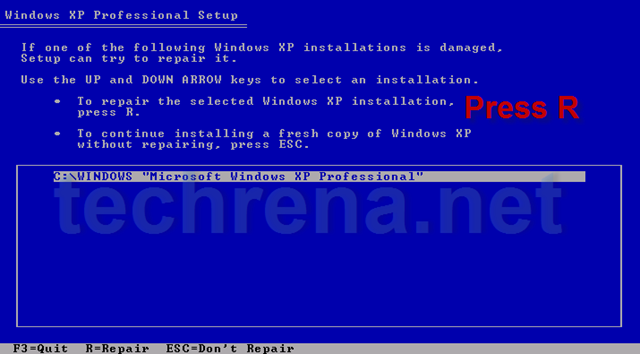
LoL I said REPAIR and REPAIR has nothing to do with REINSTALLATION.It is not the same thing.REINSTALLATION will delete everything and then install XP and you will lose all your data and settings while REPAIR will do the same thing,but without deleting ANY of your data and settings.The only thing it will delete are the Windows updates and IE8 is one of them.After the REPAIR you will end up with IE6 and you can then easily install IE7 or IE8.REPAIR looks like on the following picture:
repair_xp.png


So from the list just choose the partition you want to fix and that's it.You do not have to reinstall anything...
 
Last edited:
STARS, If you read the first line of my post I said that when I put in my XP cd I do not get the option to 'repair' I know re-install will lose all data. that's why I used Windows easy transfer last week to put all data on my ext hd. Since I can't seem to repair XP or remove IE8 I think I will do an install of XP on the free partition I have and bring that one up to IE7. John's post re Ken Blake more or less agrees that it will work.
John, Thanks, I think it makes sense that it would be allowed by microsoft since it all occurs on one m/c. In my case it would be two separate hds
 
I personally doubt that MS would find it acceptable since they insist that you need a separate license for each OS in any VMs you install.
 
I found a post to a forum online by a microsoft MVP and they state as long as its on the same drive but different partition then its okay. But frankly I feel it shouldn't matter if its on the same drive or different HDD, the license is still only being used on the same system and not at the same time.

It's the last post on this link.

http://www.realgeek.com/forums/installing-multiple-versions-of-xp-on-one-computer-387887.html
There are 2 MS MVPs that posted in that thread, one says no, the other says yes. Which should we believe? LOL

Believe the one that agrees with what you want to do of course!
 
There are 2 MS MVPs that posted in that thread, one says no, the other says yes. Which should we believe? LOL

Believe the one that agrees with what you want to do of course!

HUH? Go back and read both of them. Both of them say there should be no problem.
 
Back
Top