Using Nvidia's nTune software for general overclocking?

Joyce P

New Member
Hi everyone, I noticed in the nTune software to overclock the Nvidia cards there is a section for motherboard tuning. It has sliders for CPU parameters as well as for memory that work in the exact same way as their sliders to overclock the GPU. Is this a safe, stable way to overclock your motherboard hardware? I was only able to get another 600 marks on 3DMark06 after tinkering for 3 hours.

Additionally are there any other programs that work in a similar fashion that overclock CPU and memory from a program in windows without having to make adjustments in BIOS? Thanks!

- Joyce
 
Yeah the comp will lock up a lot when nTune is utilized. I have heard a lot about Rivatuner and I am willing to experiment with it now. Thanks a lot.

Does Rivatuner have the ability to adjust parameters beyond the GPU?
 
You can control fan speeds and modify advanced settings, such as the driver registry entries. Don't mess with that, though.

Okay. I will download it tomorrow. I guess the last thing I need to figure out now is if there are any programs that can overclock the CPU and memory through a desktop program because I have a budget motherboard and there are no overclocking options in BIOS. The motherboard options in nTune did get a 0.1GHz overclock on the CPU and I got 30 more MHz out of the memory. :rolleyes:

Is the 6400+ even overclockable if it's not the black edition?

Thanks so much!

- Joyce
 
Is the 6400+ even overclockable if it's not the black edition?

Yes, that chip is definitely overclockable. I'd recommend buying a good, affordable Socket AM2 mobo. Overclocking within the BIOS is the most effective method. Personally, I wouldn't recommend any software programs.

Here's a few mobos:

Asus

Gigabyte

If money isn't a problem, there's some other good boards above the $100 price range; although I think one of the two above would suffice.
 
mep, I've thought about getting a better motherboard for this computer. Would I see a performance difference with the 570 or 590 chipset? I have a feeling the motherboard is the bottleneck in this system although I have been decently impressed with it considering what is cost. It's an ECS something or other. I noticed none of those AM2 boards you showed me on newegg had 6 series chipsets, do they make those for the AM2 or is that relegated to Intel CPU boards? I have considered shoving a Core 2 Duo in there but keep the rest of my existing hardware.

Ambushed, did it work well, how were the results with Rivatuver?
 
I noticed none of those AM2 boards you showed me on newegg had 6 series chipsets, do they make those for the AM2 or is that relegated to Intel CPU boards?

Yeah, the 600 series is limited to Intel procs. There is a 780a and 790a nVidia chipset that will soon be available (if it isn't already). I'm not sure whether or not your chip will be supported, however. It's Socket AM2+, but I think it's primarily designed for the Phenom.

I have considered shoving a Core 2 Duo in there but keep the rest of my existing hardware.

Sure, but you would also need a Socket 775 mobo.
 
Yeah I probably wont go with an AM2+ and a Phenom. If I spent a lot of money on this thing I'd get a C2D and a 775 motherboard that could support quad core for the future. I want to be able to overclock this 6400+ but if I pull the motherboard out to go with a better AM2 board I think I'll regret not making the switch at that time. Speaking of overclocking I downloaded Rivatuner and to be honest it was beyond my understanding. I think for right now I'll just let it be and think about hardware upgrades. Thanks so much!

- J
 
Speaking of overclocking I downloaded Rivatuner and to be honest it was beyond my understanding. I think for right now I'll just let it be and think about hardware upgrades. Thanks so much!

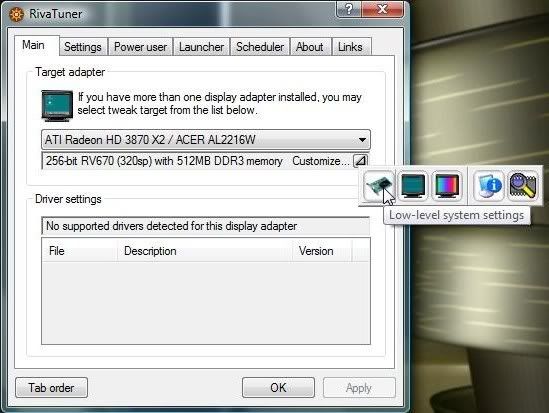
Just in case you'd like to give RivaTuner another shot, here are some basic instructions.

Open up the program and click on the arrow next to "customize." Select "low level system settings."

riva1.jpg


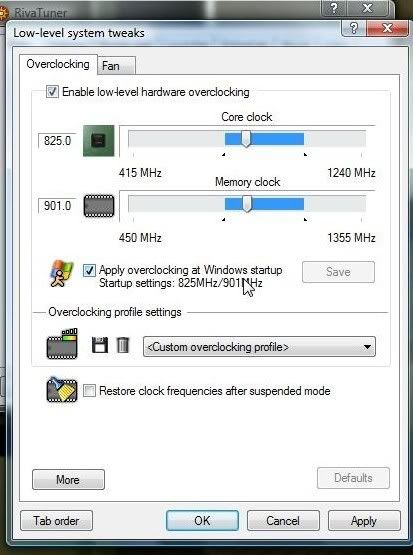
In the picture below, you can see the core and memory sliders. You may have the ability to link the shader clock with the core as well. After adjusting the clocks, be sure to click "apply" and, if you'd like, you can check the box that will automatically set the OC at startup.

riva2.jpg


To test stability, I run 3DMark06, and you should also run a graphic intensive game. If you don't have any application crashes, then your OC can be considered stable, and you could even increase the clocks until you find the max stability. Honestly, I've never noticed any significant performance increase with GPU overclocking, so I keep my card at defalut settings. That's just a personal preference. Try it out for yourself and see if you're satisfied. ;)

No ATITool? Better than RiveTuner IMO... http://www.techpowerup.com/atitool/

RivaTuner FTW. :P
 
Actually, ATITool has the anti-artifacting tool which IMO helps tremendously. You can actually accurately test if it will hold the OC.
 
mep, thanks so much, those are the sliders that I wasn't able to find before. I will definitely give it another shot tonight. I have been using 3Dmark06 with the nTune and it is a great program, I like 3dMark a lot. I will give it another shit because I wasn't too happy with nTune.

oscary, that ATITool can be used for Nvidia cards too, huh? I saw that it has a "find max clock" and "find max mem" tools. Have you used that option and if so were you happy with the accuracy? Thanks!

- Joyce
 
Okay I was able to use Rivatuner tonight, nice program, easy to use once I found the sliders. Only problem is I clocked my GTX to 630/950 and it didn't 3DMark any higher than it did with nTune. I stared to raised them in increments of 5 and it locked up after 3 runs on 3DMark. Best I pulled with the Rivatuner OC was 11,089, about the same as nTune. When playing on nTune I was moving the motherboard sliders to get a small OC out of the CPU and memory and then I was able to 3DMark the 11,4xx and 11,5xx as usual. This brings me to the conclusion that I'm bottlenecking at the processsing power on the motherboard. I know OC'ing from a desktop program isn't optimal but considering the situation I'm in (no OC'ing options in BIOS) do you know of any programs that would allow me to configure CPU and RAM memory clocks from windows? Thanks so much....

- J

EDIT: Also Nvidia's monitor seems to be inaccurate. Is there any program that measures all clock speeds (CPU, RAM, GPU core and mem, ect) but is more accurate?
 
Last edited:
mep, thanks so much, those are the sliders that I wasn't able to find before. I will definitely give it another shot tonight. I have been using 3Dmark06 with the nTune and it is a great program, I like 3dMark a lot. I will give it another shit because I wasn't too happy with nTune.

oscary, that ATITool can be used for Nvidia cards too, huh? I saw that it has a "find max clock" and "find max mem" tools. Have you used that option and if so were you happy with the accuracy? Thanks!

- Joyce

Yes, ATITool can be used for nVidia and ATi cards. If it's impossible, then I must've been an idiot and somehow OC'd my FX5200 :rolleyes:

But to answer your question, yes it works on nVidia cards, and I am happy with its accuracy. For example, if I got no artifacts using its scanner, then I got no artifacts during whatever level of gaming at whatever settings. If I did get artifacts, I got artifacts in every level of gaming at any setting.

Catch my drift? :cool:
 
Back
Top