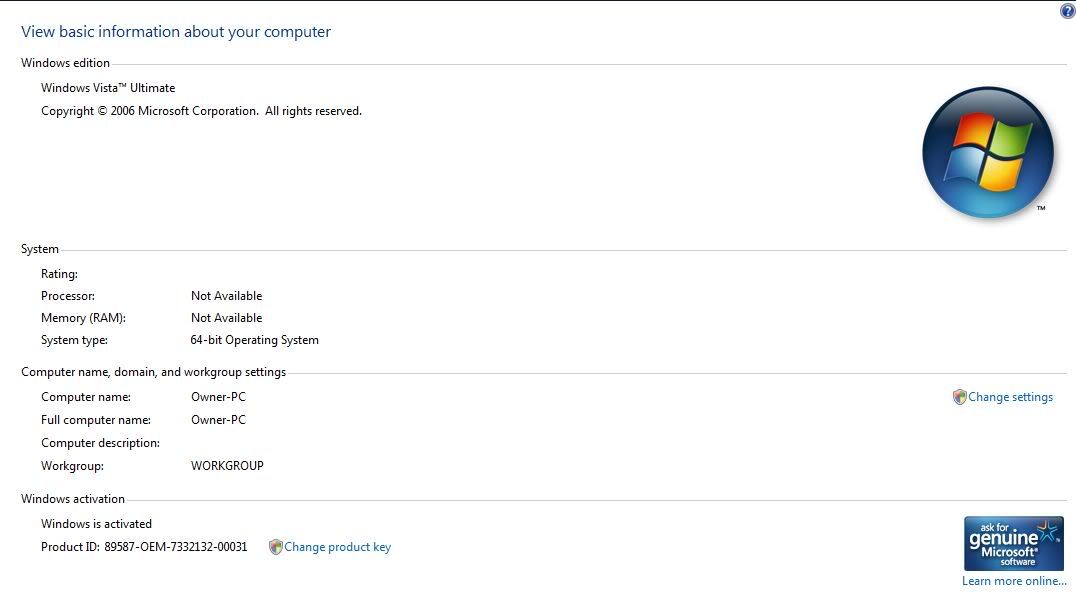
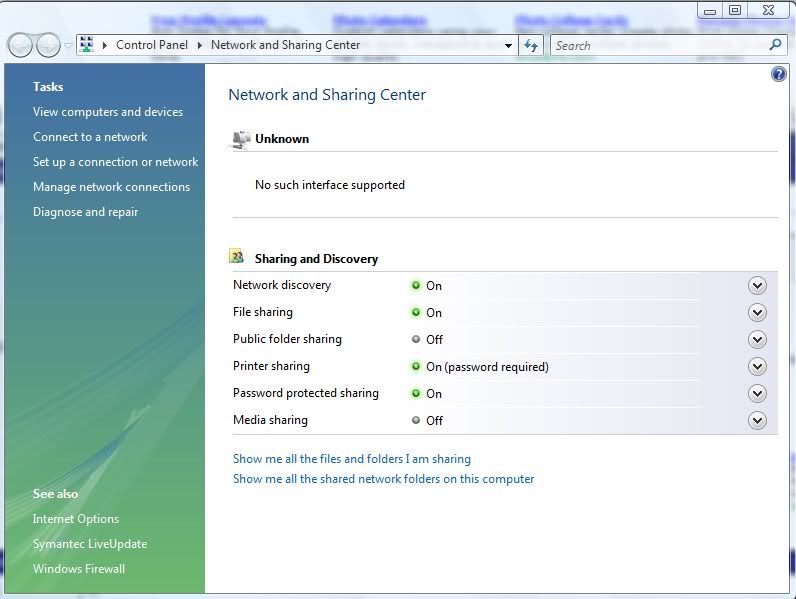
Vista acting funny do I have spyware

Jabes

banned
Here is my hijackthis log


Logfile of Trend Micro HijackThis v2.0.2
Scan saved at 3:13:21 PM, on 10/25/2007
Platform: Windows Vista (WinNT 6.00.1904)
MSIE: Internet Explorer v7.00 (7.00.6000.16546)
Boot mode: Normal

Running processes:
C:\Windows\SysWOW64\rundll32.exe
C:\Program Files (x86)\DAEMON Tools\daemon.exe
C:\Program Files (x86)\uTorrent\uTorrent.exe
C:\Program Files (x86)\Microsoft SQL Server\80\Tools\Binn\sqlmangr.exe
C:\Program Files\Common Files\Logitech\LCD Manager\Applets\LCDMedia.exe
C:\Program Files (x86)\Google\Google Talk\googletalk.exe
C:\Program Files (x86)\Java\jre1.6.0_02\bin\jusched.exe
C:\Program Files (x86)\Adobe\Acrobat 8.0\Acrobat\acrotray.exe
C:\Program Files (x86)\Common Files\Symantec Shared\ccApp.exe
C:\Program Files (x86)\Symantec AntiVirus\VPTray.exe
C:\Program Files\Logitech\SetPoint\x86\SetPoint32.exe
C:\Program Files (x86)\AIM6\aim6.exe
C:\Program Files (x86)\AIM6\aolsoftware.exe
C:\Program Files (x86)\AOP\Switched-On Schoolhouse 2007 Home\SOSHStudentApp.exe
C:\Program Files (x86)\Microsoft Office\Office12\OUTLOOK.EXE
C:\PROGRA~2\MOZILL~1\FIREFOX.EXE
C:\Windows\SysWOW64\DllHost.exe
C:\Program Files (x86)\Windows Media Player\wmplayer.exe
C:\Users\Owner\Desktop\HiJackThis.exe

R1 - HKCU\Software\Microsoft\Internet Explorer\Main,Search Page = http://go.microsoft.com/fwlink/?LinkId=54896
R0 - HKCU\Software\Microsoft\Internet Explorer\Main,Start Page = http://runonce.msn.com/?v=msgrv75
R1 - HKLM\Software\Microsoft\Internet Explorer\Main,Default_Page_URL = http://go.microsoft.com/fwlink/?LinkId=69157
R1 - HKLM\Software\Microsoft\Internet Explorer\Main,Default_Search_URL = http://go.microsoft.com/fwlink/?LinkId=54896
R1 - HKLM\Software\Microsoft\Internet Explorer\Main,Search Page = http://go.microsoft.com/fwlink/?LinkId=54896
R0 - HKLM\Software\Microsoft\Internet Explorer\Main,Start Page = http://go.microsoft.com/fwlink/?LinkId=69157
R0 - HKLM\Software\Microsoft\Internet Explorer\Search,SearchAssistant =
R0 - HKLM\Software\Microsoft\Internet Explorer\Search,CustomizeSearch =
R1 - HKCU\Software\Microsoft\Windows\CurrentVersion\Int ernet Settings,ProxyOverride = *.local
R0 - HKCU\Software\Microsoft\Internet Explorer\Toolbar,LinksFolderName =
F2 - REG:system.ini: UserInit=userinit.exe
O1 - Hosts: ::1 localhost
O2 - BHO: Adobe PDF Reader Link Helper - {06849E9F-C8D7-4D59-B87D-784B7D6BE0B3} - C:\Program Files (x86)\Common Files\Adobe\Acrobat\ActiveX\AcroIEHelper.dll
O2 - BHO: ContributeBHO Class - {074C1DC5-9320-4A9A-947D-C042949C6216} - C:\Program Files (x86)\Adobe\/Adobe Contribute CS3/contributeieplugin.dll
O2 - BHO: Spybot-S&D IE Protection - {53707962-6F74-2D53-2644-206D7942484F} - C:\PROGRA~2\SPYBOT~1\SDHelper.dll
O2 - BHO: Groove GFS Browser Helper - {72853161-30C5-4D22-B7F9-0BBC1D38A37E} - C:\PROGRA~2\MICROS~1\Office12\GRA8E1~1.DLL
O2 - BHO: SSVHelper Class - {761497BB-D6F0-462C-B6EB-D4DAF1D92D43} - C:\Program Files (x86)\Java\jre1.6.0_02\bin\ssv.dll
O2 - BHO: Adobe PDF Conversion Toolbar Helper - {AE7CD045-E861-484f-8273-0445EE161910} - C:\Program Files (x86)\Adobe\Acrobat 8.0\Acrobat\AcroIEFavClient.dll
O3 - Toolbar: Adobe PDF - {47833539-D0C5-4125-9FA8-0819E2EAAC93} - C:\Program Files (x86)\Adobe\Acrobat 8.0\Acrobat\AcroIEFavClient.dll
O3 - Toolbar: Contribute Toolbar - {517BDDE4-E3A7-4570-B21E-2B52B6139FC7} - C:\Program Files (x86)\Adobe\/Adobe Contribute CS3/contributeieplugin.dll
O4 - HKLM\..\Run: [GrooveMonitor] "C:\Program Files (x86)\Microsoft Office\Office12\GrooveMonitor.exe"
O4 - HKLM\..\Run: [googletalk] "C:\Program Files (x86)\Google\Google Talk\googletalk.exe" /autostart
O4 - HKLM\..\Run: [SunJavaUpdateSched] "C:\Program Files (x86)\Java\jre1.6.0_02\bin\jusched.exe"
O4 - HKLM\..\Run: [Acrobat Assistant 8.0] "C:\Program Files (x86)\Adobe\Acrobat 8.0\Acrobat\Acrotray.exe"
O4 - HKLM\..\Run: [Adobe_ID0EYTHM] C:\PROGRA~2\COMMON~1\Adobe\ADOBEV~1\Server\bin\VER SIO~2.EXE
O4 - HKLM\..\Run: [QuickTime Task] "C:\Program Files (x86)\VistaCodecPack\QT\QTTask.exe" -atboottime
O4 - HKLM\..\Run: [NBKeyScan] "C:\Program Files (x86)\Nero\Nero8\Nero BackItUp\NBKeyScan.exe"
O4 - HKLM\..\Run: [ccApp] "C:\Program Files (x86)\Common Files\Symantec Shared\ccApp.exe"
O4 - HKLM\..\Run: [vptray] C:\PROGRA~2\SYMANT~1\VPTray.exe
O4 - HKCU\..\Run: [Sidebar] C:\Program Files\Windows Sidebar\sidebar.exe /autoRun
O4 - HKCU\..\Run: [ehTray.exe] C:\Windows\ehome\ehTray.exe
O4 - HKCU\..\Run: [Aim6] "C:\Program Files (x86)\AIM6\aim6.exe" /d locale=en-US ee://aol/imApp
O4 - HKCU\..\Run: [DAEMON Tools] "C:\Program Files (x86)\DAEMON Tools\daemon.exe" -lang 1033
O4 - HKCU\..\Run: [MsnMsgr] "C:\Program Files (x86)\MSN Messenger\MsnMsgr.Exe" /background
O4 - HKCU\..\Run: [uTorrent] "C:\Program Files (x86)\uTorrent\uTorrent.exe"
O4 - HKCU\..\Run: [BgMonitor_{79662E04-7C6C-4d9f-84C7-88D8A56B10AA}] "C:\Program Files (x86)\Common Files\Nero\Lib\NMBgMonitor.exe"
O4 - HKCU\..\Run: [WMPNSCFG] C:\Program Files (x86)\Windows Media Player\WMPNSCFG.exe
O4 - HKUS\S-1-5-19\..\Run: [Sidebar] %ProgramFiles%\Windows Sidebar\Sidebar.exe /detectMem (User '?')
O4 - HKUS\S-1-5-19\..\Run: [WindowsWelcomeCenter] rundll32.exe oobefldr.dll,ShowWelcomeCenter (User '?')
O4 - HKUS\S-1-5-20\..\Run: [Sidebar] %ProgramFiles%\Windows Sidebar\Sidebar.exe /detectMem (User '?')
O4 - HKUS\S-1-5-21-3062914783-1664766385-3860116348-1000\..\Run: [Sidebar] C:\Program Files\Windows Sidebar\sidebar.exe /autoRun (User '?')
O4 - HKUS\S-1-5-21-3062914783-1664766385-3860116348-1000\..\Run: [MsnMsgr] "C:\Program Files (x86)\MSN Messenger\MsnMsgr.Exe" /background (User '?')
O4 - HKUS\S-1-5-21-3062914783-1664766385-3860116348-1000\..\Run: [uTorrent] "C:\Program Files (x86)\uTorrent\uTorrent.exe" (User '?')
O4 - HKUS\S-1-5-21-3062914783-1664766385-3860116348-1000\..\Run: [BgMonitor_{79662E04-7C6C-4d9f-84C7-88D8A56B10AA}] "C:\Program Files (x86)\Common Files\Nero\Lib\NMBgMonitor.exe" (User '?')
O4 - HKUS\S-1-5-21-3062914783-1664766385-3860116348-1000\..\Run: [WMPNSCFG] C:\Program Files (x86)\Windows Media Player\WMPNSCFG.exe (User '?')
O4 - Global Startup: Logitech SetPoint.lnk = ?
O4 - Global Startup: Service Manager.lnk = C:\Program Files (x86)\Microsoft SQL Server\80\Tools\Binn\sqlmangr.exe
O8 - Extra context menu item: Append to existing PDF - res://C:\Program Files (x86)\Adobe\Acrobat 8.0\Acrobat\AcroIEFavClient.dll/AcroIEAppend.html
O8 - Extra context menu item: Convert link target to Adobe PDF - res://C:\Program Files (x86)\Adobe\Acrobat 8.0\Acrobat\AcroIEFavClient.dll/AcroIECapture.html
O8 - Extra context menu item: Convert link target to existing PDF - res://C:\Program Files (x86)\Adobe\Acrobat 8.0\Acrobat\AcroIEFavClient.dll/AcroIEAppend.html
O8 - Extra context menu item: Convert selected links to Adobe PDF - res://C:\Program Files (x86)\Adobe\Acrobat 8.0\Acrobat\AcroIEFavClient.dll/AcroIECaptureSelLinks.html
O8 - Extra context menu item: Convert selected links to existing PDF - res://C:\Program Files (x86)\Adobe\Acrobat 8.0\Acrobat\AcroIEFavClient.dll/AcroIEAppendSelLinks.html
O8 - Extra context menu item: Convert selection to Adobe PDF - res://C:\Program Files (x86)\Adobe\Acrobat 8.0\Acrobat\AcroIEFavClient.dll/AcroIECapture.html
O8 - Extra context menu item: Convert selection to existing PDF - res://C:\Program Files (x86)\Adobe\Acrobat 8.0\Acrobat\AcroIEFavClient.dll/AcroIEAppend.html
O8 - Extra context menu item: Convert to Adobe PDF - res://C:\Program Files (x86)\Adobe\Acrobat 8.0\Acrobat\AcroIEFavClient.dll/AcroIECapture.html
O8 - Extra context menu item: E&xport to Microsoft Excel - res://C:\PROGRA~2\MICROS~1\Office12\EXCEL.EXE/3000
O9 - Extra button: (no name) - {08B0E5C0-4FCB-11CF-AAA5-00401C608501} - C:\Program Files (x86)\Java\jre1.6.0_02\bin\ssv.dll
O9 - Extra 'Tools' menuitem: Sun Java Console - {08B0E5C0-4FCB-11CF-AAA5-00401C608501} - C:\Program Files (x86)\Java\jre1.6.0_02\bin\ssv.dll
O9 - Extra button: Send to OneNote - {2670000A-7350-4f3c-8081-5663EE0C6C49} - C:\PROGRA~2\MICROS~1\Office12\ONBttnIE.dll
O9 - Extra 'Tools' menuitem: S&end to OneNote - {2670000A-7350-4f3c-8081-5663EE0C6C49} - C:\PROGRA~2\MICROS~1\Office12\ONBttnIE.dll
O9 - Extra button: Research - {92780B25-18CC-41C8-B9BE-3C9C571A8263} - C:\PROGRA~2\MICROS~1\Office12\REFIEBAR.DLL
O9 - Extra button: (no name) - {DFB852A3-47F8-48C4-A200-58CAB36FD2A2} - C:\PROGRA~2\SPYBOT~1\SDHelper.dll
O9 - Extra 'Tools' menuitem: Spybot - Search & Destroy Configuration - {DFB852A3-47F8-48C4-A200-58CAB36FD2A2} - C:\PROGRA~2\SPYBOT~1\SDHelper.dll
O13 - Gopher Prefix:
O18 - Protocol: grooveLocalGWS - {88FED34C-F0CA-4636-A375-3CB6248B04CD} - C:\PROGRA~2\MICROS~1\Office12\GR99D3~1.DLL
O23 - Service: Adobe Version Cue CS3 - Adobe Systems Incorporated - C:\Program Files (x86)\Common Files\Adobe\Adobe Version Cue CS3\Server\bin\VersionCueCS3.exe
O23 - Service: @%SystemRoot%\system32\Alg.exe,-112 (ALG) - Unknown owner - C:\Windows\System32\alg.exe (file missing)
O23 - Service: ##Id_String1.6844F930_1628_4223_B5CC_5BB94B879762# # (Bonjour Service) - Apple Computer, Inc. - C:\Program Files (x86)\Bonjour\mDNSResponder.exe
O23 - Service: Symantec Event Manager (ccEvtMgr) - Symantec Corporation - C:\Program Files (x86)\Common Files\Symantec Shared\ccSvcHst.exe
O23 - Service: Symantec Settings Manager (ccSetMgr) - Symantec Corporation - C:\Program Files (x86)\Common Files\Symantec Shared\ccSvcHst.exe
O23 - Service: Symantec AntiVirus Definition Watcher (DefWatch) - Symantec Corporation - C:\Program Files (x86)\Symantec AntiVirus\DefWatch.exe
O23 - Service: @dfsrres.dll,-101 (DFSR) - Unknown owner - C:\Windows\system32\DFSR.exe (file missing)
O23 - Service: @%systemroot%\system32\fxsresm.dll,-118 (Fax) - Unknown owner - C:\Windows\system32\fxssvc.exe (file missing)
O23 - Service: FLEXnet Licensing Service - Macrovision Europe Ltd. - C:\Program Files (x86)\Common Files\Macrovision Shared\FLEXnet Publisher\FNPLicensingService.exe
O23 - Service: @keyiso.dll,-100 (KeyIso) - Unknown owner - C:\Windows\system32\lsass.exe (file missing)
O23 - Service: LiveUpdate - Symantec Corporation - C:\PROGRA~2\Symantec\LIVEUP~1\LUCOMS~1.EXE
O23 - Service: @comres.dll,-2797 (MSDTC) - Unknown owner - C:\Windows\System32\msdtc.exe (file missing)
O23 - Service: @%SystemRoot%\System32\netlogon.dll,-102 (Netlogon) - Unknown owner - C:\Windows\system32\lsass.exe (file missing)
O23 - Service: PnkBstrA - Unknown owner - C:\Windows\system32\PnkBstrA.exe
O23 - Service: @%systemroot%\system32\psbase.dll,-300 (ProtectedStorage) - Unknown owner - C:\Windows\system32\lsass.exe (file missing)
O23 - Service: @%systemroot%\system32\Locator.exe,-2 (RpcLocator) - Unknown owner - C:\Windows\system32\locator.exe (file missing)
O23 - Service: @%SystemRoot%\system32\samsrv.dll,-1 (SamSs) - Unknown owner - C:\Windows\system32\lsass.exe (file missing)
O23 - Service: SBSD Security Center Service (SBSDWSCService) - Safer Networking Ltd. - C:\Program Files (x86)\Spybot - Search & Destroy\SDWinSec.exe
O23 - Service: @%SystemRoot%\system32\SLsvc.exe,-101 (slsvc) - Unknown owner - C:\Windows\system32\SLsvc.exe (file missing)
O23 - Service: SMS_v3_1_0 - Unknown owner - C:\ProgramData\Rosetta Stone\SMS v3.1.0hs\wrapper.exe
O23 - Service: @%SystemRoot%\system32\snmptrap.exe,-3 (SNMPTRAP) - Unknown owner - C:\Windows\System32\snmptrap.exe (file missing)
O23 - Service: @%systemroot%\system32\spoolsv.exe,-1 (Spooler) - Unknown owner - C:\Windows\System32\spoolsv.exe (file missing)
O23 - Service: Symantec AntiVirus - Symantec Corporation - C:\Program Files (x86)\Symantec AntiVirus\Rtvscan.exe
O23 - Service: @%SystemRoot%\system32\ui0detect.exe,-101 (UI0Detect) - Unknown owner - C:\Windows\system32\UI0Detect.exe (file missing)
O23 - Service: @%SystemRoot%\system32\vds.exe,-100 (vds) - Unknown owner - C:\Windows\System32\vds.exe (file missing)
O23 - Service: @%systemroot%\system32\vssvc.exe,-102 (VSS) - Unknown owner - C:\Windows\system32\vssvc.exe (file missing)
O23 - Service: @%systemroot%\system32\wbengine.exe,-104 (wbengine) - Unknown owner - C:\Windows\system32\wbengine.exe (file missing)
O23 - Service: @%Systemroot%\system32\wbem\wmiapsrv.exe,-110 (wmiApSrv) - Unknown owner - C:\Windows\system32\wbem\WmiApSrv.exe (file missing)
O23 - Service: @%ProgramFiles%\Windows Media Player\wmpnetwk.exe,-101 (WMPNetworkSvc) - Unknown owner - C:\Program Files (x86)\Windows Media Player\wmpnetwk.exe (file missing)

--
End of file - 12425 bytes
 
theres this
vista.jpg


this
networkandsharingcenter.jpg
 
Damaged WMI would be my first guess, unfortunately Microsoft's only solutions are to either do a System Restore or a Repair Reinstall of Windows. Give this a shot, though:
  1. At the command line, type net stop winmgmt. You may get a warning that other services need to be stopped as well; type Y and continue.
  2. Open Explorer and go to the folder called C:\Windows\System32\WBEM\ (I'm really not sure where 64bit versions of Windows keep the WMI Repository, but you'll probably only find one of the two Repository folders I've indicated here. Don't let that concern you).
  3. Find the Repository folder and rename it to Repository_bad
  4. Go to C:\Windows\sysWOW64\WBEM\
  5. Find the Repository folder and rename it to Repository_bad
  6. Reboot the system normally.
  7. On the next login, open a command prompt and type (exactly) the following commands in this order (just close any windows that popup as a result of these commands):
    cd /d %windir%\system32\wbem
    for %i in (*.dll) do RegSvr32 -s %i
    for %i in (*.exe) do %i /RegServer
    cd /d %windir%\sysWOW64\wbem
    for %i in (*.dll) do RegSvr32 -s %i
    for %i in (*.exe) do %i /RegServer
    winmgmt /resetrepository
    winmgmt /resyncperf

If that doesn't work, you can try running the WMI Diagnostic Utility: http://www.microsoft.com/downloads/...d6-18d1-4d05-b11e-4c64192ae97d&displaylang=en. It will produce a log (in the temporary directory of all places, which you can get to by typing %TEMP% in the address bar). If you post that log here, it may provide some more info.
 
1st half

25124 11:56:48 (0) ** WMIDiag v2.0 started on Saturday, October 27, 2007 at 11:49.
25125 11:56:48 (0) **
25126 11:56:48 (0) ** Copyright (c) Microsoft Corporation. All rights reserved - January 2007.
25127 11:56:48 (0) **
25128 11:56:48 (0) ** This script is not supported under any Microsoft standard support program or service.
25129 11:56:48 (0) ** The script is provided AS IS without warranty of any kind. Microsoft further disclaims all
25130 11:56:48 (0) ** implied warranties including, without limitation, any implied warranties of merchantability
25131 11:56:48 (0) ** or of fitness for a particular purpose. The entire risk arising out of the use or performance
25132 11:56:48 (0) ** of the scripts and documentation remains with you. In no event shall Microsoft, its authors,
25133 11:56:48 (0) ** or anyone else involved in the creation, production, or delivery of the script be liable for
25134 11:56:48 (0) ** any damages whatsoever (including, without limitation, damages for loss of business profits,
25135 11:56:48 (0) ** business interruption, loss of business information, or other pecuniary loss) arising out of
25136 11:56:48 (0) ** the use of or inability to use the script or documentation, even if Microsoft has been advised
25137 11:56:48 (0) ** of the possibility of such damages.
25138 11:56:48 (0) **
25139 11:56:48 (0) **
25140 11:56:48 (0) ** ----------------------------------------------------------------------------------------------------------------------------------
25141 11:56:48 (0) ** ----------------------------------------------------- WMI REPORT: BEGIN ----------------------------------------------------------
25142 11:56:48 (0) ** ----------------------------------------------------------------------------------------------------------------------------------
25143 11:56:48 (0) **
25144 11:56:48 (0) ** ----------------------------------------------------------------------------------------------------------------------------------
25145 11:56:48 (0) ** Windows Vista - No service pack - 64-bit (6000) - User 'OWNER-PC\OWNER' on computer 'OWNER-PC'.
25146 11:56:48 (0) ** ----------------------------------------------------------------------------------------------------------------------------------
25147 11:56:48 (0) ** Environment: ........................................................................................................ OK..
25148 11:56:48 (0) ** There are no missing WMI system files: .............................................................................. OK.
25149 11:56:48 (0) ** There are no missing WMI repository files: .......................................................................... OK.
25150 11:56:48 (0) ** WMI repository state: ............................................................................................... CONSISTENT.
25151 11:56:48 (0) ** BEFORE running WMIDiag:
25152 11:56:48 (0) ** The WMI repository has a size of: ................................................................................... 48 MB.
25153 11:56:48 (0) ** - Disk free space on 'C:': .......................................................................................... 21743 MB.
25154 11:56:48 (0) ** - INDEX.BTR, 5971968 bytes, 10/27/2007 11:38:12 AM
25155 11:56:48 (0) ** - MAPPING1.MAP, 145224 bytes, 10/27/2007 11:38:12 AM
25156 11:56:48 (0) ** - MAPPING2.MAP, 145224 bytes, 10/27/2007 11:36:37 AM
25157 11:56:48 (0) ** - OBJECTS.DATA, 44081152 bytes, 10/27/2007 11:38:11 AM
25158 11:56:48 (0) ** AFTER running WMIDiag:
25159 11:56:48 (0) ** The WMI repository has a size of: ................................................................................... 48 MB.
25160 11:56:48 (0) ** - Disk free space on 'C:': .......................................................................................... 21738 MB.
25161 11:56:48 (0) ** - INDEX.BTR, 5971968 bytes, 10/27/2007 11:38:12 AM
25162 11:56:48 (0) ** - MAPPING1.MAP, 145224 bytes, 10/27/2007 11:38:12 AM
25163 11:56:48 (0) ** - MAPPING2.MAP, 145224 bytes, 10/27/2007 11:36:37 AM
25164 11:56:48 (0) ** - OBJECTS.DATA, 44081152 bytes, 10/27/2007 11:38:11 AM
25165 11:56:48 (0) ** ----------------------------------------------------------------------------------------------------------------------------------
25166 11:56:48 (0) ** INFO: Windows Firewall status: ...................................................................................... ENABLED.
25167 11:56:48 (0) ** Windows Firewall Profile: ........................................................................................... PUBLIC.
25168 11:56:48 (0) ** Inbound connections that do not match a rule BLOCKED: ............................................................... ENABLED.
25169 11:56:48 (0) ** => This will prevent any WMI remote connectivity to this computer except
25170 11:56:48 (0) ** if the following three inbound rules are ENABLED and non-BLOCKING:
25171 11:56:48 (0) ** - 'Windows Management Instrumentation (DCOM-In)'
25172 11:56:48 (0) ** - 'Windows Management Instrumentation (WMI-In)'
25173 11:56:48 (0) ** - 'Windows Management Instrumentation (ASync-In)'
25174 11:56:48 (0) ** Verify the reported status for each of these three inbound rules below.
25175 11:56:48 (0) **
25176 11:56:48 (0) ** Windows Firewall 'Windows Management Instrumentation (WMI)' group rule: ............................................. DISABLED.
25177 11:56:48 (0) ** => This will prevent any WMI remote connectivity to/from this machine.
25178 11:56:48 (0) ** - You can adjust the configuration by executing the following command:
25179 11:56:48 (0) ** i.e. 'NETSH.EXE ADVFIREWALL FIREWALL SET RULE GROUP="Windows Management Instrumentation (WMI)" NEW ENABLE=YES'
25180 11:56:48 (0) ** Note: With this command all inbound and outbound WMI rules are activated at once!
25181 11:56:48 (0) ** You can also enable each individual rule instead of activating the group rule.
25182 11:56:48 (0) **
25183 11:56:48 (0) ** Windows Firewall 'Windows Management Instrumentation (ASync-In)' rule: .............................................. DISABLED.
25184 11:56:48 (0) ** => This will prevent any WMI asynchronous inbound connectivity to this machine.
25185 11:56:48 (0) ** - You can adjust the configuration of this rule by executing the following command:
25186 11:56:48 (0) ** i.e. 'NETSH.EXE ADVFIREWALL FIREWALL SET RULE NAME="Windows Management Instrumentation (ASync-In)" NEW ENABLE=YES'
25187 11:56:48 (0) **
25188 11:56:48 (0) ** Windows Firewall 'Windows Management Instrumentation (WMI-Out)' rule: ............................................... DISABLED.
25189 11:56:48 (0) ** => This will prevent any WMI asynchronous outbound connectivity from this machine.
25190 11:56:48 (0) ** - You can adjust the configuration of this rule by executing the following command:
25191 11:56:48 (0) ** i.e. 'NETSH.EXE ADVFIREWALL FIREWALL SET RULE NAME="Windows Management Instrumentation (WMI-Out)" NEW ENABLE=YES'
25192 11:56:48 (0) **
25193 11:56:48 (0) ** Windows Firewall 'Windows Management Instrumentation (WMI-In)' rule: ................................................ DISABLED.
25194 11:56:48 (0) ** => This will prevent any WMI inbound connectivity to this machine.
25195 11:56:48 (0) ** Note: The rule 'Windows Management Instrumentation (WMI-In)' rule must be ENABLED to allow incoming WMI connectivity.
25196 11:56:48 (0) ** - You can adjust the configuration of this rule by executing the following command:
25197 11:56:48 (0) ** i.e. 'NETSH.EXE ADVFIREWALL FIREWALL SET RULE NAME="Windows Management Instrumentation (WMI-In)" NEW ENABLE=YES'
25198 11:56:48 (0) **
25199 11:56:48 (0) ** Windows Firewall 'Windows Management Instrumentation (DCOM-In)' rule: ............................................... DISABLED.
25200 11:56:48 (0) ** => This will prevent any DCOM WMI inbound connectivity to this machine.
25201 11:56:48 (0) ** Note: The rule 'Windows Management Instrumentation (DCOM-In)' rule must be ENABLED to allow incoming DCOM WMI connectivity.
25202 11:56:48 (0) ** - You can adjust the configuration of this rule by executing the following command:
25203 11:56:48 (0) ** i.e. 'NETSH.EXE ADVFIREWALL FIREWALL SET RULE NAME="Windows Management Instrumentation (DCOM-In)" NEW ENABLE=YES'
25204 11:56:48 (0) **
25205 11:56:48 (0) ** ----------------------------------------------------------------------------------------------------------------------------------
25206 11:56:48 (0) ** DCOM Status: ........................................................................................................ OK.
25207 11:56:48 (0) ** WMI registry setup: ................................................................................................. OK.
25208 11:56:48 (0) ** INFO: WMI service has dependents: ................................................................................... 2 SERVICE(S)!
25209 11:56:48 (0) ** - Security Center (WSCSVC, StartMode='Automatic')
25210 11:56:48 (0) ** - Internet Connection Sharing (ICS) (SHAREDACCESS, StartMode='Disabled')
25211 11:56:48 (0) ** => If the WMI service is stopped, the listed service(s) will have to be stopped as well.
25212 11:56:48 (0) ** Note: If the service is marked with (*), it means that the service/application uses WMI but
25213 11:56:48 (0) ** there is no hard dependency on WMI. However, if the WMI service is stopped,
25214 11:56:48 (0) ** this can prevent the service/application to work as expected.
25215 11:56:48 (0) **
25216 11:56:48 (0) ** RPCSS service: ...................................................................................................... OK (Already started).
25217 11:56:48 (0) ** WINMGMT service: .................................................................................................... OK (Already started).
25218 11:56:48 (0) ** ----------------------------------------------------------------------------------------------------------------------------------
25219 11:56:48 (0) ** WMI service DCOM setup: ............................................................................................. OK.
25220 11:56:48 (0) ** WMI components DCOM registrations: .................................................................................. OK.
25221 11:56:48 (0) ** WMI ProgID registrations: ........................................................................................... OK.
25222 11:56:48 (0) ** WMI provider DCOM registrations: .................................................................................... OK.
25223 11:56:48 (0) ** WMI provider CIM registrations: ..................................................................................... OK.
25224 11:56:48 (0) ** WMI provider CLSIDs: ................................................................................................ OK.
25225 11:56:48 (0) ** WMI providers EXE/DLL availability: ................................................................................. OK.
25226 11:56:48 (0) ** ----------------------------------------------------------------------------------------------------------------------------------
25227 11:56:48 (0) ** INFO: User Account Control (UAC): ................................................................................... DISABLED.
25228 11:56:48 (0) ** INFO: Local Account Filtering: ...................................................................................... ENABLED.
25229 11:56:48 (0) ** => WMI tasks remotely accessing WMI information on this computer and requiring Administrative
25230 11:56:48 (0) ** privileges MUST use a DOMAIN account part of the Local Administrators group of this computer
25231 11:56:48 (0) ** to ensure that administrative privileges are granted. If a Local User account is used for remote
25232 11:56:48 (0) ** accesses, it will be reduced to a plain user (filtered token), even if it is part of the Local Administrators group.
25233 11:56:48 (0) **
25234 11:56:48 (0) ** Overall DCOM security status: ....................................................................................... OK.
25235 11:56:48 (0) ** Overall WMI security status: ........................................................................................ OK.
25236 11:56:48 (0) ** - Started at 'Root' --------------------------------------------------------------------------------------------------------------
25237 11:56:48 (0) ** INFO: WMI permanent SUBSCRIPTION(S): ................................................................................ 1.
25238 11:56:48 (0) ** - ROOT/SUBSCRIPTION, NTEventLogEventConsumer.Name="SCM Event Log Consumer".
25239 11:56:48 (0) ** 'select * from MSFT_SCMEventLogEvent'
25240 11:56:48 (0) **
25241 11:56:48 (0) ** WMI TIMER instruction(s): ........................................................................................... NONE.
25242 11:56:48 (0) ** INFO: WMI namespace(s) requiring PACKET PRIVACY: .................................................................... 4 NAMESPACE(S)!
25243 11:56:48 (0) ** - ROOT/CIMV2/SECURITY/MICROSOFTTPM.
25244 11:56:48 (0) ** - ROOT/CIMV2/SECURITY/MICROSOFTVOLUMEENCRYPTION.
25245 11:56:48 (0) ** - ROOT/CIMV2/TERMINALSERVICES.
25246 11:56:48 (0) ** - ROOT/SERVICEMODEL.
25247 11:56:48 (0) ** => When remotely connecting, the namespace(s) listed require(s) the WMI client to
25248 11:56:48 (0) ** use an encrypted connection by specifying the PACKET PRIVACY authentication level.
25249 11:56:48 (0) ** (RPC_C_AUTHN_LEVEL_PKT_PRIVACY or PktPrivacy flags)
25250 11:56:48 (0) ** i.e. 'WMIC.EXE /NODE:"OWNER-PC" /AUTHLEVEL:Pktprivacy /NAMESPACE:\\ROOT\SERVICEMODEL Class __SystemSecurity'
25251 11:56:48 (0) **
25252 11:56:48 (0) ** WMI MONIKER CONNECTIONS: ............................................................................................ OK.
25253 11:56:48 (0) ** WMI CONNECTIONS: .................................................................................................... OK.
25254 11:56:48 (1) !! ERROR: WMI GET operation errors reported: ........................................................................... 10 ERROR(S)!
25255 11:56:48 (0) ** - Root/CIMv2, Win32_Process.Handle=492, 0x80004002 - No such interface supported.
25256 11:56:48 (0) ** MOF Registration: 'C:\WINDOWS\SYSTEM32\WBEM\CIMWIN32.MOF / C:\WINDOWS\SYSTEM32\WBEM\SECRCW32.MOF'
25257 11:56:48 (0) ** - Root/CIMv2, Win32_Process.Handle=492, 0x80004002 - No such interface supported.
25258 11:56:48 (0) ** MOF Registration: 'C:\WINDOWS\SYSTEM32\WBEM\CIMWIN32.MOF / C:\WINDOWS\SYSTEM32\WBEM\SECRCW32.MOF'
25259 11:56:48 (0) ** - Root/CIMv2, Win32_Process.Handle=3200, 0x80004002 - No such interface supported.
25260 11:56:48 (0) ** MOF Registration: 'C:\WINDOWS\SYSTEM32\WBEM\CIMWIN32.MOF / C:\WINDOWS\SYSTEM32\WBEM\SECRCW32.MOF'
25261 11:56:48 (0) ** - Root/CIMV2, Win32_Service='WSCSVC', 0x80004002 - No such interface supported.
25262 11:56:48 (0) ** MOF Registration: 'C:\WINDOWS\SYSTEM32\WBEM\CIMWIN32.MOF / C:\WINDOWS\SYSTEM32\WBEM\SECRCW32.MOF'
25263 11:56:48 (0) ** - Root/CIMv2, Win32_Process.Handle=492, 0x80004002 - No such interface supported.
25264 11:56:48 (0) ** MOF Registration: 'C:\WINDOWS\SYSTEM32\WBEM\CIMWIN32.MOF / C:\WINDOWS\SYSTEM32\WBEM\SECRCW32.MOF'
25265 11:56:48 (0) ** - Root/CIMv2, Win32_Process.Handle=492, 0x80004002 - No such interface supported.
25266 11:56:48 (0) ** MOF Registration: 'C:\WINDOWS\SYSTEM32\WBEM\CIMWIN32.MOF / C:\WINDOWS\SYSTEM32\WBEM\SECRCW32.MOF'
25267 11:56:48 (0) ** - Root/CIMv2, Win32_Process.Handle=3200, 0x80004002 - No such interface supported.
25268 11:56:48 (0) ** MOF Registration: 'C:\WINDOWS\SYSTEM32\WBEM\CIMWIN32.MOF / C:\WINDOWS\SYSTEM32\WBEM\SECRCW32.MOF'
25269 11:56:48 (0) ** - Root/CIMv2, Win32_Process.Handle=3200, 0x80004002 - No such interface supported.
25270 11:56:48 (0) ** MOF Registration: 'C:\WINDOWS\SYSTEM32\WBEM\CIMWIN32.MOF / C:\WINDOWS\SYSTEM32\WBEM\SECRCW32.MOF'
25271 11:56:48 (0) ** - Root/CIMv2, Win32_Process.Handle=3200, 0x80004002 - No such interface supported.
25272 11:56:48 (0) ** MOF Registration: 'C:\WINDOWS\SYSTEM32\WBEM\CIMWIN32.MOF / C:\WINDOWS\SYSTEM32\WBEM\SECRCW32.MOF'
25273 11:56:48 (0) ** - Root/CIMv2, Win32_Process.Handle=3200, 0x80004002 - No such interface supported.
25274 11:56:48 (0) ** MOF Registration: 'C:\WINDOWS\SYSTEM32\WBEM\CIMWIN32.MOF / C:\WINDOWS\SYSTEM32\WBEM\SECRCW32.MOF'
25275 11:56:48 (0) **
25276 11:56:48 (0) ** WMI MOF representations: ............................................................................................ OK.
25277 11:56:48 (0) ** WMI QUALIFIER access operations: .................................................................................... OK.
25278 11:56:48 (1) !! ERROR: WMI ENUMERATION operation errors reported: ................................................................... 24 ERROR(S)!
25279 11:56:48 (0) ** - ROOT/CIMV2, InstancesOfAsync, 'CIM_USBDevice', 0x80004002 - .
25280 11:56:48 (0) ** MOF Registration: 'WMI information not available (This could be the case for an external application or a third party WMI provider)'
25281 11:56:48 (0) ** - ROOT/CIMV2, InstancesOfAsync, 'CIM_USBHub', 0x80004002 - .
25282 11:56:48 (0) ** MOF Registration: 'WMI information not available (This could be the case for an external application or a third party WMI provider)'
25283 11:56:48 (0) ** - ROOT/CIMV2, InstancesOfAsync, 'CIM_StorageVolume', 0x80004002 - .
25284 11:56:48 (0) ** MOF Registration: 'WMI information not available (This could be the case for an external application or a third party WMI provider)'
25285 11:56:48 (0) ** - Root/CIMV2, InstancesOf, 'Win32_ComputerSystem', 0x80004002 - No such interface supported.
25286 11:56:48 (0) ** MOF Registration: 'C:\WINDOWS\SYSTEM32\WBEM\CIMWIN32.MOF / C:\WINDOWS\SYSTEM32\WBEM\SECRCW32.MOF'
25287 11:56:48 (0) ** - Root/CIMV2, InstancesOf, 'Win32_Service', 0x80004002 - No such interface supported.
25288 11:56:48 (0) ** MOF Registration: 'C:\WINDOWS\SYSTEM32\WBEM\CIMWIN32.MOF / C:\WINDOWS\SYSTEM32\WBEM\SECRCW32.MOF'
25289 11:56:48 (0) ** - Root/CIMV2, InstancesOf, 'Win32_Process', 0x80004002 - No such interface supported.
25290 11:56:48 (0) ** MOF Registration: 'C:\WINDOWS\SYSTEM32\WBEM\CIMWIN32.MOF / C:\WINDOWS\SYSTEM32\WBEM\SECRCW32.MOF'
25291 11:56:48 (0) ** - Root/CIMV2, InstancesOf, 'Win32_OperatingSystem', 0x80004002 - No such interface supported.
25292 11:56:48 (0) ** MOF Registration: 'C:\WINDOWS\SYSTEM32\WBEM\CIMWIN32.MOF / C:\WINDOWS\SYSTEM32\WBEM\SECRCW32.MOF'
25293 11:56:48 (0) ** - Root/CIMV2, InstancesOf, 'Win32_BIOS', 0x80004002 - No such interface supported.
25294 11:56:48 (0) ** MOF Registration: 'C:\WINDOWS\SYSTEM32\WBEM\CIMWIN32.MOF / C:\WINDOWS\SYSTEM32\WBEM\SECRCW32.MOF'
25295 11:56:48 (0) ** - Root/CIMV2, InstancesOf, 'Win32_PerfFormattedData_PerfOS_Cache', 0x80004002 - No such interface supported.
25296 11:56:48 (0) ** MOF Registration: 'C:\WINDOWS\SYSTEM32\WBEM\WMIPERFINST.MOF'
25297 11:56:48 (0) ** - Root/CIMV2, InstancesOf, 'Win32_PerfFormattedData_PerfOS_Memory', 0x80004002 - No such interface supported.
25298 11:56:48 (0) ** MOF Registration: 'C:\WINDOWS\SYSTEM32\WBEM\WMIPERFINST.MOF'
25299 11:56:48 (0) ** - Root/CIMV2, InstancesOf, 'Win32_PerfFormattedData_PerfOS_Objects', 0x80004002 - No such interface supported.
25300 11:56:48 (0) ** MOF Registration: 'C:\WINDOWS\SYSTEM32\WBEM\WMIPERFINST.MOF'
25301 11:56:48 (0) ** - Root/CIMV2, InstancesOf, 'Win32_PerfFormattedData_PerfOS_PagingFile', 0x80004002 - No such interface supported.
25302 11:56:48 (0) ** MOF Registration: 'C:\WINDOWS\SYSTEM32\WBEM\WMIPERFINST.MOF'
25303 11:56:48 (0) ** - Root/CIMV2, InstancesOf, 'Win32_PerfFormattedData_PerfOS_Processor', 0x80004002 - No such interface supported.
25304 11:56:48 (0) ** MOF Registration: 'C:\WINDOWS\SYSTEM32\WBEM\WMIPERFINST.MOF'
25305 11:56:48 (0) ** - Root/CIMV2, InstancesOf, 'Win32_PerfFormattedData_PerfOS_System', 0x80004002 - No such interface supported.
25306 11:56:48 (0) ** MOF Registration: 'C:\WINDOWS\SYSTEM32\WBEM\WMIPERFINST.MOF'
25307 11:56:48 (0) ** - Root/CIMV2, InstancesOf, 'Win32_PerfFormattedData_PerfProc_Process', 0x80004002 - No such interface supported.
25308 11:56:48 (0) ** MOF Registration: 'C:\WINDOWS\SYSTEM32\WBEM\WMIPERFINST.MOF'
25309 11:56:48 (0) ** - Root/CIMV2, InstancesOf, 'Win32_PerfFormattedData_PerfProc_Thread', 0x80004002 - No such interface supported.
25310 11:56:48 (0) ** MOF Registration: 'C:\WINDOWS\SYSTEM32\WBEM\WMIPERFINST.MOF'
25311 11:56:48 (0) ** - Root/CIMV2, InstancesOf, 'Win32_PerfFormattedData_Tcpip_ICMP', 0x80004002 - No such interface supported.
25312 11:56:48 (0) ** MOF Registration: 'C:\WINDOWS\SYSTEM32\WBEM\WMIPERFINST.MOF'
25313 11:56:48 (0) ** - Root/CIMV2, InstancesOf, 'Win32_PerfFormattedData_Tcpip_ICMPv6', 0x80004002 - No such interface supported.
25314 11:56:48 (0) ** MOF Registration: 'C:\WINDOWS\SYSTEM32\WBEM\WMIPERFINST.MOF'
25315 11:56:48 (0) ** - Root/CIMV2, InstancesOf, 'Win32_PerfFormattedData_Tcpip_IPv4', 0x80004002 - No such interface supported.
25316 11:56:48 (0) ** MOF Registration: 'C:\WINDOWS\SYSTEM32\WBEM\WMIPERFINST.MOF'
25317 11:56:48 (0) ** - Root/CIMV2, InstancesOf, 'Win32_PerfFormattedData_Tcpip_IPv6', 0x80004002 - No such interface supported.
25318 11:56:48 (0) ** MOF Registration: 'C:\WINDOWS\SYSTEM32\WBEM\WMIPERFINST.MOF'
25319 11:56:48 (0) ** - Root/CIMV2, InstancesOf, 'Win32_PerfFormattedData_Tcpip_TCPv4', 0x80004002 - No such interface supported.
25320 11:56:48 (0) ** MOF Registration: 'C:\WINDOWS\SYSTEM32\WBEM\WMIPERFINST.MOF'
25321 11:56:48 (0) ** - Root/CIMV2, InstancesOf, 'Win32_PerfFormattedData_Tcpip_TCPv6', 0x80004002 - No such interface supported.
25322 11:56:48 (0) ** MOF Registration: 'C:\WINDOWS\SYSTEM32\WBEM\WMIPERFINST.MOF'
25323 11:56:48 (0) ** - Root/CIMV2, InstancesOf, 'Win32_PerfFormattedData_Tcpip_UDPv4', 0x80004002 - No such interface supported.
25324 11:56:48 (0) ** MOF Registration: 'C:\WINDOWS\SYSTEM32\WBEM\WMIPERFINST.MOF'
25325 11:56:48 (0) ** - Root/CIMV2, InstancesOf, 'Win32_PerfFormattedData_Tcpip_UDPv6', 0x80004002 - No such interface supported.
25326 11:56:48 (0) ** MOF Registration: 'C:\WINDOWS\SYSTEM32\WBEM\WMIPERFINST.MOF'
25327 11:56:48 (0) **
25328 11:56:48 (1) !! ERROR: WMI EXECQUERY operation errors reported:
 
2nd half

..................................................................... 17 ERROR(S)!
25329 11:56:48 (0) ** - Root/CIMV2, Select * From Win32_LogicalDisk WHERE FreeSpace > 10000000 AND DriveType = 3, 0x80004002 - No such interface supported.
25330 11:56:48 (0) ** - Root/CIMV2, Select DriveType From Win32_LogicalDisk WHERE Name='C:', 0x80004002 - No such interface supported.
25331 11:56:48 (0) ** - Root/CIMV2, Select * From Win32_Service, 0x80041013 - (WBEM_E_PROVIDER_LOAD_FAILURE) COM cannot locate a provider referenced in the schema.
25332 11:56:48 (0) ** - Root/CIMV2, Select * From Win32_PageFileUsage, 0x80041013 - (WBEM_E_PROVIDER_LOAD_FAILURE) COM cannot locate a provider referenced in the schema.
25333 11:56:48 (0) ** - Root/CIMV2, Select * From Win32_BIOS WHERE Version IS NOT NULL, 0x80041013 - (WBEM_E_PROVIDER_LOAD_FAILURE) COM cannot locate a provider referenced in the schema.
25334 11:56:48 (0) ** - Root/CIMV2, Select * From Win32_NetworkAdapter WHERE AdapterType IS NOT NULL AND AdapterType != "Wide Area Network (WAN)" AND Description != "Packet Scheduler Miniport", 0x80041013 - (WBEM_E_PROVIDER_LOAD_FAILURE) COM cannot locate a provider referenced in the schema.
25335 11:56:48 (0) ** - Root/CIMV2, Select * From Win32_Processor WHERE Name IS NOT NULL, 0x80004002 - No such interface supported.
25336 11:56:48 (0) ** - Root/CIMV2, Select * From Win32_DiskDrive, 0x80004002 - No such interface supported.
25337 11:56:48 (0) ** - Root/CIMV2, Select * From Win32_ComputerSystem, 0x80004002 - No such interface supported.
25338 11:56:48 (0) ** - Root/CIMV2, Select * From Win32_DiskPartition, 0x80004002 - No such interface supported.
25339 11:56:48 (0) ** - Root/CIMV2, Select * From Win32_LogicalDisk WHERE Description != "Network Connection", 0x80004002 - No such interface supported.
25340 11:56:48 (0) ** - Root/CIMV2, Select * From Win32_VideoController, 0x80004002 - No such interface supported.
25341 11:56:48 (0) ** - Root/CIMV2, Select * From Win32_USBController, 0x80004002 - No such interface supported.
25342 11:56:48 (0) ** - Root/CIMV2, Select * From Win32_DesktopMonitor, 0x80004002 - No such interface supported.
25343 11:56:48 (0) ** - Root/CIMV2, Select * From Win32_PointingDevice WHERE Status = "OK", 0x80004002 - No such interface supported.
25344 11:56:48 (0) ** - Root/CIMV2, Select * From Win32_Keyboard, 0x80004002 - No such interface supported.
25345 11:56:48 (0) ** - Root/CIMV2, Select * From Win32_SystemDriver WHERE StartMode != "Disabled", 0x80041013 - (WBEM_E_PROVIDER_LOAD_FAILURE) COM cannot locate a provider referenced in the schema.
25346 11:56:48 (0) **
25347 11:56:48 (0) ** WMI GET VALUE operations: ........................................................................................... OK.
25348 11:56:48 (0) ** WMI WRITE operations: ............................................................................................... NOT TESTED.
25349 11:56:48 (0) ** WMI PUT operations: ................................................................................................. NOT TESTED.
25350 11:56:48 (0) ** WMI DELETE operations: .............................................................................................. NOT TESTED.
25351 11:56:48 (0) ** WMI static instances retrieved: ..................................................................................... 1675.
25352 11:56:48 (0) ** WMI dynamic instances retrieved: .................................................................................... 0.
25353 11:56:48 (0) ** WMI instance request cancellations (to limit performance impact): ................................................... 1.
25354 11:56:48 (0) ** ----------------------------------------------------------------------------------------------------------------------------------
25355 11:56:48 (0) ** # of Event Log events BEFORE WMIDiag execution since the last 20 day(s):
25356 11:56:48 (0) ** DCOM: ............................................................................................................. ERROR!
25357 11:56:48 (0) ** WINMGMT: .......................................................................................................... ERROR!
25358 11:56:48 (0) ** WMIADAPTER: ....................................................................................................... ERROR!
25359 11:56:48 (0) **
25360 11:56:48 (0) ** # of additional Event Log events AFTER WMIDiag execution:
25361 11:56:48 (0) ** DCOM: ............................................................................................................. ERROR!
25362 11:56:48 (0) ** WINMGMT: .......................................................................................................... ERROR!
25363 11:56:48 (0) ** WMIADAPTER: ....................................................................................................... ERROR!
25364 11:56:48 (0) **
25365 11:56:48 (0) ** 46 error(s) 0x80004002 - (WBEM_UNKNOWN) This error code is external to WMI.
25366 11:56:48 (0) ** => This error is not a WMI error. It is a DCOM error due to the following reasons:
25367 11:56:48 (0) ** - An application has changed the COM/DCOM settings of OLE32.DLL and/or OLEAUT32.DLL.
25368 11:56:48 (0) ** - The registry settings of COM/DCOM has been damage or wrongly modified.
25369 11:56:48 (0) ** => To correct this situation, you must re-register the original COM/DCOM DLLs with REGSVR32.EXE
25370 11:56:48 (0) ** i.e. 'REGSVR32.EXE OLE32.DLL'
25371 11:56:48 (0) ** i.e. 'REGSVR32.EXE OLEAUT32.DLL'
25372 11:56:48 (0) **
25373 11:56:48 (0) **
25374 11:56:48 (0) ** 5 error(s) 0x80041013 - (WBEM_E_PROVIDER_LOAD_FAILURE) COM cannot locate a provider referenced in the schema
25375 11:56:48 (0) ** => This error is typically due to the following major reasons:
25376 11:56:48 (0) ** - The application queried by the WMI provider is not installed, not available or not running
25377 11:56:48 (0) ** at the time of the request was made. This error can also be generated because
25378 11:56:48 (0) ** the application supporting the providers has been uninstalled.
25379 11:56:48 (0) ** - Some WMI providers (i.e. RSOP Planning Mode, Exchange 2003) are implemented as a WMI service.
25380 11:56:48 (0) ** Make sure the required services are successfully started.
25381 11:56:48 (0) ** - The WMI provider binary files are not accessible (i.e. access denied ACL).
25382 11:56:48 (0) ** - A WMI provider registration problem at the CIM level (MOFCOMP.EXE) or at the COM level (REGSVR32.EXE).
25383 11:56:48 (0) ** You must re-register the WMI provider by recompiling its associated MOF file with MOFCOMP.EXE
25384 11:56:48 (0) ** Note: - If the WMI provider DLL CIM and COM registrations are correct, this error can
25385 11:56:48 (0) ** be returned because the provider has a dependency on another DLL that cannot be
25386 11:56:48 (0) ** loaded (missing or bad DLL)
25387 11:56:48 (0) ** - Dependencies can be found with the DEPENDS.EXE tool coming with the
25388 11:56:48 (0) ** Windows XP and Windows 2003 Support Tools. The command line is as follows:
25389 11:56:48 (0) ** i.e. DEPENDS.EXE <PATH><Provider.DLL>
25390 11:56:48 (0) ** => When a WMI provider fails to load, it is possible to trace the provider load process by
25391 11:56:48 (0) ** submitting, via WBEMTEST and asynchronously, the following WMI event query:
25392 11:56:48 (0) ** 'Select * From MSFT_WmiSelfEvent'
25393 11:56:48 (0) ** Then you can trace the following WMI events:
25394 11:56:48 (0) ** - Msft_WmiProvider_ComServerLoadOperationEvent
25395 11:56:48 (0) ** - Msft_WmiProvider_InitializationOperationEvent
25396 11:56:48 (0) ** - Msft_WmiProvider_LoadOperationEvent
25397 11:56:48 (0) ** and depending on the WMI operation executed, you can trace the following WMI events:
25398 11:56:48 (0) ** i.e. for an enumeration:
25399 11:56:48 (0) ** - Msft_WmiProvider_CreateInstanceEnumAsyncEvent_Pre and Msft_WmiProvider_CreateInstanceEnumAsyncEvent_Post
25400 11:56:48 (0) ** i.e. for a put operation:
25401 11:56:48 (0) ** - Msft_WmiProvider_PutInstanceAsyncEvent_Pre and Msft_WmiProvider_PutInstanceAsyncEvent_Post
25402 11:56:48 (0) **
25403 11:56:48 (0) ** => If the software has been de-installed intentionally, then this information must be
25404 11:56:48 (0) ** removed from the WMI repository. You can use the 'WMIC.EXE' command to remove the provider
25405 11:56:48 (0) ** registration data and its set of associated classes.
25406 11:56:48 (0) ** => To correct this situation, you can:
25407 11:56:48 (0) ** - Install or start the application supporting these providers.
25408 11:56:48 (0) ** - Register the providers in CIM (MOFCOMP) or DCOM (REGSVR32).
25409 11:56:48 (0) ** Note: In this case the provider should also be listed in the 'missing WMI
25410 11:56:48 (0) ** provider DCOM registrations' or in the 'missing WMI provider files' section.
25411 11:56:48 (2) !! WARNING: Re-registering with REGSVR32.EXE all DLL from 'C:\WINDOWS\SYSTEM32\WBEM\'
25412 11:56:48 (0) ** may not solve the problem as the DLL supporting the WMI class(es)
25413 11:56:48 (0) ** can be located in a different folder.
25414 11:56:48 (0) ** You must refer to the class name to determine the software delivering the related DLL.
25415 11:56:48 (0) **
25416 11:56:48 (0) ** ----------------------------------------------------------------------------------------------------------------------------------
25417 11:56:48 (0) ** WMI Registry key setup: ............................................................................................. OK.
25418 11:56:48 (0) ** ----------------------------------------------------------------------------------------------------------------------------------
25419 11:56:48 (0) ** ----------------------------------------------------------------------------------------------------------------------------------
25420 11:56:48 (0) ** ----------------------------------------------------------------------------------------------------------------------------------
25421 11:56:48 (0) ** ----------------------------------------------------------------------------------------------------------------------------------
25422 11:56:48 (0) **
25423 11:56:48 (0) ** ----------------------------------------------------------------------------------------------------------------------------------
25424 11:56:48 (0) ** ------------------------------------------------------ WMI REPORT: END -----------------------------------------------------------
25425 11:56:48 (0) ** ----------------------------------------------------------------------------------------------------------------------------------
25426 11:56:48 (0) **
25427 11:56:48 (0) ** ERROR: WMIDiag detected issues that could prevent WMI to work properly!. Check 'C:\USERS\OWNER\APPDATA\LOCAL\TEMP\WMIDIAG-V2.0_VISTA.CLI.RTM.64_OWNER-PC_2007.10.27_11.49.23.LOG' for details.
25428 11:56:48 (0) **
25429 11:56:48 (0) ** WMIDiag v2.0 ended on Saturday, October 27, 2007 at 11:56 (W:55 E:79 S:1).
 
OK, try this: Open up a Command Prompt and type the following commands
REGSVR32.EXE OLE32.DLL
REGSVR32.EXE OLEAUT32.DLL
cd /d %windir%\system32\wbem
for /f %s in ('dir /b *.mof *.mfl') do mofcomp %s


See if the problem remains. If so, try posting an updated WMIDiag log.
 
didn't work heres the wmidiag log first half

Code:
?
24116 22:46:22 (0) ** WMIDiag v2.0 started on Sunday, October 28, 2007 at 22:39.
24117 22:46:22 (0) ** 
24118 22:46:22 (0) ** Copyright (c) Microsoft Corporation. All rights reserved - January 2007.
24119 22:46:22 (0) ** 
24120 22:46:22 (0) ** This script is not supported under any Microsoft standard support program or service.
24121 22:46:22 (0) ** The script is provided AS IS without warranty of any kind. Microsoft further disclaims all
24122 22:46:22 (0) ** implied warranties including, without limitation, any implied warranties of merchantability
24123 22:46:22 (0) ** or of fitness for a particular purpose. The entire risk arising out of the use or performance
24124 22:46:22 (0) ** of the scripts and documentation remains with you. In no event shall Microsoft, its authors,
24125 22:46:22 (0) ** or anyone else involved in the creation, production, or delivery of the script be liable for
24126 22:46:22 (0) ** any damages whatsoever (including, without limitation, damages for loss of business profits,
24127 22:46:22 (0) ** business interruption, loss of business information, or other pecuniary loss) arising out of
24128 22:46:22 (0) ** the use of or inability to use the script or documentation, even if Microsoft has been advised
24129 22:46:22 (0) ** of the possibility of such damages.
24130 22:46:22 (0) ** 
24131 22:46:22 (0) ** 
24132 22:46:22 (0) ** ----------------------------------------------------------------------------------------------------------------------------------
24133 22:46:22 (0) ** ----------------------------------------------------- WMI REPORT: BEGIN ----------------------------------------------------------
24134 22:46:22 (0) ** ----------------------------------------------------------------------------------------------------------------------------------
24135 22:46:22 (0) ** 
24136 22:46:22 (0) ** ----------------------------------------------------------------------------------------------------------------------------------
24137 22:46:22 (0) ** Windows Vista - No service pack - 64-bit (6000) - User 'OWNER-PC\OWNER' on computer 'OWNER-PC'.
24138 22:46:22 (0) ** ----------------------------------------------------------------------------------------------------------------------------------
24139 22:46:22 (0) ** Environment: ........................................................................................................ OK..
24140 22:46:22 (0) ** There are no missing WMI system files: .............................................................................. OK.
24141 22:46:22 (0) ** There are no missing WMI repository files: .......................................................................... OK.
24142 22:46:22 (0) ** WMI repository state: ............................................................................................... CONSISTENT.
24143 22:46:22 (0) ** BEFORE running WMIDiag:
24144 22:46:22 (0) ** The WMI repository has a size of: ................................................................................... 49 MB.
24145 22:46:22 (0) ** - Disk free space on 'C:': .......................................................................................... 20488 MB.
24146 22:46:22 (0) **   - INDEX.BTR,                     5996544 bytes,      10/28/2007 10:36:07 PM
24147 22:46:22 (0) **   - MAPPING1.MAP,                  145776 bytes,       10/28/2007 10:36:07 PM
24148 22:46:22 (0) **   - MAPPING2.MAP,                  145776 bytes,       10/28/2007 10:29:47 PM
24149 22:46:22 (0) **   - OBJECTS.DATA,                  45023232 bytes,     10/28/2007 10:36:07 PM
24150 22:46:22 (0) ** AFTER running WMIDiag:
24151 22:46:22 (0) ** The WMI repository has a size of: ................................................................................... 49 MB.
24152 22:46:22 (0) ** - Disk free space on 'C:': .......................................................................................... 20502 MB.
24153 22:46:22 (0) **   - INDEX.BTR,                     5996544 bytes,      10/28/2007 10:36:07 PM
24154 22:46:22 (0) **   - MAPPING1.MAP,                  145776 bytes,       10/28/2007 10:36:07 PM
24155 22:46:22 (0) **   - MAPPING2.MAP,                  145776 bytes,       10/28/2007 10:29:47 PM
24156 22:46:22 (0) **   - OBJECTS.DATA,                  45023232 bytes,     10/28/2007 10:36:07 PM
24157 22:46:22 (0) ** ----------------------------------------------------------------------------------------------------------------------------------
24158 22:46:22 (0) ** INFO: Windows Firewall status: ...................................................................................... ENABLED.
24159 22:46:22 (0) ** Windows Firewall Profile: ........................................................................................... PUBLIC.
24160 22:46:22 (0) ** Inbound connections that do not match a rule BLOCKED: ............................................................... ENABLED.
24161 22:46:22 (0) ** => This will prevent any WMI remote connectivity to this computer except
24162 22:46:22 (0) **    if the following three inbound rules are ENABLED and non-BLOCKING:
24163 22:46:22 (0) **    - 'Windows Management Instrumentation (DCOM-In)'
24164 22:46:22 (0) **    - 'Windows Management Instrumentation (WMI-In)'
24165 22:46:22 (0) **    - 'Windows Management Instrumentation (ASync-In)'
24166 22:46:22 (0) **    Verify the reported status for each of these three inbound rules below.
24167 22:46:22 (0) ** 
24168 22:46:22 (0) ** Windows Firewall 'Windows Management Instrumentation (WMI)' group rule: ............................................. DISABLED.
24169 22:46:22 (0) ** => This will prevent any WMI remote connectivity to/from this machine.
24170 22:46:22 (0) **    - You can adjust the configuration by executing the following command:
24171 22:46:22 (0) **    i.e. 'NETSH.EXE ADVFIREWALL FIREWALL SET RULE GROUP="Windows Management Instrumentation (WMI)" NEW ENABLE=YES'
24172 22:46:22 (0) ** Note: With this command all inbound and outbound WMI rules are activated at once!
24173 22:46:22 (0) **       You can also enable each individual rule instead of activating the group rule.
24174 22:46:22 (0) ** 
24175 22:46:22 (0) ** Windows Firewall 'Windows Management Instrumentation (ASync-In)' rule: .............................................. DISABLED.
24176 22:46:22 (0) ** => This will prevent any WMI asynchronous inbound connectivity to this machine.
24177 22:46:22 (0) **    - You can adjust the configuration of this rule by executing the following command:
24178 22:46:22 (0) **    i.e. 'NETSH.EXE ADVFIREWALL FIREWALL SET RULE NAME="Windows Management Instrumentation (ASync-In)" NEW ENABLE=YES'
24179 22:46:22 (0) ** 
24180 22:46:22 (0) ** Windows Firewall 'Windows Management Instrumentation (WMI-Out)' rule: ............................................... DISABLED.
24181 22:46:22 (0) ** => This will prevent any WMI asynchronous outbound connectivity from this machine.
24182 22:46:22 (0) **    - You can adjust the configuration of this rule by executing the following command:
24183 22:46:22 (0) **    i.e. 'NETSH.EXE ADVFIREWALL FIREWALL SET RULE NAME="Windows Management Instrumentation (WMI-Out)" NEW ENABLE=YES'
24184 22:46:22 (0) ** 
24185 22:46:22 (0) ** Windows Firewall 'Windows Management Instrumentation (WMI-In)' rule: ................................................ DISABLED.
24186 22:46:22 (0) ** => This will prevent any WMI inbound connectivity to this machine.
24187 22:46:22 (0) ** Note: The rule 'Windows Management Instrumentation (WMI-In)' rule must be ENABLED to allow incoming WMI connectivity.
24188 22:46:22 (0) **    - You can adjust the configuration of this rule by executing the following command:
24189 22:46:22 (0) **    i.e. 'NETSH.EXE ADVFIREWALL FIREWALL SET RULE NAME="Windows Management Instrumentation (WMI-In)" NEW ENABLE=YES'
24190 22:46:22 (0) ** 
24191 22:46:22 (0) ** Windows Firewall 'Windows Management Instrumentation (DCOM-In)' rule: ............................................... DISABLED.
24192 22:46:22 (0) ** => This will prevent any DCOM WMI inbound connectivity to this machine.
24193 22:46:22 (0) ** Note: The rule 'Windows Management Instrumentation (DCOM-In)' rule must be ENABLED to allow incoming DCOM WMI connectivity.
24194 22:46:22 (0) **    - You can adjust the configuration of this rule by executing the following command:
24195 22:46:22 (0) **    i.e. 'NETSH.EXE ADVFIREWALL FIREWALL SET RULE NAME="Windows Management Instrumentation (DCOM-In)" NEW ENABLE=YES'
24196 22:46:22 (0) ** 
24197 22:46:22 (0) ** ----------------------------------------------------------------------------------------------------------------------------------
24198 22:46:22 (0) ** DCOM Status: ........................................................................................................ OK.
24199 22:46:22 (0) ** WMI registry setup: ................................................................................................. OK.
24200 22:46:22 (0) ** INFO: WMI service has dependents: ................................................................................... 2 SERVICE(S)!
24201 22:46:22 (0) ** - Security Center (WSCSVC, StartMode='Automatic')
24202 22:46:22 (0) ** - Internet Connection Sharing (ICS) (SHAREDACCESS, StartMode='Manual')
24203 22:46:22 (0) ** => If the WMI service is stopped, the listed service(s) will have to be stopped as well.
24204 22:46:22 (0) **    Note: If the service is marked with (*), it means that the service/application uses WMI but
24205 22:46:22 (0) **          there is no hard dependency on WMI. However, if the WMI service is stopped,
24206 22:46:22 (0) **          this can prevent the service/application to work as expected.
24207 22:46:22 (0) ** 
24208 22:46:22 (0) ** RPCSS service: ...................................................................................................... OK (Already started).
24209 22:46:22 (0) ** WINMGMT service: .................................................................................................... OK (Already started).
24210 22:46:22 (0) ** ----------------------------------------------------------------------------------------------------------------------------------
24211 22:46:22 (0) ** WMI service DCOM setup: ............................................................................................. OK.
24212 22:46:22 (0) ** WMI components DCOM registrations: .................................................................................. OK.
24213 22:46:22 (0) ** WMI ProgID registrations: ........................................................................................... OK.
24214 22:46:22 (0) ** WMI provider DCOM registrations: .................................................................................... OK.
24215 22:46:22 (0) ** WMI provider CIM registrations: ..................................................................................... OK.
24216 22:46:22 (0) ** WMI provider CLSIDs: ................................................................................................ OK.
24217 22:46:22 (0) ** WMI providers EXE/DLL availability: ................................................................................. OK.
24218 22:46:22 (0) ** ----------------------------------------------------------------------------------------------------------------------------------
24219 22:46:22 (0) ** INFO: User Account Control (UAC): ................................................................................... DISABLED.
24220 22:46:22 (0) ** INFO: Local Account Filtering: ...................................................................................... ENABLED.
24221 22:46:22 (0) ** => WMI tasks remotely accessing WMI information on this computer and requiring Administrative
24222 22:46:22 (0) **    privileges MUST use a DOMAIN account part of the Local Administrators group of this computer
24223 22:46:22 (0) **    to ensure that administrative privileges are granted. If a Local User account is used for remote
24224 22:46:22 (0) **    accesses, it will be reduced to a plain user (filtered token), even if it is part of the Local Administrators group.
24225 22:46:22 (0) ** 
24226 22:46:22 (0) ** Overall DCOM security status: ....................................................................................... OK.
24227 22:46:22 (0) ** Overall WMI security status: ........................................................................................ OK.
24228 22:46:22 (0) ** - Started at 'Root' --------------------------------------------------------------------------------------------------------------
24229 22:46:22 (0) ** INFO: WMI permanent SUBSCRIPTION(S): ................................................................................ 1.
24230 22:46:22 (0) ** - ROOT/SUBSCRIPTION, NTEventLogEventConsumer.Name="SCM Event Log Consumer".
24231 22:46:22 (0) **   'select * from MSFT_SCMEventLogEvent'
24232 22:46:22 (0) ** 
24233 22:46:22 (0) ** WMI TIMER instruction(s): ........................................................................................... NONE.
24234 22:46:22 (0) ** INFO: WMI namespace(s) requiring PACKET PRIVACY: .................................................................... 3 NAMESPACE(S)!
24235 22:46:22 (0) ** - ROOT/CIMV2/SECURITY/MICROSOFTTPM.
24236 22:46:22 (0) ** - ROOT/CIMV2/TERMINALSERVICES.
24237 22:46:22 (0) ** - ROOT/SERVICEMODEL.
24238 22:46:22 (0) ** => When remotely connecting, the namespace(s) listed require(s) the WMI client to
24239 22:46:22 (0) **    use an encrypted connection by specifying the PACKET PRIVACY authentication level.
24240 22:46:22 (0) **    (RPC_C_AUTHN_LEVEL_PKT_PRIVACY or PktPrivacy flags)
24241 22:46:22 (0) **    i.e. 'WMIC.EXE /NODE:"OWNER-PC" /AUTHLEVEL:Pktprivacy /NAMESPACE:\\ROOT\SERVICEMODEL Class __SystemSecurity'
24242 22:46:22 (0) ** 
24243 22:46:22 (0) ** WMI MONIKER CONNECTIONS: ............................................................................................ OK.
24244 22:46:22 (0) ** WMI CONNECTIONS: .................................................................................................... OK.
24245 22:46:22 (1) !! ERROR: WMI GET operation errors reported: ........................................................................... 11 ERROR(S)!
24246 22:46:22 (0) ** - Root/CIMv2, Win32_Process.Handle=564, 0x80004002 - No such interface supported.
24247 22:46:22 (0) **   MOF Registration: 'C:\WINDOWS\SYSTEM32\WBEM\CIMWIN32.MOF / C:\WINDOWS\SYSTEM32\WBEM\SECRCW32.MOF'
24248 22:46:22 (0) ** - Root/CIMv2, Win32_Process.Handle=564, 0x80004002 - No such interface supported.
24249 22:46:22 (0) **   MOF Registration: 'C:\WINDOWS\SYSTEM32\WBEM\CIMWIN32.MOF / C:\WINDOWS\SYSTEM32\WBEM\SECRCW32.MOF'
24250 22:46:22 (0) ** - Root/CIMv2, Win32_Process.Handle=4092, 0x80004002 - No such interface supported.
24251 22:46:22 (0) **   MOF Registration: 'C:\WINDOWS\SYSTEM32\WBEM\CIMWIN32.MOF / C:\WINDOWS\SYSTEM32\WBEM\SECRCW32.MOF'
24252 22:46:22 (0) ** - Root/CIMV2, Win32_Service='WSCSVC', 0x80004002 - No such interface supported.
24253 22:46:22 (0) **   MOF Registration: 'C:\WINDOWS\SYSTEM32\WBEM\CIMWIN32.MOF / C:\WINDOWS\SYSTEM32\WBEM\SECRCW32.MOF'
24254 22:46:22 (0) ** - Root/CIMv2, Win32_Process.Handle=564, 0x80004002 - No such interface supported.
24255 22:46:22 (0) **   MOF Registration: 'C:\WINDOWS\SYSTEM32\WBEM\CIMWIN32.MOF / C:\WINDOWS\SYSTEM32\WBEM\SECRCW32.MOF'
24256 22:46:22 (0) ** - Root/CIMv2, Win32_Process.Handle=564, 0x80004002 - No such interface supported.
24257 22:46:22 (0) **   MOF Registration: 'C:\WINDOWS\SYSTEM32\WBEM\CIMWIN32.MOF / C:\WINDOWS\SYSTEM32\WBEM\SECRCW32.MOF'
24258 22:46:22 (0) ** - Root/CIMv2, Win32_Process.Handle=4092, 0x80004002 - No such interface supported.
24259 22:46:22 (0) **   MOF Registration: 'C:\WINDOWS\SYSTEM32\WBEM\CIMWIN32.MOF / C:\WINDOWS\SYSTEM32\WBEM\SECRCW32.MOF'
24260 22:46:22 (0) ** - Root/CIMv2, Win32_Process.Handle=564, 0x80004002 - No such interface supported.
24261 22:46:22 (0) **   MOF Registration: 'C:\WINDOWS\SYSTEM32\WBEM\CIMWIN32.MOF / C:\WINDOWS\SYSTEM32\WBEM\SECRCW32.MOF'
24262 22:46:22 (0) ** - Root/CIMv2, Win32_Process.Handle=4092, 0x80004002 - No such interface supported.
24263 22:46:22 (0) **   MOF Registration: 'C:\WINDOWS\SYSTEM32\WBEM\CIMWIN32.MOF / C:\WINDOWS\SYSTEM32\WBEM\SECRCW32.MOF'
24264 22:46:22 (0) ** - Root/CIMv2, Win32_Process.Handle=4092, 0x80004002 - No such interface supported.
24265 22:46:22 (0) **   MOF Registration: 'C:\WINDOWS\SYSTEM32\WBEM\CIMWIN32.MOF / C:\WINDOWS\SYSTEM32\WBEM\SECRCW32.MOF'
24266 22:46:22 (0) ** - Root/CIMv2, Win32_Process.Handle=4092, 0x80004002 - No such interface supported.
24267 22:46:22 (0) **   MOF Registration: 'C:\WINDOWS\SYSTEM32\WBEM\CIMWIN32.MOF / C:\WINDOWS\SYSTEM32\WBEM\SECRCW32.MOF'
24268 22:46:22 (0) ** 
24269 22:46:22 (0) ** WMI MOF representations: ............................................................................................ OK.
24270 22:46:22 (0) ** WMI QUALIFIER access operations: .................................................................................... OK.
24271 22:46:22 (1) !! ERROR: WMI ENUMERATION operation errors reported: ................................................................... 24 ERROR(S)!
24272 22:46:22 (0) ** - ROOT/CIMV2, InstancesOfAsync, 'CIM_USBDevice', 0x80004002 - .
24273 22:46:22 (0) **   MOF Registration: 'WMI information not available (This could be the case for an external application or a third party WMI provider)'
24274 22:46:22 (0) ** - ROOT/CIMV2, InstancesOfAsync, 'CIM_USBHub', 0x80004002 - .
24275 22:46:22 (0) **   MOF Registration: 'WMI information not available (This could be the case for an external application or a third party WMI provider)'
24276 22:46:22 (0) ** - ROOT/CIMV2, InstancesOfAsync, 'CIM_StorageVolume', 0x80004002 - .
24277 22:46:22 (0) **   MOF Registration: 'WMI information not available (This could be the case for an external application or a third party WMI provider)'
24278 22:46:22 (0) ** - Root/CIMV2, InstancesOf, 'Win32_ComputerSystem', 0x80004002 - No such interface supported.
24279 22:46:22 (0) **   MOF Registration: 'C:\WINDOWS\SYSTEM32\WBEM\CIMWIN32.MOF / C:\WINDOWS\SYSTEM32\WBEM\SECRCW32.MOF'
24280 22:46:22 (0) ** - Root/CIMV2, InstancesOf, 'Win32_Service', 0x80004002 - No such interface supported.
24281 22:46:22 (0) **   MOF Registration: 'C:\WINDOWS\SYSTEM32\WBEM\CIMWIN32.MOF / C:\WINDOWS\SYSTEM32\WBEM\SECRCW32.MOF'
24282 22:46:22 (0) ** - Root/CIMV2, InstancesOf, 'Win32_Process', 0x80004002 - No such interface supported.
24283 22:46:22 (0) **   MOF Registration: 'C:\WINDOWS\SYSTEM32\WBEM\CIMWIN32.MOF / C:\WINDOWS\SYSTEM32\WBEM\SECRCW32.MOF'
24284 22:46:22 (0) ** - Root/CIMV2, InstancesOf, 'Win32_OperatingSystem', 0x80004002 - No such interface supported.
24285 22:46:22 (0) **   MOF Registration: 'C:\WINDOWS\SYSTEM32\WBEM\CIMWIN32.MOF / C:\WINDOWS\SYSTEM32\WBEM\SECRCW32.MOF'
24286 22:46:22 (0) ** - Root/CIMV2, InstancesOf, 'Win32_BIOS', 0x80004002 - No such interface supported.
24287 22:46:22 (0) **   MOF Registration: 'C:\WINDOWS\SYSTEM32\WBEM\CIMWIN32.MOF / C:\WINDOWS\SYSTEM32\WBEM\SECRCW32.MOF'
24288 22:46:22 (0) ** - Root/CIMV2, InstancesOf, 'Win32_PerfFormattedData_PerfOS_Cache', 0x80004002 - No such interface supported.
24289 22:46:22 (0) **   MOF Registration: 'C:\WINDOWS\SYSTEM32\WBEM\WMIPERFINST.MOF'
24290 22:46:22 (0) ** - Root/CIMV2, InstancesOf, 'Win32_PerfFormattedData_PerfOS_Memory', 0x80004002 - No such interface supported.
24291 22:46:22 (0) **   MOF Registration: 'C:\WINDOWS\SYSTEM32\WBEM\WMIPERFINST.MOF'
24292 22:46:22 (0) ** - Root/CIMV2, InstancesOf, 'Win32_PerfFormattedData_PerfOS_Objects', 0x80004002 - No such interface supported.
24293 22:46:22 (0) **   MOF Registration: 'C:\WINDOWS\SYSTEM32\WBEM\WMIPERFINST.MOF'
24294 22:46:22 (0) ** - Root/CIMV2, InstancesOf, 'Win32_PerfFormattedData_PerfOS_PagingFile', 0x80004002 - No such interface supported.
24295 22:46:22 (0) **   MOF Registration: 'C:\WINDOWS\SYSTEM32\WBEM\WMIPERFINST.MOF'
24296 22:46:22 (0) ** - Root/CIMV2, InstancesOf, 'Win32_PerfFormattedData_PerfOS_Processor', 0x80004002 - No such interface supported.
24297 22:46:22 (0) **   MOF Registration: 'C:\WINDOWS\SYSTEM32\WBEM\WMIPERFINST.MOF'
24298 22:46:22 (0) ** - Root/CIMV2, InstancesOf, 'Win32_PerfFormattedData_PerfOS_System', 0x80004002 - No such interface supported.
24299 22:46:22 (0) **   MOF Registration: 'C:\WINDOWS\SYSTEM32\WBEM\WMIPERFINST.MOF'
24300 22:46:22 (0) ** - Root/CIMV2, InstancesOf, 'Win32_PerfFormattedData_PerfProc_Process', 0x80004002 - No such interface supported.
24301 22:46:22 (0) **   MOF Registration: 'C:\WINDOWS\SYSTEM32\WBEM\WMIPERFINST.MOF'
24302 22:46:22 (0) ** - Root/CIMV2, InstancesOf, 'Win32_PerfFormattedData_PerfProc_Thread', 0x80004002 - No such interface supported.
24303 22:46:22 (0) **   MOF Registration: 'C:\WINDOWS\SYSTEM32\WBEM\WMIPERFINST.MOF'
24304 22:46:22 (0) ** - Root/CIMV2, InstancesOf, 'Win32_PerfFormattedData_Tcpip_ICMP', 0x80004002 - No such interface supported.
24305 22:46:22 (0) **   MOF Registration: 'C:\WINDOWS\SYSTEM32\WBEM\WMIPERFINST.MOF'
24306 22:46:22 (0) ** - Root/CIMV2, InstancesOf, 'Win32_PerfFormattedData_Tcpip_ICMPv6', 0x80004002 - No such interface supported.
24307 22:46:22 (0) **   MOF Registration: 'C:\WINDOWS\SYSTEM32\WBEM\WMIPERFINST.MOF'
24308 22:46:22 (0) ** - Root/CIMV2, InstancesOf, 'Win32_PerfFormattedData_Tcpip_IPv4', 0x80004002 - No such interface supported.
24309 22:46:22 (0) **   MOF Registration: 'C:\WINDOWS\SYSTEM32\WBEM\WMIPERFINST.MOF'
24310 22:46:22 (0) ** - Root/CIMV2, InstancesOf, 'Win32_PerfFormattedData_Tcpip_IPv6', 0x80004002 - No such interface supported.
24311 22:46:22 (0) **   MOF Registration: 'C:\WINDOWS\SYSTEM32\WBEM\WMIPERFINST.MOF'
24312 22:46:22 (0) ** - Root/CIMV2, InstancesOf, 'Win32_PerfFormattedData_Tcpip_TCPv4', 0x80004002 - No such interface supported.
24313 22:46:22 (0) **   MOF Registration: 'C:\WINDOWS\SYSTEM32\WBEM\WMIPERFINST.MOF'
24314 22:46:22 (0) ** - Root/CIMV2, InstancesOf, 'Win32_PerfFormattedData_Tcpip_TCPv6', 0x80004002 - No such interface supported.
24315 22:46:22 (0) **   MOF Registration: 'C:\WINDOWS\SYSTEM32\WBEM\WMIPERFINST.MOF'
24316 22:46:22 (0) ** - Root/CIMV2, InstancesOf, 'Win32_PerfFormattedData_Tcpip_UDPv4', 0x80004002 - No such interface supported.
24317 22:46:22 (0) **   MOF Registration: 'C:\WINDOWS\SYSTEM32\WBEM\WMIPERFINST.MOF'
24318 22:46:22 (0) ** - Root/CIMV2, InstancesOf, 'Win32_PerfFormattedData_Tcpip_UDPv6', 0x80004002 - No such interface supported.
24319 22:46:22 (0) **   MOF Registration: 'C:\WINDOWS\SYSTEM32\WBEM\WMIPERFINST.MOF'
24320 22:46:22 (0) ** 
24321 22:46:22 (1) !! ERROR: WMI EXECQUERY operation errors reported:
 
second half
Code:
24322 22:46:22 (0) ** - Root/CIMV2, Select * From Win32_LogicalDisk WHERE FreeSpace > 10000000 AND DriveType = 3, 0x80004002 - No such interface supported.
24323 22:46:22 (0) ** - Root/CIMV2, Select DriveType From Win32_LogicalDisk WHERE Name='C:', 0x80004002 - No such interface supported.
24324 22:46:22 (0) ** - Root/CIMV2, Select * From Win32_Service, 0x80004002 - No such interface supported.
24325 22:46:22 (0) ** - Root/CIMV2, Select * From Win32_PageFileUsage, 0x80004002 - No such interface supported.
24326 22:46:22 (0) ** - Root/CIMV2, Select * From Win32_BIOS WHERE Version IS NOT NULL, 0x80004002 - No such interface supported.
24327 22:46:22 (0) ** - Root/CIMV2, Select * From Win32_NetworkAdapter WHERE AdapterType IS NOT NULL AND AdapterType != "Wide Area Network (WAN)" AND Description != "Packet Scheduler Miniport", 0x80004002 - No such interface supported.
24328 22:46:22 (0) ** - Root/CIMV2, Select * From Win32_Processor WHERE Name IS NOT NULL, 0x80041013 - (WBEM_E_PROVIDER_LOAD_FAILURE) COM cannot locate a provider referenced in the schema.
24329 22:46:22 (0) ** - Root/CIMV2, Select * From Win32_DiskDrive, 0x80041013 - (WBEM_E_PROVIDER_LOAD_FAILURE) COM cannot locate a provider referenced in the schema.
24330 22:46:22 (0) ** - Root/CIMV2, Select * From Win32_ComputerSystem, 0x80004002 - No such interface supported.
24331 22:46:22 (0) ** - Root/CIMV2, Select * From Win32_DiskPartition, 0x80004002 - No such interface supported.
24332 22:46:22 (0) ** - Root/CIMV2, Select * From Win32_LogicalDisk WHERE Description != "Network Connection", 0x80004002 - No such interface supported.
24333 22:46:22 (0) ** - Root/CIMV2, Select * From Win32_VideoController, 0x80041013 - (WBEM_E_PROVIDER_LOAD_FAILURE) COM cannot locate a provider referenced in the schema.
24334 22:46:22 (0) ** - Root/CIMV2, Select * From Win32_USBController, 0x80004002 - No such interface supported.
24335 22:46:22 (0) ** - Root/CIMV2, Select * From Win32_DesktopMonitor, 0x80004002 - No such interface supported.
24336 22:46:22 (0) ** - Root/CIMV2, Select * From Win32_PointingDevice WHERE Status = "OK", 0x80004002 - No such interface supported.
24337 22:46:22 (0) ** - Root/CIMV2, Select * From Win32_Keyboard, 0x80041013 - (WBEM_E_PROVIDER_LOAD_FAILURE) COM cannot locate a provider referenced in the schema.
24338 22:46:22 (0) ** - Root/CIMV2, Select * From Win32_SystemDriver WHERE StartMode != "Disabled", 0x80041013 - (WBEM_E_PROVIDER_LOAD_FAILURE) COM cannot locate a provider referenced in the schema.
24339 22:46:22 (0) ** 
24340 22:46:22 (0) ** WMI GET VALUE operations: ........................................................................................... OK.
24341 22:46:22 (0) ** WMI WRITE operations: ............................................................................................... NOT TESTED.
24342 22:46:22 (0) ** WMI PUT operations: ................................................................................................. NOT TESTED.
24343 22:46:22 (0) ** WMI DELETE operations: .............................................................................................. NOT TESTED.
24344 22:46:22 (0) ** WMI static instances retrieved: ..................................................................................... 1662.
24345 22:46:22 (0) ** WMI dynamic instances retrieved: .................................................................................... 0.
24346 22:46:22 (0) ** WMI instance request cancellations (to limit performance impact): ................................................... 1.
24347 22:46:22 (0) ** ----------------------------------------------------------------------------------------------------------------------------------
24348 22:46:22 (0) ** # of Event Log events BEFORE WMIDiag execution since the last 20 day(s):
24349 22:46:22 (0) **   DCOM: ............................................................................................................. ERROR!
24350 22:46:22 (0) **   WINMGMT: .......................................................................................................... ERROR!
24351 22:46:22 (0) **   WMIADAPTER: ....................................................................................................... ERROR!
24352 22:46:22 (0) ** 
24353 22:46:22 (0) ** # of additional Event Log events AFTER WMIDiag execution:
24354 22:46:22 (0) **   DCOM: ............................................................................................................. ERROR!
24355 22:46:22 (0) **   WINMGMT: .......................................................................................................... ERROR!
24356 22:46:22 (0) **   WMIADAPTER: ....................................................................................................... ERROR!
24357 22:46:22 (0) ** 
24358 22:46:22 (0) ** 47 error(s) 0x80004002 - (WBEM_UNKNOWN) This error code is external to WMI.
24359 22:46:22 (0) ** => This error is not a WMI error. It is a DCOM error due to the following reasons:
24360 22:46:22 (0) **    - An application has changed the COM/DCOM settings of OLE32.DLL and/or OLEAUT32.DLL.
24361 22:46:22 (0) **    - The registry settings of COM/DCOM has been damage or wrongly modified.
24362 22:46:22 (0) ** => To correct this situation, you must re-register the original COM/DCOM DLLs with REGSVR32.EXE
24363 22:46:22 (0) **    i.e. 'REGSVR32.EXE OLE32.DLL'
24364 22:46:22 (0) **    i.e. 'REGSVR32.EXE OLEAUT32.DLL'
24365 22:46:22 (0) ** 
24366 22:46:22 (0) ** 
24367 22:46:22 (0) ** 5 error(s) 0x80041013 - (WBEM_E_PROVIDER_LOAD_FAILURE) COM cannot locate a provider referenced in the schema
24368 22:46:22 (0) ** => This error is typically due to the following major reasons:
24369 22:46:22 (0) **    - The application queried by the WMI provider is not installed, not available or not running
24370 22:46:22 (0) **      at the time of the request was made. This error can also be generated because 
24371 22:46:22 (0) **      the application supporting the providers has been uninstalled.
24372 22:46:22 (0) **    - Some WMI providers (i.e. RSOP Planning Mode, Exchange 2003) are implemented as a WMI service.
24373 22:46:22 (0) **      Make sure the required services are successfully started.
24374 22:46:22 (0) **    - The WMI provider binary files are not accessible (i.e. access denied ACL).
24375 22:46:22 (0) **    - A WMI provider registration problem at the CIM level (MOFCOMP.EXE) or at the COM level (REGSVR32.EXE).
24376 22:46:22 (0) **      You must re-register the WMI provider by recompiling its associated MOF file with MOFCOMP.EXE
24377 22:46:22 (0) **    Note: - If the WMI provider DLL CIM and COM registrations are correct, this error can
24378 22:46:22 (0) **            be returned because the provider has a dependency on another DLL that cannot be
24379 22:46:22 (0) **            loaded (missing or bad DLL)
24380 22:46:22 (0) **          - Dependencies can be found with the DEPENDS.EXE tool coming with the
24381 22:46:22 (0) **            Windows XP and Windows 2003 Support Tools. The command line is as follows:
24382 22:46:22 (0) **            i.e. DEPENDS.EXE <PATH><Provider.DLL>
24383 22:46:22 (0) ** => When a WMI provider fails to load, it is possible to trace the provider load process by
24384 22:46:22 (0) **    submitting, via WBEMTEST and asynchronously, the following WMI event query:
24385 22:46:22 (0) **    'Select * From MSFT_WmiSelfEvent'
24386 22:46:22 (0) **    Then you can trace the following WMI events:
24387 22:46:22 (0) **    - Msft_WmiProvider_ComServerLoadOperationEvent
24388 22:46:22 (0) **    - Msft_WmiProvider_InitializationOperationEvent
24389 22:46:22 (0) **    - Msft_WmiProvider_LoadOperationEvent
24390 22:46:22 (0) **    and depending on the WMI operation executed, you can trace the following WMI events:
24391 22:46:22 (0) **    i.e. for an enumeration:
24392 22:46:22 (0) **    - Msft_WmiProvider_CreateInstanceEnumAsyncEvent_Pre and Msft_WmiProvider_CreateInstanceEnumAsyncEvent_Post
24393 22:46:22 (0) **    i.e. for a put operation:
24394 22:46:22 (0) **    - Msft_WmiProvider_PutInstanceAsyncEvent_Pre and Msft_WmiProvider_PutInstanceAsyncEvent_Post
24395 22:46:22 (0) ** 
24396 22:46:22 (0) ** => If the software has been de-installed intentionally, then this information must be
24397 22:46:22 (0) **    removed from the WMI repository. You can use the 'WMIC.EXE' command to remove the provider
24398 22:46:22 (0) **    registration data and its set of associated classes.
24399 22:46:22 (0) ** => To correct this situation, you can:
24400 22:46:22 (0) **    - Install or start the application supporting these providers.
24401 22:46:22 (0) **    - Register the providers in CIM (MOFCOMP) or DCOM (REGSVR32).
24402 22:46:22 (0) **    Note: In this case the provider should also be listed in the 'missing WMI
24403 22:46:22 (0) **          provider DCOM registrations' or in the 'missing WMI provider files' section.
24404 22:46:22 (2) !! WARNING: Re-registering with REGSVR32.EXE all DLL from 'C:\WINDOWS\SYSTEM32\WBEM\'
24405 22:46:22 (0) **          may not solve the problem as the DLL supporting the WMI class(es)
24406 22:46:22 (0) **          can be located in a different folder.
24407 22:46:22 (0) **          You must refer to the class name to determine the software delivering the related DLL.
24408 22:46:22 (0) ** 
24409 22:46:22 (0) ** ----------------------------------------------------------------------------------------------------------------------------------
24410 22:46:22 (0) ** WMI Registry key setup: ............................................................................................. OK.
24411 22:46:22 (0) ** ----------------------------------------------------------------------------------------------------------------------------------
24412 22:46:22 (0) ** ----------------------------------------------------------------------------------------------------------------------------------
24413 22:46:22 (0) ** ----------------------------------------------------------------------------------------------------------------------------------
24414 22:46:22 (0) ** ----------------------------------------------------------------------------------------------------------------------------------
24415 22:46:22 (0) ** 
24416 22:46:22 (0) ** ----------------------------------------------------------------------------------------------------------------------------------
24417 22:46:22 (0) ** ------------------------------------------------------ WMI REPORT: END -----------------------------------------------------------
24418 22:46:22 (0) ** ----------------------------------------------------------------------------------------------------------------------------------
24419 22:46:22 (0) ** 
24420 22:46:22 (0) ** ERROR: WMIDiag detected issues that could prevent WMI to work properly!.  Check 'C:\USERS\OWNER\APPDATA\LOCAL\TEMP\WMIDIAG-V2.0_VISTA.CLI.RTM.64_OWNER-PC_2007.10.28_22.39.02.LOG' for details.
24421 22:46:22 (0) ** 
24422 22:46:22 (0) ** WMIDiag v2.0 ended on Sunday, October 28, 2007 at 22:46 (W:50 E:80 S:1).
 
Unless anyone else has a better idea, I'd say that Microsoft's idea is going to be about the easiest way to fix this - either System Restore to before the problem began, or better yet do a Repair Reinstall of Windows (doing so should not cause you to lose data or stop programs from working).
 
Unless anyone else has a better idea, I'd say that Microsoft's idea is going to be about the easiest way to fix this - either System Restore to before the problem began, or better yet do a Repair Reinstall of Windows (doing so should not cause you to lose data or stop programs from working).

I'll try that when I get a chance
 
Back
Top