Vista (can't find how to change color?)

amocksun

New Member
Hi, I am frustrated right now with something very unimportant, but I would really appreciate some help if anyone knows.

I basically run Vista because it's pretty. I'm a girl, sue me. I know it's slow and all, but I love being able to customize the colors of the Windows on that little color slider.

Well, I had it set on green...but I just noticed my windows are blue (barf). When I go into Control Panel, as I've always done to adjust color, none of the options take me to that. I don't have a clue why. When I go into color settings all I get to is a window with a drop-down menu of preset stuff.

If anyone knows how to get my pretty colors back, please tell me!
 
You do have Windows Aero theme selected, right?

color5.jpg


If you do;

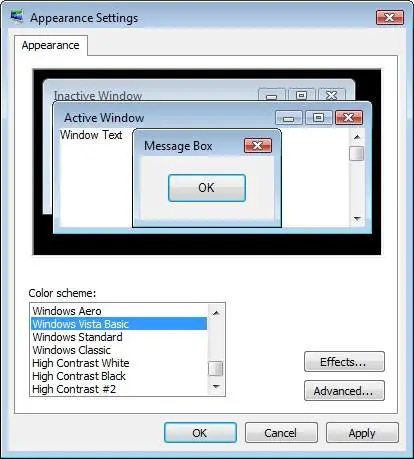
Right Click Desktop > Personalize > Window Colour and Appearance > Show Colour Mixer


But you're right about the Blue sucking, go Green!
 
I DID...but now when I go into that window there is no option for Aero and it is set to basic...what is going on?

You do have Windows Aero theme selected, right?

color5.jpg


If you do;

Right Click Desktop > Personalize > Window Colour and Appearance > Show Colour Mixer


But you're right about the Blue sucking, go Green!
 
Have you removed or installed any new drivers recently?

Try going back to a Restore Point that you know it worked on.
 
yea like Danny said, it sounds like a problem with your drivers. try uninstalling and reinstalling the video driver, if the restore doesn't work.
 
Won't I lose info or programs if I go to a restore point? The only thing I can think of that I've installed and uninstalled is Nero. COuld I find Vista drivers online to download?

Have you removed or installed any new drivers recently?

Try going back to a Restore Point that you know it worked on.
 
Won't I lose info or programs if I go to a restore point? The only thing I can think of that I've installed and uninstalled is Nero. COuld I find Vista drivers online to download?

Nope. A restore point won't touch your system files, or personal files. So you'll loose nothing.

Sure, there's loads of Vista drivers online, but if it's been working then all of a sudden it isn't, I doubt it's a driver problem, since you've probably already got one installed.

Click Start > Type 'dxdiag' > Hit 'Enter' > Go to the 'Display' tab > What does it say under 'Main Driver', 'Version' and 'Date'?
 
Main Driver: nvd3dum.dll,nvwgf2um.dll
Version: 7.15.0011.8250 (English)
Date: 3/28/2009 12:03:00 AM

It that all you needed to know?
 
Well, you do have display drivers installed, so I don't get why it shouldn't work.

Try going back a restore point.
 
This should work:

Go to Control Panel and Click System. Then, click "Windows Experience Index". On the bottom right click "Re-run the Assessment". During the test it should re-enable Aero.
 
Back
Top