Wanting to upgrade computer, Little help?

Thanks,the things you suggested look great. This would be the first time that i am upgrading my computer by myself so your help is appreciated. Quick question what makes the ram you suggested better then the ones i found,like i said this is my first time upgrading my own hardware and i'm not the expert at it. Also i had been looking at this http://www.newegg.com/Product/Produ...-pr1c3grabb3r-_-Video+Cards-_-EVGA-_-14130394 earlier and was wondering for the 12$ extra is it better then the one you suggested?

EDIT:Oh, and the games i play are mainly games on steam (Hl2,CSS, Gmod,Orange box etc.) and i also play CoH. So would what you suggested be good for those types of games?
 
Last edited:
Yes, the video card will handle them well. 32 bit Windows can only address up to 3.5GB of RAM. Any more without a 64 bit OS is wasted and could cause conflicts. Latency is the time it takes between memory accesses. The smaller number the better. I picked out a latency of 4 for you because it was only a couple dollars more than the one with 5.

Hope that cleared it up. ;)
 
oh ok, Thank you. I will go with the ram you picked out(glad you suggested it by the way otherwise i would of went with what i found_ but what about the graphics card? Should i go with the one you suggested or the one i found that is 15$ more? Thanks for all your help sorry if i'm bugging you.
 
I'm sorry, I didn't notice the link in your reply. The video card you picked out is much better. Both the core and memory clocks are significantly higher, good job! ;) Let me know how it all works out for you. :cool:
 
Ok good, The only question about the card i found is that it says its memory type is DDR3? So does that mean i wouldn't be able to use it becuase i use DDR2 or?
 
Am i going to have to get anything new to handle cooling? From what i've read the graphics card that i found says that it runs hot?
 
has nothing to do with what kinda memory your board takes... it will work

zer0_c00l is correct! :D They are separate entities.

As for cooling, what do you have for case fans? Your main objective is to exhaust excess heat. It appears from your manual diagram that you have either a 80mm or 90mm case fan or there is not one at all based on the diagram. The diagram looks a lot like the EMachines case my Step-Daughter has and that's an 80mm. I used this based on the balance of velocity/noise...

http://www.newegg.com/Product/Product.aspx?Item=N82E16835214006

Check out your case and tell me what you have. :good:
 
You gotta get your hands dirty. Unless you feel somewhat confident in what you are doing, you may want to get some help.

First, unplug. Be careful of sharp edges and keep contact with the case for grounding purposes. Open the case and explore. If the fan(s) don't state their size, measure them. 80mm will be ~3.1" & 90mm will be ~3.5". While you're in there...

How many RAM slots are full?

Got a digital camera? Take shots of the inside cuz it will help.
 
I've been watching alot of videos about installing Ram and Graphics cards so i know about the grounding thing, From what i understand both slots are full there are 2 x 256 mb sticks.I'm not sure if i'm going to be able to open my PC today but the graphics card that i'm getting has a built in fan and is said to run 51'c on idle and anywhere from 60c to 70c under load. So will i really need to worry about fans? Also what about the power supply, i won't need to worry about that correct?

Edit:Also, I'll be working on a tile floor and on a glass table with a anti-static strap when i put my new components in so.
 
Last edited:
I'm not getting the PSU information from your manual. Look for a sticker on your PSU. It must be at least 350W w/ a minimum 22A on 12V. That's combined 12V, so...

12V @ 14A & 12V @ 14A = 28A.

As for the case fan...

If you don't have one, I still HIGHLY RECOMMEND one! You have a space for one in the back of your case. For the cost of the fan, do you want to risk what you're investing? I didn't think so.
 
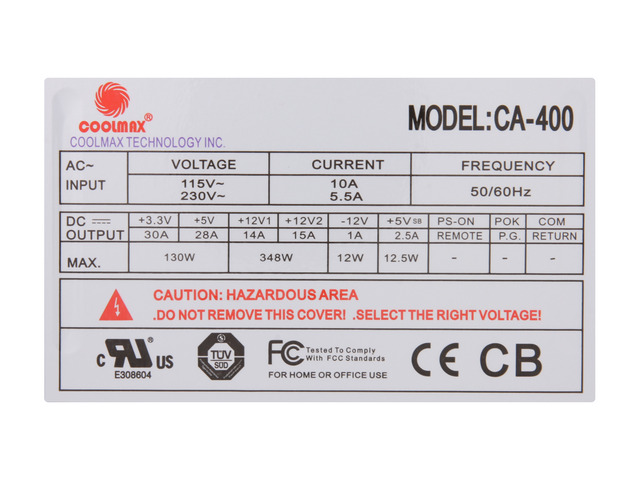
On the side of the PSU you'll see the specifications. Example...


PSU-1.jpg


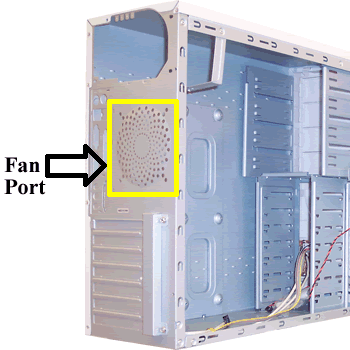
See the fan in the PSU. This is NOT the fan I speak of. To the right, there should be a bunch of holes in the metal in the shape of a sphere approximately 3" in Diameter. See example...


fan-ports-picture.gif


I hope someone else steps in cuz I gotta leave. Good luck, you have a start. :good:
 
Opened the case up, was fairly simple only had to twist a knob off. Here's what i got off the power supply

250W
output:12+v,14 a,12 v
+5V,25A.+5v5B
+3.3v,18A

Also i have no fan, so i will need to buy one.
 
Last edited:
Here is all the info off the label:

BESTEC
MODEL-ATX-250-12Z REV: D2R
INPUT:100-12V-6A-200-240V-3A BST ATX-250-12Z DR 50-60HZ
OUTPUT:+12V/14A/-12V/0.8A
250W MAX|+5V/25A +5VSB/2A
+3.3V/18A PEAK 2.5A
+SV & 8 +3.3V 165W MAX
+SV & 12V 218W MAX

S/N:060900418654

HP P/N 5188-2622
 
Last edited:
You're in luck!

Turns out you have an ATX PSU so that alone brings your price down. Secondly, the video card you chose does NOT require the 6-pin PCIe x16 connector! :good:

This PSU has all the features you need plus "2" 12V rails...

http://www.newegg.com/Product/Product.aspx?Item=N82E16817159043

17-159-043-25.jpg


add your case fan...

http://www.newegg.com/Product/Product.aspx?Item=N82E16835214006

memory...

http://www.newegg.com/Product/Product.aspx?Item=N82E16820231051

and video card...

http://www.newegg.com/Product/Product.aspx?Item=N82E16814130394&Tpk=EVGA 256-P2-N761-TR

You're looking at about $125.00 shipped!:D I can do no more for you, my Friend. You have to decide...video card...memory? You need the the better PSU to support the card and it's very inexpensive. The $12 case fan is only gonna help in the long run.

Best of luck! :cool:
 
Back
Top