I just purchased a new computer about three days ago, with Vista. Everytime my computer comes out of sleep mode, I have the same window that pops up (see attached image). What does this mean and is it a problem with the computer or Vista. How do I get it fixed? Or should I bring the computer back to the store and get a new one? Thank you!

You are using an out of date browser. It may not display this or other websites correctly.
You should upgrade or use an alternative browser.
You should upgrade or use an alternative browser.
What is this error message on Vista mean?
- Thread starter Iroc24
- Start date
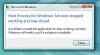
One of the preinstalled programs or maybe Windows itself is seeing a glitch there. You can try changing the power profile to never go into standby mode to see if that will stop the error messages. In the meantime you should have their tech if one works at the store look the system over under warranty. Let them solve the headache instead of vioding anything yourself there.
Kodiak kid
New Member
I used to get that when I installed vista 64. It turned out to be one of the programs I was using (this was during the beta stage of vista and 3rd party drivers). However, I still can't run the program w/out getting that error...although it doesn't happen EVERY time, but about 50% of the time.
My suggestion is run the program manager and see what processes are running, get a screen shot. Then let it sleep and when you get the error again (without starting any new programs, etc), go back to the program manager and see if any of the processes are missing from your original screen shot. If there isn't, then its most likely a vista/system glitch and not hardware related.
Hope that helps.
My suggestion is run the program manager and see what processes are running, get a screen shot. Then let it sleep and when you get the error again (without starting any new programs, etc), go back to the program manager and see if any of the processes are missing from your original screen shot. If there isn't, then its most likely a vista/system glitch and not hardware related.
Hope that helps.
Right now being a new purchase any real changes to correct any problems should be done by the store while under warranty. Any goofs made would simply be their headache to see it corrected. That doesn't necessarily mean replacing the system just being covered there.
A "host process" would direct you to a background service needed by Windows itself over any 3rd party software preinstalled. There are a few ways of changing services found in Vista from automatic to manual or disabled. This is part of the 10 ways to improve performance overall in the new version. http://www.connectedinternet.co.uk/2007/10/19/10-simple-ways-to-speed-up-windows-vista/
For do it yourself troubleshooting in Vista you could try the BITS repair tool for Vista provided directly from Microsoft for corecting Host process for Windows services type errors. The MS download page for this is at http://www.microsoft.com/downloads/...60-4045-435b-b165-2c1496cd94a4&DisplayLang=en
A "host process" would direct you to a background service needed by Windows itself over any 3rd party software preinstalled. There are a few ways of changing services found in Vista from automatic to manual or disabled. This is part of the 10 ways to improve performance overall in the new version. http://www.connectedinternet.co.uk/2007/10/19/10-simple-ways-to-speed-up-windows-vista/
For do it yourself troubleshooting in Vista you could try the BITS repair tool for Vista provided directly from Microsoft for corecting Host process for Windows services type errors. The MS download page for this is at http://www.microsoft.com/downloads/...60-4045-435b-b165-2c1496cd94a4&DisplayLang=en