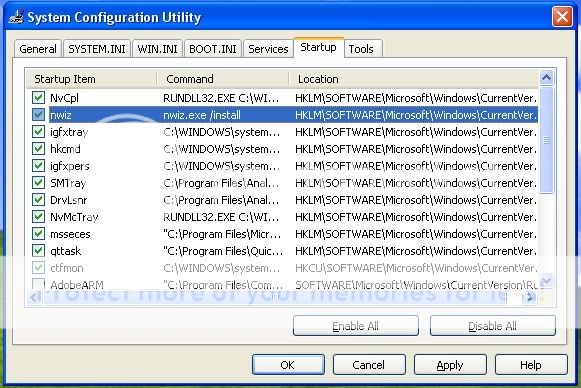
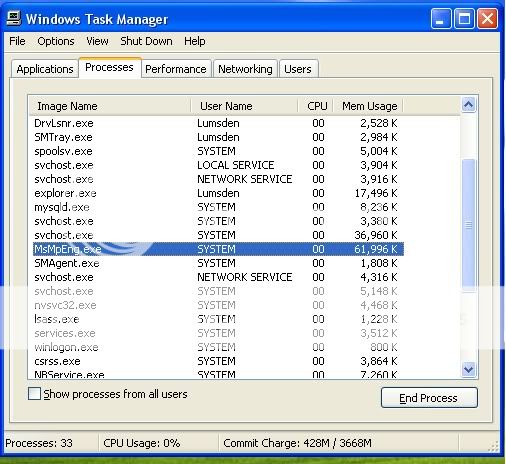
dave1701 New Member Dec 20, 2010 #1 The thing that's selected. Also, if you see something I should turn off let me know
Rocko New Member Dec 20, 2010 #2 It is a process that your Nvidia nView program uses. It is directly related to your video card driver
It is a process that your Nvidia nView program uses. It is directly related to your video card driver
voyagerfan99 Master of Turning Things Off and Back On Again Staff member Dec 20, 2010 #3 I see it a lot as well. I'm guessing it has something to do with nVidia software but I'm not sure.
dave1701 New Member Dec 20, 2010 #5 Oh ok. It just seems like I have alot of processes running. This is taking up alot of memory. What is this?
Oh ok. It just seems like I have alot of processes running. This is taking up alot of memory. What is this?
linkin VIP Member Dec 20, 2010 #6 30 or so is normal for windows xp. My 7 system runs 40-50 normally.
Twinbird24 Member Dec 20, 2010 #7 On my XP machine I also had well over 30 processes running, right now on my Windows 7 I have 63. You can also find a lot of information about these processes just by googling them: MsMpEng.exe
On my XP machine I also had well over 30 processes running, right now on my Windows 7 I have 63. You can also find a lot of information about these processes just by googling them: MsMpEng.exe