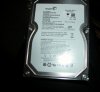
What the hell is this?

deanj20

New Member
3672d1268644106-seagate-ex-hdd-500gb-old-style-non-usb-powered-dscn0260.jpg


I've never seen a connection like it. I haven't worked on a ton of laptops, but it looks sort of like a laptop HD connection. Sort of. :confused:

Heavybarrell and I have been trying to find a USB adapter for the drive in another post. He gave me the specs:

Seagate 500gb external hd
barracuda 7200.11
ST3500820AS
S/N 9QM386ZX
P/N 9BX134-568
FIRMWARE: 8D81

But that doesn't match what I'm seeing in this picture.

Any questions, comments or things you'd like to think about?
 
Last edited:
I've never seen a connection like it. I haven't worked on a ton of laptops, but it looks sort of like a laptop HD connection. Sort of. :confused:

Heavybarrell and I have been trying to find a USB adapter for the laptop in another post. He gave me the specs:

Seagate 500gb external hd
barracuda 7200.11
ST3500820AS
S/N 9QM386ZX
P/N 9BX134-568
FIRMWARE: 8D81

But that doesn't match what I'm seeing in this picture.

Any questions, comments or things you'd like to think about?


Are you trying to get the information off of it? A mini usb and a power cord should get it up and running.


Just to clear up the connectors, the connectors in red are for the external power and Mini usb prots. while the connectors in blue are attached to the SATA ports on the drive (for power and data). If you remove the circuit board, you should have a regular internal 3.5" HDD.

I hope that answers you questions!
 
i have tried several power supplies which i had a hard time finding due to the voltage specifications and none of them have worked.
The closest i got was the orange strip light flashing then nothing.
Surely there is a way to power this unit without using the power supply slot.

I have attached the photo of the sticker i mentioned in the previous thread hope this helps
 

Attachments

  • white sticker.jpg
    white sticker.jpg
    80.2 KB · Views: 136
If you look at the diagram on the bottom of the white sticker it does not match the components that you can see in the picture posted by Dean.
All id like to do is get the files off this dam thing then i can wack it around the backyard with my 2 iron :eek:
 
Have a look at the connections displayed in the pic.
If you can post a pic of a connector that will fit this hdd then by all means post it.
Please read the previous posts in this thread and the other which will show you that this is more than a simple case of hooking it up to a desk top pc which i have already looked at.
Thanks for your input anyways
 
Hey heavybarrell,

If you remove the circuit board, you should have a regular internal 3.5" HDD.

Try pulling that part off the drive. (The green board). It must have the regular connections underneath. That green piece has to be some sort of crossover.

Let me know.
:D
 
Last edited:
i think you can pull that off. i searched it and it comes up as a sata drive. i had a laptop drive laying around here that i didn't even know it was a sata till i pulled the adapter off.
 
Hey heavybarrell,


Try pulling that part off the drive. (The green board). It must have the regular connections underneath. That green piece has to be some sort of crossover.

Let me know.
:D

Let me start off by thanking everyone involved with this issue.
i pulled that board off and BOOM problem solved.
Cables i had bought previously fit perfectly now and i will be able to recover all my files.
Thanks again Deanj20 for the extra hand you gave me.
I will possibly post some pics after i have removed all files from the HDD and demonstrate exactly what a HDD looks like when it has been hit around the backyard with a 2 iron :P
 
Heres the kicker when i hook the ex hdd via sata to my old desktop downstairs it dosent read it at all.
The hdd is working but the computer dosent detect it anywhere.
Stay tuned for the next installment of the dreaded seagate monster
 
Heres the kicker when i hook the ex hdd via sata to my old desktop downstairs it dosent read it at all.
The hdd is working but the computer dosent detect it anywhere.

If it's not reading it, then how do we know it's working? :confused:

Have you checked your BIOS settings? Does the computer 'see' it in BIOS?

If so, maybe you just need to install a driver for it. Is it the same computer you pulled it out of? Or did you pull it out of a laptop (must've been - that's why it had the "do-hickey" on it... right?)

What are the specs of the desktop you're hooking it into? you might try the DiscWizard from Seagate - check it out: http://www.seagate.com/ww/v/index.j...toid=d9fd4a3cdde5c010VgnVCM100000dd04090aRCRD

Stay tuned for the next installment of the dreaded seagate monster

We'll get it goin' sooner or later. Don't get discouraged. Welcome to the wonderful world of computer troubleshooting!

I will possibly post some pics after i have removed all files from the HDD and demonstrate exactly what a HDD looks like when it has been hit around the backyard with a 2 iron :p

:eek:
Don't do that!!! Send it to me instead - I could definitely use the extra space!!!
 
Basically the pc i hooked it up to has been sitting around and not used for over a year so i can see why its not working.
I have 2 laptops that i can sort this out with after i just purchased a usb to ide/sata converter which i will use to hook it up to the laptop.
I pulled it out of its case as it was just a seagate 500gb freeagent external hdd.
If i do decide to part with the external hdd ill definately send it your way.
 
Back
Top