Where did my OS go??

bennyboy9201

New Member
I was on my brothers computer, which is a off the shelf HP running vista. I went into BIOS, looked around, and to my knowledge did not change anything. When I restarted the computer, it would not load Windows, and after reading the error messages it seems as if it cannot find the OS on the HDD anymore. Ihooked up the Harddrive to my computer, and all the files seem to still be there. What can I do to fix this?


Also, I fragmented the disk using my computer, and also made sure the RAM was ok.
 
did you somehow stop the system from booting from the hard drive?

Have a look in your bios again,at the bottom there should be an "F" key,usualy F6 i think to restore default settings.

press that then f10 to save settings and see if it boots,If not you need to see where your pc is trying to boot from first.
 
maybe u changed the hard drive interface from ahci to ide compat or something. this will make it unbootable. change it back, if it's sata disk try it in ahci mode.
 
I was on my brothers computer, which is a off the shelf HP running vista. I went into BIOS, looked around, and to my knowledge did not change anything. When I restarted the computer, it would not load Windows, and after reading the error messages it seems as if it cannot find the OS on the HDD anymore. Ihooked up the Harddrive to my computer, and all the files seem to still be there. What can I do to fix this?


Also, I fragmented the disk using my computer, and also made sure the RAM was ok.

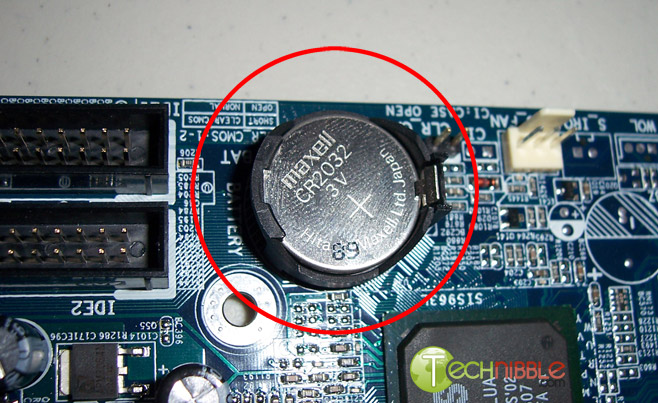
You probably changed something without knowing it. Just reset the bios and see if it will boot, either by the jumper on the board or take the battery out for a minute.
 
Here, if it looks like this, you just move the jumper over for a minute, then move it back. Some boards just have two pin, you just put a jumper on them, then remove it. You do this with the computer off and uplugged.
72-clear-cmos-jumper-bios.jpg

clearcmos.jpg


Cant find it, just remove the battery for a minute, then put the battery back.
remove-battery.jpg
 
Does the harddrive show up in the bios? If so, like said above. Look around in the bios for your boot order and set the drive as first. Then hit Save and Exit.
 
I can't recall exactly what it said, but I booted my PC from his HDD, and my PC Repair worked on it, so I put his back together and it worked fine. I took it upstairs, plugged it in up there, and it goes back to the same stuff.

EDIT: Is there a change that the SATA cable to the hard drive became faulty?
 
Last edited:
Back
Top