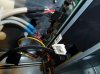
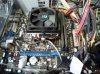
Ok I finished putting in the mobo, fan, RAM, and plugged in all the easy wires. The power supply worked when I disassembled the unit. The above mentioned parts are new. Everything went together fine. But when I plugged it in and hit the start button "nothing". The wire in the picture doesnt seem to fit (exactly) the plug in the pic. I'm almost sure that is where it was originally. I couldnt find a wiring diagram online. The tower is a Acer Aspire M1641-U1521A.

You are using an out of date browser. It may not display this or other websites correctly.
You should upgrade or use an alternative browser.
You should upgrade or use an alternative browser.
Where does this wire go ??
- Thread starter aintgotno
- Start date


G80FTW
Active Member
If you are talking about the white plug that is not plugged into anything in the first pic towards the right, that is for a floppy drive (dont know if anyone still even has those  ) and some older video cards also used them for extra power. Its just another power connector, older style.
The one in the other pic that is not plugged in that is resting on the motherboard is a fan connector.
) and some older video cards also used them for extra power. Its just another power connector, older style.The one in the other pic that is not plugged in that is resting on the motherboard is a fan connector.
Last edited:
G80FTW
Active Member
What powers the on off switch ?
You may have forgot to hook up the switches. Some motherboards have the wiring labled on the board itself for easy connecting, but alot dont especially older ones so Id recommend picking up a manual for the motherboard (if you just bought it you should have one) and find your switch wires which should be coming from the front of the case and labeled PW RS like that. Or Power/Reset

G80FTW
Active Member
Well I guess I'll take it to a different shop tomorrow. The last shop said it was the mobo or processor, now I know that was wrong.
I take it you are using onboard video? As I dont see a video card in your picture. So the shop may be right.
You didnt replace the processor right? That could be the problem. If the processor is faulty, then it wont even POST, leaving you with just a blank screen as you describe.
G80FTW
Active Member
Nope G80, i replaced APU also. Here is what is new, mobo, APU, RAM, fan, harddrive. I have a new video card but left it out till I got the unit up and running. IS THERE ANYWAY the power supply could be at fault? The monitor is plugged into the onboard video.
Its possible.
Its not POSTing right? If its POSTing, then there is probably another problem.