You are using an out of date browser. It may not display this or other websites correctly.
You should upgrade or use an alternative browser.
You should upgrade or use an alternative browser.
Where to get new bios? evga 790i ultra sli
- Thread starter KPC84
- Start date

I don't think you want a new bios - just a more recent driver for the card. Just go to the nVidia website for it.

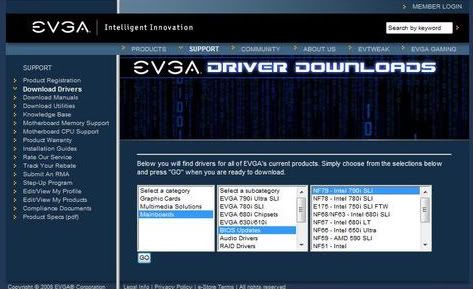
I can't find BIOS updates on evga's website. The drivers that came on the CD should be OK for your motherboard (as should the BIOS, you really only need to update if something isn't working or if there are new features you want).
Ok, I came to the same conclusion. I was just reading reviews on newegg for the 790i ultra sli mobo i just got and a common remark was "after bios update things worked fine." So I figured there was some fatal flaw with the bios released with the mobo.
As for the drivers, should I download and burn the new drivers off the evga website and throw out the disk that comes in the box? Or should I load the disk that comes with the box first and then download the new drivers from the website?

Vizy
New Member
Ok, I came to the same conclusion. I was just reading reviews on newegg for the 790i ultra sli mobo i just got and a common remark was "after bios update things worked fine." So I figured there was some fatal flaw with the bios released with the mobo.
As for the drivers, should I download and burn the new drivers off the evga website and throw out the disk that comes in the box? Or should I load the disk that comes with the box first and then download the new drivers from the website?
dont throw out your disk. NEVER. because usually the older drivers are the ones that for sure work. All u have to do is just install the ones on the CD then get the ones online. thats what i would do. but
never never throw out the disk....dude
dont throw out your disk. NEVER. because usually the older drivers are the ones that for sure work. All u have to do is just install the ones on the CD then get the ones online. thats what i would do. but
never never throw out the disk....dude
Well, yeah, I didn't literally mean throw out the disk.
So the consensus is to load the drivers that come in the box and then just download the latest from the evga website?