
win 7 error message

phoenix144

New Member
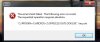
When I try to open an e-mail client notifier I get this error message.

I have gone into the program and adjusted the security settings to allow more lee way for this one program, but still get the same message.

I have googled and there were dozens of similar queries.

Any ideas?

Thanks.

The attachment is an IrfanView screenshot file.
 

Attachments

  • popeeper error.jpg
    popeeper error.jpg
    71 KB · Views: 63
Computer, C: Local Disc, Programs, PoP peeper, right click. Run as Admin is not there. I then went into Security for the program and tried increasing what the program was "allow...ed" to do. This did not "stick".

Perhaps I am still missing something. The odd thing is that it had been working previously. I am uncertain as to whether or not the most recent patches from MS may have had an effect?

I have been using Win7 for more than a year (1st the RC version) and the the final release once it became available, both versions were/are Ultimate.

Am I still missing something?
 
Just another guess. Ive had something similar before.
Go into control panel / Add or remove user accounts.
I have several accounts. (backup's with admin rights).
I don't know why it happens but suggest you create another.
its a start. reboot or log off. log in with new account and see if that works.
 
Thank you all for your suggestions! It seems that Win7 figured out the solution on it's own!

After about 5 attempts on my part to use the New Mail notification App. a message popped up on my screen, say something to the effect of; a program has attempted to make changes, it (the program) has been set to compatibility mode.

The upshot is, now it is working just fine :)

I really have to say that I love Win7, Tried vista, but switched back to XP until 7 came out.

I do have one other question...I have the OE Win7 clock and weather Gadgets, and even though they are set to be "always on top", from time to time they end up being behind everything. It seems that the only way that I can get them to stay on top again (for a while) is to uncheck and then recheck the "always on top".

Ideas?

Thank You
 
interesting also.
suggest starting a new thread and letting this one go.
They will see this thread and not look. Others will and reply if they know.
I don't read all, because i don't know either.
 
do it again same way. hard drive problem win 7 or '
win 7 and issue with gadgets on top'.
then explain it the same way.
put it in operating system.
 
Back
Top