Window Vista Memory Dump

Rynet

New Member
This is a memory dump from a crash that occurs on occasion. From what I'm reading its the hard-drive or the memory that is failing?


0: kd> !analyze -v
*************************************************************************** ****
* *
* Bugcheck Analysis *
* *
*************************************************************************** ****

CRITICAL_OBJECT_TERMINATION (f4)
A process or thread crucial to system operation has unexpectedly exited or been
terminated.
Several processes and threads are necessary for the operation of the
system; when they are terminated (for any reason), the system can no
longer function.
Arguments:
Arg1: 00000003, Process
Arg2: 88533b48, Terminating object
Arg3: 88533c94, Process image file name
Arg4: 82463ab0, Explanatory message (ascii)

Debugging Details:
------------------


PROCESS_OBJECT: 88533b48

IMAGE_NAME: hardware_disk

DEBUG_FLR_IMAGE_TIMESTAMP: 0

FAULTING_MODULE: 00000000

PROCESS_NAME: csrss.exe

EXCEPTION_RECORD: a5bab9dc -- (.exr 0xffffffffa5bab9dc)
ExceptionAddress: 757bd575
ExceptionCode: c0000006 (In-page I/O error)
ExceptionFlags: 00000000
NumberParameters: 3
Parameter[0]: 00000008
Parameter[1]: 757bd575
Parameter[2]: c000000e
Inpage operation failed at 757bd575, due to I/O error c000000e

EXCEPTION_CODE: (NTSTATUS) 0xc0000006 - The instruction at 0x%08lx referenced memory at 0x%08lx. The required data was not placed into memory because of an I/O error status of 0x%08lx.

CUSTOMER_CRASH_COUNT: 1

DEFAULT_BUCKET_ID: VISTA_DRIVER_FAULT

CURRENT_IRQL: 0

ERROR_CODE: (NTSTATUS) 0xc0000006 - The instruction at 0x%08lx referenced memory at 0x%08lx. The required data was not placed into memory because of an I/O error status of 0x%08lx.

EXCEPTION_PARAMETER1: 00000008

EXCEPTION_PARAMETER2: 757bd575

EXCEPTION_PARAMETER3: c000000e

IO_ERROR: (NTSTATUS) 0xc000000e - A device which does not exist was specified.

EXCEPTION_STR: 0xc0000006_c000000e

FAULTING_IP:
+12a
757bd575 ?? ???

BUGCHECK_STR: 0xF4_IOERR_C000000E

STACK_TEXT:
a5bab4e4 824cfc40 000000f4 00000003 88533b48 nt!KeBugCheckEx+0x1e
a5bab508 8242e35d 82463ab0 88533c94 88533d70 nt!PspCatchCriticalBreak+0x73
a5bab538 8242e304 88533b48 890a32c8 c0000006 nt!PspTerminateAllThreads+0x2c
a5bab56c 82287c7a ffffffff c0000006 a5bab9b0 nt!NtTerminateProcess+0x1c1
a5bab56c 82286cdd ffffffff c0000006 a5bab9b0 nt!KiFastCallEntry+0x12a
a5bab5ec 82264b95 ffffffff c0000006 69857ed5 nt!ZwTerminateProcess+0x11
a5bab9b0 82263238 a5bab9dc 00000000 a5babd64 nt!KiDispatchException+0x41b
a5babd34 8228b7cb 09f7f544 09f7f564 00000000 nt!KiRaiseException+0x175
a5babd50 82287c7a 09f7f544 09f7f564 00000000 nt!NtRaiseException+0x33
a5babd50 757bd575 09f7f544 09f7f564 00000000 nt!KiFastCallEntry+0x12a
WARNING: Frame IP not in any known module. Following frames may be wrong.
09f7f848 00000000 00000000 00000000 00000000 0x757bd575


STACK_COMMAND: kb

FOLLOWUP_IP:
+12a
757bd575 ?? ???

SYMBOL_STACK_INDEX: a

FOLLOWUP_NAME: MachineOwner

MODULE_NAME: hardware_disk

SYMBOL_NAME: +12a

FAILURE_BUCKET_ID: 0xF4_IOERR_C000000E_+12a

BUCKET_ID: 0xF4_IOERR_C000000E_+12a

Followup: MachineOwner
---------
 
Download BlueScreenView
No installation required.
Unzip downloaded file and double click on BlueScreenView.exe file to run the program.
When scanning is done, go Edit>Select All.
Go File>Save Selected Items, and save the report as BSOD.txt.
Open BSOD.txt in Notepad, copy all content, and paste it into your next reply.
 
==================================================
Dump File : Mini113011-01.dmp
Crash Time : 11/30/2011 7:12:01 PM
Bug Check String : CRITICAL_OBJECT_TERMINATION
Bug Check Code : 0x000000f4
Parameter 1 : 0x00000003
Parameter 2 : 0x88533b48
Parameter 3 : 0x88533c94
Parameter 4 : 0x82463ab0
Caused By Driver : ntoskrnl.exe
Caused By Address : ntoskrnl.exe+cdb3f
File Description : NT Kernel & System
Product Name : Microsoft® Windows® Operating System
Company : Microsoft Corporation
File Version : 6.0.6002.18484 (vistasp2_gdr.110617-0336)
Processor : 32-bit
Crash Address : ntoskrnl.exe+cdb3f
Stack Address 1 : ntoskrnl.exe+292c40
Stack Address 2 : ntoskrnl.exe+1f135d
Stack Address 3 : ntoskrnl.exe+1f1304
Computer Name :
Full Path : C:\Windows\Minidump\Mini113011-01.dmp
Processors Count : 2
Major Version : 15
Minor Version : 6002
Dump File Size : 163,280
==================================================
 
Not saying you are, but its a possibility you could be infected.

Please download Malwarebytes' Anti-Malware from here or here and save it to your desktop.
  • Double-click mbam-setup.exe and follow the prompts to install the program.
  • At the end, be sure a checkmark is placed next to
    • Update Malwarebytes' Anti-Malware
    • and Launch Malwarebytes' Anti-Malware
  • then click Finish.
  • If an update is found, it will download and install the latest version. Please keep updating until it says you have the latest version.
  • Once the program has loaded, select Perform quick scan, then click Scan.
  • When the scan is complete, click OK, then Show Results to view the results.
  • Be sure that everything is checked, and click Remove Selected.
  • A log will be saved automatically which you can access by clicking on the Logs tab within Malwarebytes' Anti-Malware

If for some reason Malwarebytes will not install or run please download and run Rkill.scr, Rkill.exe, or Rkill.com. If you are still having issues running rkill then try downloading these renamed versions of the same program.

EXPLORER.EXE
IEXPLORE.EXE
USERINIT.EXE
WINLOGON.EXE

But DO NOT reboot the system and then try installing or running Malwarebytes. If Rkill (which is a black box) appears and then disappears right away or you get a message saying rkill is infected, keep trying to run rkill until it over powers the infection and temporarily kills it. Once a log appears on the screen, you can try running malwarebytes or downloading other programs.


Download the HijackThis installer from here.
Run the installer and choose Install, indicating that you accept the licence agreement. The installer will place a shortcut on your desktop and launch HijackThis.

Click Do a system scan and save a logfile

Most of what HijackThis lists will be harmless or even essential, don't fix anything yet.

When the hijackthis log appears in a notepad file, click on the edit menu, click select all, then click on the edit menu again and click on copy. Come back to your reply and right click on your mouse and click on paste.

Post the logfile that HijackThis produces along with the Malwarebytes Anti-Malware log
 
I've run all of them before and nothing came up. Had problems prior and did a fresh install and problems still persisted.
 
But here is highjackthis for giggles.


Logfile of Trend Micro HijackThis v2.0.4
Scan saved at 11:14:24 PM, on 11/30/2011
Platform: Windows Vista SP2 (WinNT 6.00.1906)
MSIE: Internet Explorer v9.00 (9.00.8112.16421)
Boot mode: Normal

Running processes:
C:\Windows\system32\Dwm.exe
C:\Windows\Explorer.EXE
C:\Program Files\Windows Defender\MSASCui.exe
C:\Program Files\AVAST Software\Avast\AvastUI.exe
C:\Program Files\Common Files\Java\Java Update\jusched.exe
C:\Windows\Samsung\PanelMgr\SSMMgr.exe
C:\Program Files\Logitech Gaming Software\LCore.exe
C:\Program Files\Zune\ZuneLauncher.exe
C:\Program Files\HP\HP Software Update\hpwuschd2.exe
C:\Windows\system32\taskeng.exe
C:\Program Files\Windows Media Player\WMPSideShowGadget.exe
C:\Program Files\Windows Media Player\wmplayer.exe
C:\Program Files\HP\Digital Imaging\bin\hpqtra08.exe
C:\Program Files\Windows Media Player\wmpnscfg.exe
C:\Program Files\HP\Digital Imaging\bin\hpqSTE08.exe
C:\Program Files\HP\Digital Imaging\bin\hpqbam08.exe
C:\Program Files\HP\Digital Imaging\bin\hpqgpc01.exe
C:\Users\Emily\AppData\Local\Google\Chrome\Application\chrome.exe
C:\Windows\system32\rundll32.exe
C:\Users\Emily\AppData\Local\Google\Chrome\Application\chrome.exe
C:\Windows\system32\NOTEPAD.EXE
C:\Users\Emily\AppData\Local\Google\Chrome\Application\chrome.exe
C:\Windows\system32\SearchFilterHost.exe
C:\Program Files\Trend Micro\HiJackThis\HiJackThis.exe

R1 - HKCU\Software\Microsoft\Internet Explorer\Main,Search Page = http://go.microsoft.com/fwlink/?LinkId=54896
R0 - HKCU\Software\Microsoft\Internet Explorer\Main,Start Page = http://go.microsoft.com/fwlink/?LinkId=69157
R1 - HKLM\Software\Microsoft\Internet Explorer\Main,Default_Page_URL = http://go.microsoft.com/fwlink/?LinkId=69157
R1 - HKLM\Software\Microsoft\Internet Explorer\Main,Default_Search_URL = http://go.microsoft.com/fwlink/?LinkId=54896
R1 - HKLM\Software\Microsoft\Internet Explorer\Main,Search Page = http://go.microsoft.com/fwlink/?LinkId=54896
R0 - HKLM\Software\Microsoft\Internet Explorer\Main,Start Page = http://go.microsoft.com/fwlink/?LinkId=69157
R0 - HKLM\Software\Microsoft\Internet Explorer\Search,SearchAssistant =
R0 - HKLM\Software\Microsoft\Internet Explorer\Search,CustomizeSearch =
R0 - HKCU\Software\Microsoft\Internet Explorer\Toolbar,LinksFolderName =
R3 - URLSearchHook: Yahoo! Toolbar - {EF99BD32-C1FB-11D2-892F-0090271D4F88} - C:\Program Files\Yahoo!\Companion\Installs\cpn\yt.dll
O1 - Hosts: ::1 localhost
O2 - BHO: &Yahoo! Toolbar Helper - {02478D38-C3F9-4efb-9B51-7695ECA05670} - C:\Program Files\Yahoo!\Companion\Installs\cpn\yt.dll
O2 - BHO: HP Print Enhancer - {0347C33E-8762-4905-BF09-768834316C61} - C:\Program Files\HP\Digital Imaging\Smart Web Printing\hpswp_printenhancer.dll
O2 - BHO: AcroIEHelperStub - {18DF081C-E8AD-4283-A596-FA578C2EBDC3} - C:\Program Files\Common Files\Adobe\Acrobat\ActiveX\AcroIEHelperShim.dll
O2 - BHO: avast! WebRep - {8E5E2654-AD2D-48bf-AC2D-D17F00898D06} - C:\Program Files\AVAST Software\Avast\aswWebRepIE.dll
O2 - BHO: Windows Live ID Sign-in Helper - {9030D464-4C02-4ABF-8ECC-5164760863C6} - C:\Program Files\Common Files\Microsoft Shared\Windows Live\WindowsLiveLogin.dll
O2 - BHO: URLRedirectionBHO - {B4F3A835-0E21-4959-BA22-42B3008E02FF} - C:\PROGRA~1\MICROS~2\Office14\URLREDIR.DLL
O2 - BHO: Java(tm) Plug-In 2 SSV Helper - {DBC80044-A445-435b-BC74-9C25C1C588A9} - C:\Program Files\Java\jre6\bin\jp2ssv.dll
O2 - BHO: SingleInstance Class - {FDAD4DA1-61A2-4FD8-9C17-86F7AC245081} - C:\Program Files\Yahoo!\Companion\Installs\cpn\YTSingleInstance.dll
O2 - BHO: HP Smart BHO Class - {FFFFFFFF-CF4E-4F2B-BDC2-0E72E116A856} - C:\Program Files\HP\Digital Imaging\Smart Web Printing\hpswp_BHO.dll
O3 - Toolbar: avast! WebRep - {8E5E2654-AD2D-48bf-AC2D-D17F00898D06} - C:\Program Files\AVAST Software\Avast\aswWebRepIE.dll
O3 - Toolbar: Yahoo! Toolbar - {EF99BD32-C1FB-11D2-892F-0090271D4F88} - C:\Program Files\Yahoo!\Companion\Installs\cpn\yt.dll
O4 - HKLM\..\Run: [Windows Defender] %ProgramFiles%\Windows Defender\MSASCui.exe -hide
O4 - HKLM\..\Run: [avast] "C:\Program Files\AVAST Software\Avast\avastUI.exe" /nogui
O4 - HKLM\..\Run: [SunJavaUpdateSched] "C:\Program Files\Common Files\Java\Java Update\jusched.exe"
O4 - HKLM\..\Run: [Adobe ARM] "C:\Program Files\Common Files\Adobe\ARM\1.0\AdobeARM.exe"
O4 - HKLM\..\Run: [Samsung PanelMgr] C:\Windows\Samsung\PanelMgr\SSMMgr.exe /autorun
O4 - HKLM\..\Run: [AdobeAAMUpdater-1.0] "C:\Program Files\Common Files\Adobe\OOBE\PDApp\UWA\UpdaterStartupUtility.exe"
O4 - HKLM\..\Run: [SwitchBoard] C:\Program Files\Common Files\Adobe\SwitchBoard\SwitchBoard.exe
O4 - HKLM\..\Run: [AdobeCS5.5ServiceManager] "C:\Program Files\Common Files\Adobe\CS5.5ServiceManager\CS5.5ServiceManager.exe" -launchedbylogin
O4 - HKLM\..\Run: [Launch LCore] "C:\Program Files\Logitech Gaming Software\LCore.exe" /minimized
O4 - HKLM\..\Run: [Zune Launcher] "C:\Program Files\Zune\ZuneLauncher.exe"
O4 - HKLM\..\Run: [HP Software Update] C:\Program Files\HP\HP Software Update\HPWuSchd2.exe
O4 - HKLM\..\Run: [Malwarebytes' Anti-Malware] "C:\Program Files\Malwarebytes' Anti-Malware\mbamgui.exe" /starttray
O4 - HKLM\..\RunOnce: [Malwarebytes' Anti-Malware] C:\Program Files\Malwarebytes' Anti-Malware\mbamgui.exe /install /silent
O4 - HKCU\..\Run: [Google Update] "C:\Users\Emily\AppData\Local\Google\Update\GoogleUpdate.exe" /c
O4 - HKCU\..\Run: [DAEMON Tools Lite] "C:\Program Files\DAEMON Tools Lite\DTLite.exe" -autorun
O4 - HKCU\..\RunOnce: [FlashPlayerUpdate] C:\Windows\system32\Macromed\Flash\FlashUtil10x_ActiveX.exe -update activex
O4 - HKUS\S-1-5-19\..\Run: [Sidebar] %ProgramFiles%\Windows Sidebar\Sidebar.exe /detectMem (User 'LOCAL SERVICE')
O4 - HKUS\S-1-5-19\..\Run: [WindowsWelcomeCenter] rundll32.exe oobefldr.dll,ShowWelcomeCenter (User 'LOCAL SERVICE')
O4 - HKUS\S-1-5-20\..\Run: [Sidebar] %ProgramFiles%\Windows Sidebar\Sidebar.exe /detectMem (User 'NETWORK SERVICE')
O4 - Global Startup: HP Digital Imaging Monitor.lnk = C:\Program Files\HP\Digital Imaging\bin\hpqtra08.exe
O8 - Extra context menu item: E&xport to Microsoft Excel - res://C:\PROGRA~1\MICROS~2\Office14\EXCEL.EXE/3000
O8 - Extra context menu item: Se&nd to OneNote - res://C:\PROGRA~1\MICROS~2\Office14\ONBttnIE.dll/105
O9 - Extra button: Send to OneNote - {2670000A-7350-4f3c-8081-5663EE0C6C49} - C:\Program Files\Microsoft Office\Office14\ONBttnIE.dll
O9 - Extra 'Tools' menuitem: Se&nd to OneNote - {2670000A-7350-4f3c-8081-5663EE0C6C49} - C:\Program Files\Microsoft Office\Office14\ONBttnIE.dll
O9 - Extra button: OneNote Lin&ked Notes - {789FE86F-6FC4-46A1-9849-EDE0DB0C95CA} - C:\Program Files\Microsoft Office\Office14\ONBttnIELinkedNotes.dll
O9 - Extra 'Tools' menuitem: OneNote Lin&ked Notes - {789FE86F-6FC4-46A1-9849-EDE0DB0C95CA} - C:\Program Files\Microsoft Office\Office14\ONBttnIELinkedNotes.dll
O9 - Extra button: Show or hide HP Smart Web Printing - {DDE87865-83C5-48c4-8357-2F5B1AA84522} - C:\Program Files\HP\Digital Imaging\Smart Web Printing\hpswp_BHO.dll
O11 - Options group: [ACCELERATED_GRAPHICS] Accelerated graphics
O15 - Trusted Zone: *.clonewarsadventures.com
O15 - Trusted Zone: *.freerealms.com
O15 - Trusted Zone: http://www.samsungsetup.com
O15 - Trusted Zone: *.soe.com
O15 - Trusted Zone: *.sony.com
O18 - Protocol: wlpg - {E43EF6CD-A37A-4A9B-9E6F-83F89B8E6324} - C:\Program Files\Windows Live\Photo Gallery\AlbumDownloadProtocolHandler.dll
O18 - Filter hijack: text/xml - {807573E5-5146-11D5-A672-00B0D022E945} - C:\Program Files\Common Files\Microsoft Shared\OFFICE14\MSOXMLMF.DLL
O22 - SharedTaskScheduler: Component Categories cache daemon - {8C7461EF-2B13-11d2-BE35-3078302C2030} - C:\Windows\system32\browseui.dll
O23 - Service: Adobe Acrobat Update Service (AdobeARMservice) - Adobe Systems Incorporated - C:\Program Files\Common Files\Adobe\ARM\1.0\armsvc.exe
O23 - Service: avast! Antivirus - AVAST Software - C:\Program Files\AVAST Software\Avast\AvastSvc.exe
O23 - Service: MBAMService - Malwarebytes Corporation - C:\Program Files\Malwarebytes' Anti-Malware\mbamservice.exe
O23 - Service: NVIDIA Display Driver Service (nvsvc) - NVIDIA Corporation - C:\Windows\system32\nvvsvc.exe
O23 - Service: NVIDIA Stereoscopic 3D Driver Service (Stereo Service) - NVIDIA Corporation - C:\Program Files\NVIDIA Corporation\3D Vision\nvSCPAPISvr.exe
O23 - Service: Adobe SwitchBoard (SwitchBoard) - Adobe Systems Incorporated - C:\Program Files\Common Files\Adobe\SwitchBoard\SwitchBoard.exe
O23 - Service: TVersity Media Server (TVersityMediaServer) - Unknown owner - C:\ProgramData\TVersity\Media Server\MediaServer.exe

--
End of file - 8924 bytes
 
You should fix those 015's as you should never have anything in your trusted zone. If you want to scan deeper into your system then do the following.

1.

Please download and run TDSSkiller

When the program opens, click on the start scan button.

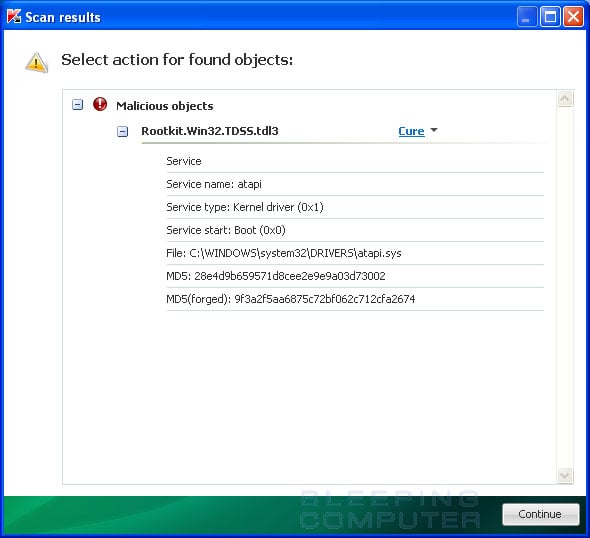
TDSSKiller will now scan your computer for the TDSS infection. When the scan has finished it will display a result screen stating whether or not the infection was found on your computer. If it was found it will display a screen similar to the one below.

infection-found.jpg


To remove the infection simply click on the Continue button and TDSSKiller will attempt to clean the infection.

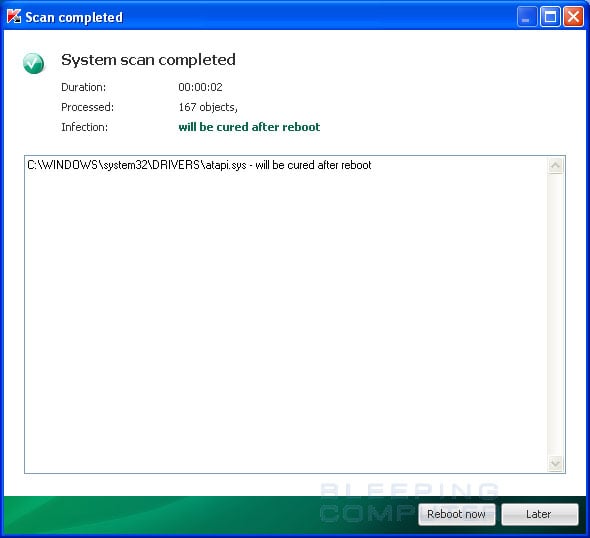
When it has finished cleaning the infection you will see a report stating whether or not it was successful as shown below.

scan-completed.jpg


If the log says will be cured after reboot, please reboot the system by pressing the reboot now button.

After running there will be a log that will be located at the root of your c:\ drive labeled tdsskiller with a series of numbers after it. Please open the log and copy and paste it back here.

2.

Download and Run ComboFix
If you already have Combofix, please delete this copy and download it again as it's being updated regularly.
  • Download this file here :

    Combofix

  • When the page loads click on the blue combofix download link next to the BleepingComputer Mirror.
  • Save the file to your windows desktop. The combofix icon will look like this when it has downloaded to your desktop.

    cf-icon.jpg
  • We are almost ready to start ComboFix, but before we do so, we need to take some preventative measures so that there are no conflicts with other programs when running ComboFix. At this point you should do the following:

  • Close all open Windows including this one.
  • Close or disable all running Antivirus, Antispyware, and Firewall programs as they may interfere with the proper running of ComboFix. Instructions on disabling these type of programs can be found here.
    Once these two steps have been completed, double-click on the ComboFix icon found on your desktop. Please note, that once you start ComboFix you should not click anywhere on the ComboFix window as it can cause the program to stall. In fact, when ComboFix is running, do not touch your computer at all. The scan could take a while, so please be patient.
  • Please click on I agree on the disclaimer window.
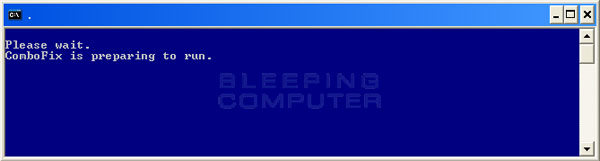
  • ComboFix will now install itself on to your computer. When it is done, a blue screen will appear as shown below.

    cf-preparing.jpg

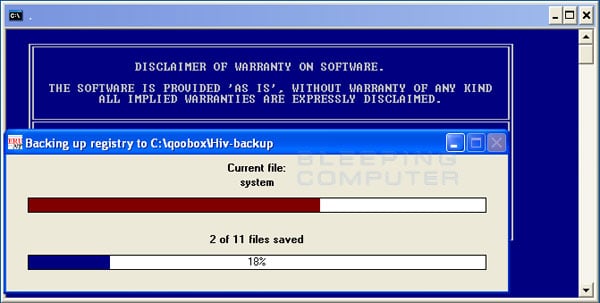
  • ComboFix is now preparing to run. When it has finished ComboFix will automatically attempt to create a System Restore point so that if any problems occur while using the program you can restore back to your previous configuration. When ComboFix has finished creating the restore point, it will then backup your Windows Registry as shown in the image below.

    erunt.jpg

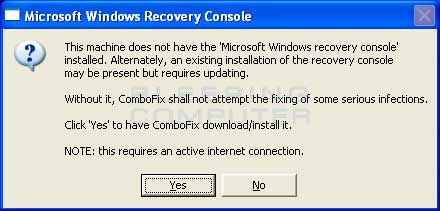
  • Once the Windows Registry has finished being backed up, ComboFix will attempt to detect if you have the Windows Recovery Console installed. If you already have it installed, you can skip to this section and continue reading. Otherwise you will see the following message as shown below:

    recovery-console-prompt.jpg

  • At the above message box, please click on the Yes button in order for ComboFix to continue. Please follow the steps and instructions given by ComboFix in order to finish the installation of the Recovery Console.
  • Please click on yes in the next window to continue scanning for malware.
  • ComboFix will now disconnect your computer from the Internet, so do not be surprised or concerned if you receive any warnings stating that you are no longer on the Internet. When ComboFix has finished it will automatically restore your Internet connection.
  • ComboFix will now start scanning your computer for known infections. This procedure can take some time, so please be patient.
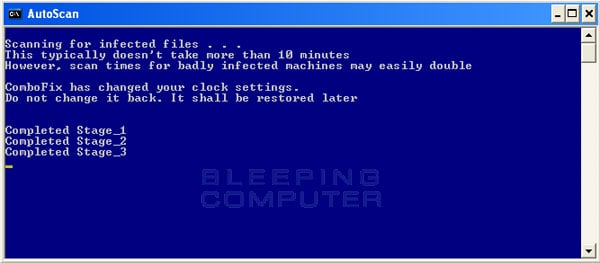
  • While the program is scanning your computer, it will change your clock format, so do not be concerned when you see this happen. When ComboFix is finished it will restore your clock settings to their previous settings. You will also see the text in the ComboFix window being updated as it goes through the various stages of its scan. An example of this can be seen below.

    still-scanning-clockchanges.jpg

  • When ComboFix has finished running, you will see a screen stating that it is preparing the log report.
  • This can take a while, so please be patient. If you see your Windows desktop disappear, do not worry. This is normal and ComboFix will restore your desktop before it is finished. Eventually you will see a new screen that states the program is almost finished and telling you the programs log file, or report, will be located at C:\ComboFix.txt.
  • When ComboFix has finished, it will automatically close the program and change your clock back to its original format. It will then display the log file automatically for you.
  • Now you just click on the edit menu and click on select all, then click on the edit menu again and click on copy. Then come to the forum in your reply and right click on your mouse and click on paste.


In your next reply please post:
  • The ComboFix log
  • A fresh HiJackThis log
  • An update on how your computer is running
 
Back
Top