
Windows 7 Shrinking

Twist86

Active Member
So I been looking to possibly getting a SSD once I sell off the 98 Mustang / 2000 Chevy Cavalier I fixed up and I want to look into ways to shrink Windows 7 to save space and cut the fat of the OS before I decide anything. I am thinking Intel X25-m just because of 80GB and the performance / price vs the 60GB Vertex 2. (G2 of course)


Is there a easy program/faq/guide of some sort that can educate a dummy like me or take the stupidity out of gutting windows / fixing settings of the wasted files? Perhaps a program designed for the novice user to click/remove stuff would be desirable (but doubtful it exists)

Example of files I would like to remove/disable
Language Packs (I want Japanese/English only)
Outdated Drivers
Paging File
Hibernation File
Shadow Copy
System Restore (its called a format)
Programs I will never use

I also wonder is there a way to find out how much space Windows 7 alone is taking currently without adding in all the crap I have installed? The goal is to get under 10GB if possible...5GB would be ideal though.


Thank you.


*Edit*
C:\Windows\System32\DriverStore\FileRepository

Is that stored drivers OR are currently installed drivers in this folder too? (fully deletion to free up 1GB) I will remove all this crap one way or another ^-^
 
Last edited:
Good deal thanks Nev will install and see what I can screw up :P Also I noticed your for sale...decided to go 460 eh? Let me know how it works out might buy one for my old man (7600GT to 460 HAHAHA) After your thread did some research on the 1GB version and I must say its impressive.
 
Last edited:
Hmm well after a little bit of playing IF the MS site is accurate Windows 7 Ultimate x64 = 20GB and my install was 12.2GB with just taking normal stuff out. Kinda fun playing around with this now that my USB drive is taking the abuse vs my DVD discs haha.

I still need to find a detailed guide for EACH service you can remove as I ran into snags with windows firewall / IE for example.
 
Good deal thanks Nev will install and see what I can screw up :P Also I noticed your for sale...decided to go 460 eh? Let me know how it works out might buy one for my old man (7600GT to 460 HAHAHA) After your thread did some research on the 1GB version and I must say its impressive.


Yeah i remember creating a custom Xp cd with this app,very handy and best of all its free,ive yet to make me a custom 7 disk with it....but i got no blank disks and the largest thumb drive i have is only 4Gb,i somehow dont think it will cut it :P

About the 460,nah even though the polls said that it would be a good upgrade i think im just going to stick with that i have for now and upgrade at a later date.,
going from a 7600GT to a 460 will be an amazing upgrade seriusly,i think your old man would be very happy :)
 
That is what I am doing...waiting to see if DX11 gets any more impressive first. So far I am the opposite of impressed so waiting for those prices to fall and see if Nvidia can come out with a 5850 that wont burn your house down.


BTW there a program I can use to edit services in Windows then burn them down? By services I mean under Component Services...you know that pesky little 20m job to disable all the crap we don't want active :P

*edit*
Nvm found the solution for that too (for those curious enable "Tweaks")....I gotta admit this is ridiculously easy. Thanks for the help you have saved me a lot of time with my family disabling all this crap every time ^-^
Next up custom images/screensaver!
 
Last edited:
Yeah i thought the same,wait at least until some more DX11 games come out!

I mean i could have upgraded my system to an I7 920 and X58 mobo yesturday along with 1666mhz 6gb ram....but personally i cant see it been all that big of an upgrade for me.


As for your services question,not sure on that one,its been a long time since i used Vlite and i just remember taking of the usual crap apps i never used...adding some drivers and automate the cd key imput and that was it!

Im glad i could somewhat help though :P
 
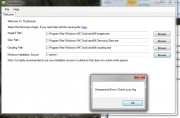
You ever used a program called RT Seven Lite? Suppose to be the Win7 version of vlite. Yet to try it as each time I load my OS ISO it gives me a error :P
 
No i have not,that looks quite good actualy i might give that a shot myself :)

What Error was it giving?


Code:
=== 7Customizer Started===
7Customizer verion: 0.4.0a
7Customizer path: C:\7Customizer_0.4.0a\7Customizer.exe
Current directory: C:\7Customizer_0.4.0a
OS: Microsoft Windows NT 6.1.7600.0
OS architecture: AMD64
Work folder found: True
Mount folder found: True
Extract utility found: True
Configuration file found: True
bootorder.txt file found: True
Boot sector file found: True
Elevated: True
Getting drive info
Free space: 347.680072784424 GB
Getting drive info: Done
Saved Imagex path: C:\Program Files\Windows AIK\Tools\amd64\imagex.exe
Saved DISM path: C:\Program Files\Windows AIK\Tools\amd64\Servicing\Dism.exe
Saved odcdimg path: C:\Program Files\Windows AIK\Tools\amd64\oscdimg.exe
Windows source path selected
Sources folder found
install.wim found
install.wim size: 3026 MB
Added: "C:\Program Files\Windows AIK\Tools\amd64\imagex.exe">work\testimagex.txt
Testing imagex
Imagex result begin:
Imagex result file created.

ImageX Tool for Windows
Copyright (C) Microsoft Corp. All rights reserved.
Version: 6.1.7600.16385

Imagex result end.
Added: "C:\Program Files\Windows AIK\Tools\amd64\Servicing\Dism.exe">work\testdism.txt
Testing dism
dism result begin:

Deployment Image Servicing and Management tool
Version: 6.1.7600.16385


dism result end.
added: "C:\Program Files\Windows AIK\Tools\amd64\imagex.exe" /XML /info "C:\seven\sources\install.wim">work\imagesinfo.xml
Starting imagex
Imagex created imagesinfo.xml Successfully
Reading images information from imagesinfo.xml
First 5 lines of imagesinfo.xml
<WIM>
  <TOTALBYTES>3173496445</TOTALBYTES>
  <IMAGE INDEX="1">
    <NAME>Windows 7 Ultimate</NAME>
    <FLAGS>Ultimate</FLAGS>
Number of Available Images: 1
Reading image indiceis
Reading image displaynames
Reading image names
Reading image architectures
Reading image edition IDs
Unexpected Error: Object reference not set to an instance of an object.
   at _7Customizer.Form1.selectImagePathBtn_Click(Object sender, EventArgs e)


This is based off a unedited OS install (services based off BlackVipers "tweaked" settings).


So not sure if I am missing a key program/software or what but with luck I find out soon.


*edit*
Forgot to add the error happens soon as I load the extracted OS folder. Will figure it out but it seems like its not 100% ready to go yet so that could be the problem. Going to try doing this on a Vista/XP system see if perhaps that will solve it.
 
Last edited:
Back
Top