wtf monitor

Heku

Member
Yop everyone... today i got an pretty weird problem... when i came home from school, i was a little while on my computer, then i shutted it off bcuz i wanted to see how 200mm fan would fit on the top of my case (moved the one in front to the top, then back... but when i started up my computer again, my monitor has stopped working.... WTF?? the only cable i even touched was the Fans "power"cable... i did not touch my gpu or anything... what could possibly have made this? i would like to get on my primary computer as soon as possible (now on my secondary computer, old laptop... not good for really anything :P just simple surfing)..
GPU: nVidia GeForce GTX 550Ti (Club 3D 1536mb version)
Monitor: ASUS VW195D (Splendid 19")

e: and the problem is not in the monitor. i tried with hooking it up to my laptop, and it worked.. so it has to be with the gpu or something... ( i even tried removing the gpu and putting the monitor (VGA?) cable in the motherboards slot, but didn't work there either....

Any help??
 
Last edited:
check the VGA/DVI cable connections, and the power to your monitor.

If none of that is the cause of your trouble, reseat the GPU and GPU power connections.

If not that, try integrated GPU if you have one. Your GPU may have failed.
 
i have tried all of those,but not even the integrated one works... wtf?
well i do have an DELL Monitor (from last computer) that has both VGA and DVI connectors (the VW195D only has VGA).. so im gonna try it.. if that doesn't work, then i do fkng wonder what tha hell is wrong...
 
Last edited:
try the other monitor just to rule that out. OR try your current monitor on your lappy to see if it will display from there.
 
try the other monitor just to rule that out. OR try your current monitor on your lappy to see if it will display from there.

the other monitor wont show anything, same as the other one (No Signal)... and yes, the VW195D connected to my lappy does work...
 
ok. so we have confirmed it is a Graphics problem in your computer, not the monitor.

Do you have a multimeter or voltmeter that you can use to check the DC volt on your PCIe cable from the PSU?
 
you should get 40 amps on the 12 volt rail. Which of coarse should read 12 volts (+- .3 volts).

if you dont get somewhere between 11.7-12.3 volts, you have a power problem. If the power checks out, then you will need to get a cheap GPU to check the PCIe x16 slot for functionality. If you had a GPU previous to this one and it still works, then you can use it to check the PCIe slot.
 
sounds like your having a power issue or possibly a PCIe x16 issue.

Do you have a shop local to your house that will test your GPUs and PSU to be sure that they have not failed? (narrowing it to the motherboard and PCIe x16 bus. That also runs your integrated gpu).
 
im starting to get a bit worried with my computer :/ ... since i don't really know where i could get the computer fixed... and if it won't work over the weekend... it will seriously suck
 
well, i just found out that the components have 2year warranty, maybe i should just go with the broken one to the shop and ask for a new :P ?
 
I would take it to a shop and have it checked out.
The numbers above really didnt make much sense to me at all. I assumed it would be in volts or amps, those are the measurements that I am familiar with. And Yellow is 12volt + and black is ground.
 
well, my brother who is an electrican (have been studying for 3 years) will come and visit us this weekend, i can ask help from him (with the cable thingy)... then we might get some amps and Volts :D
 
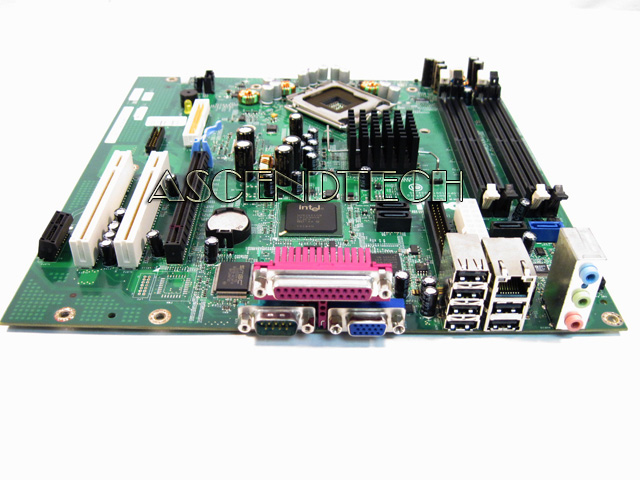
well, im still thinking it's wrong on the motherboard and gpu... since i tried putting the gpu in my old computer... but it didn't work there.. and neither did it work when i plugged my monitor to the mobos VGA input (with not having the gpu in).. but it didn't work then either.. but shouldn't it work through the mobo's VGA port, if there is no gpu connected to teh mobo? (but im not 100% sure about the gpu, since im not sure if the gpu is even compatible with the elder computers (DELL OptiPlex GX620 midtower (biggest one)) mobo...

btw, abou the DELL:
> Mainboard : Dell 0F8098
> Chipset : Intel i945G/GZ
> Processor : Intel Pentium D 830 @ 3000 MHz
> RAM : 1024 MB (2 x 512 DDR2-SDRAM )
IMG_2342.JPG

(that was what i putted the GTX550Ti in...) for try..
 
Last edited:
got some news.. i got out of the PCI-E cable:
12.11-12.12 Volts (DC)!
0.03-0.04 Amps (DC)
 
Last edited:
Back
Top