
XP cant connect to internet

caboose73

New Member
So here is the story my parents bought a Dell a long time ago that came pre loaded with XP my mom a couple years later decides to upgrades to vista which caused the sound and internet to stop working. So i finally got around to reinstalling XP so i could get it working properly for her and everything installed and it boots up fine but i cant connect to the internet. Ive tried connecting threw the control panel but i couldn't get it to work.
 
Last edited:
You need to download and install the Ethernet drivers along with all the others that xp doesn't automatically install.
 
Makes sense lol so i can just do that on my other computer and save it to a flash drive then plug that into the dell and it will work right?
 
You actually have to run the driver install but yes. Look in device manager for entries that still need drivers and then list them here along with the model of dell it is and I can link you to the drivers when I get home from work. In fact, that's all that needed to be done when Vista was installed.
 
Did you maybe by any chance got the Windows recovery disk with that laptop?
Because laptops usually come with those disks especially before few years...

If yes,use that disk and install missing drivers from it or simply make clean install of XP from that Windows Rercovery disk.It will automatically install OS and all the neccessary drivers...

If not,find the missing drivers on the internet according to a number written on your laptop.
 
its a Dimension 4600 and the list is:
Ethernet controller
Multimedia Audio controller
PCI Input Device
PCI Modem
Video Controller (VGA Compatible)

So all this needed was to install the right drivers and it would of worked with Vista? cause if that's true im going to be pissed cause the IT guy at my moms work told her Vista wouldn't work then sold her a copy of XP and said that's the only way to get the computer working right again.
 
So all this needed was to install the right drivers and it would of worked with Vista? cause if that's true im going to be pissed cause the IT guy at my moms work told her Vista wouldn't work then sold her a copy of XP and said that's the only way to get the computer working right again.

Yes all you needed was the right driver.The guy at IT lied to you by saying that XP is the only way.You got ripped off lol.Because I have a 12 years old computer and Vista and Windows 7 work great on it after installing the right drivers.

Never EVER believe to those people!They will say anything just to earn some money.And especially if they see that you do not know how to solve the problem,they use that in their advantage to rip you off without you realizing that lol.If I am you,I would go to that guy and kick his ass lol!
My friend was cheated the similar way.The guy at the store told him that Norton Antivirus won't work on his XP PC unless if he buys the new XP,reinstall it and then install Norton on new XP which is ridiculous because he already had XP Pro installed ROFL.Still my friend did not know that and the guy at the store sold him SAME XP PRO which he already had installed on his computer haha!

In short...you got ripped off lol.

I will never understand why people do that.I would never rip someone off.That is so stupid lol.
 
its a Dimension 4600 and the list is:
Ethernet controller
Multimedia Audio controller
PCI Input Device
PCI Modem
Video Controller (VGA Compatible)

So all this needed was to install the right drivers and it would of worked with Vista? cause if that's true im going to be pissed cause the IT guy at my moms work told her Vista wouldn't work then sold her a copy of XP and said that's the only way to get the computer working right again.

Here are your drivers you need to download and install.

Ethernet - http://support.dell.com/support/dow...&dateid=-1&formatid=-1&source=-1&fileid=87106

Audio - http://support.dell.com/support/dow...dateid=-1&formatid=-1&source=-1&fileid=122481

Chipset - http://support.dell.com/support/dow...&dateid=-1&formatid=-1&source=-1&fileid=70069

Modem - http://support.dell.com/support/dow...&dateid=-1&formatid=-1&source=-1&fileid=95170

Video - http://support.dell.com/support/dow...dateid=-1&formatid=-1&source=-1&fileid=137459

That should take care of the remaining devices. Let me know if it doesn't.
 
Audio - http://support.dell.com/support/dow...dateid=-1&formatid=-1&source=-1&fileid=122481
When i try to install it says:the audio driver files do not support my computer hardware.

Modem - http://support.dell.com/support/dow...&dateid=-1&formatid=-1&source=-1&fileid=95170
It unzips but when i try running the Setup.exe nothing happens

Video - http://support.dell.com/support/dow...dateid=-1&formatid=-1&source=-1&fileid=137459
When i try to install it says:This setup does not meet the minimum requirements for installing the software
 
Audio - http://support.dell.com/support/dow...dateid=-1&formatid=-1&source=-1&fileid=122481
When i try to install it says:the audio driver files do not support my computer hardware.

Modem - http://support.dell.com/support/dow...&dateid=-1&formatid=-1&source=-1&fileid=95170
It unzips but when i try running the Setup.exe nothing happens

Video - http://support.dell.com/support/dow...dateid=-1&formatid=-1&source=-1&fileid=137459
When i try to install it says:This setup does not meet the minimum requirements for installing the software

Not sure whats going on as those drivers are for the 4600 and windows XP. You may want to try reinstalling the operating system as it may be corrupt.
 
Are maybe those drivers for a specific XP edition such as Professional or Home?I know that's very unlikely,but usually when downloading drivers from a web site you are asked to choose the operating system and also to choose between 32-bit and 64-bit.Not always of course.

However if you are sure that those drivers are the right one then do what johnb35 said and reinstall XP OS.
 
So im what you call a retard :D I went back and tried reinstalling the Ethernet driver again and for some reason when i was trying it last night i was opening the win2000 folder instead of the winXP. So i opened the right folder this time and ran the setup and wouldn't you know it worked lol. Now the only driver missing is the Video Controller(VGA Compatible).
 
Last edited:
Sounds like you are manually updating the drivers. All those downloads come with setup files that you run that will automatically install the drivers. The ethernet driver should automatically install once you run the file.

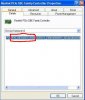
Do this for me. Go into device manager, right click on the ethernet entry and click on properties, click on the details tab and give me the 4 digit vendor and device ID numbers. They look like this circled in red.
 

Attachments

  • device.JPG
    device.JPG
    31.8 KB · Views: 28
Ven_8086&DEV_1050 The other drivers installed automatically but the Ethernet had a window that popped up that told me how to install manually.
 
I didn't know you had the ethernet driver already installed. Do the same thing for the video driver, need the vendor and device id numbers.
 
Back
Top