Lack of Network Folder

Takkun

New Member
My network folder is empty and I do not know why.
Here's a hijack log and if anyone could help that would be great.

Logfile of Trend Micro HijackThis v2.0.2
Scan saved at 3:52:44 PM, on 9/26/2008
Platform: Windows XP SP3 (WinNT 5.01.2600)
MSIE: Internet Explorer v6.00 SP3 (6.00.2900.5512)
Boot mode: Normal

Running processes:
C:\WINDOWS\System32\smss.exe
C:\WINDOWS\system32\winlogon.exe
C:\WINDOWS\system32\services.exe
C:\WINDOWS\system32\lsass.exe
C:\WINDOWS\system32\svchost.exe
C:\WINDOWS\System32\svchost.exe
C:\WINDOWS\system32\svchost.exe
C:\Program Files\Ad-Aware\aawservice.exe
C:\WINDOWS\Explorer.EXE
C:\WINDOWS\SOUNDMAN.EXE
C:\Program Files\Gigabyte\ET5\GUI.exe
C:\Program Files\Java\jre1.6.0_07\bin\jusched.exe
C:\Program Files\Common Files\Real\Update_OB\realsched.exe
C:\Program Files\FlashGet\FlashGet.exe
C:\Program Files\Ideazon\ZEngine\Zboard.exe
C:\Program Files\Adobe\Acrobat 8.0\Acrobat\Acrotray.exe
C:\Program Files\ESET\ESET NOD32 Antivirus\egui.exe
C:\WINDOWS\system32\spoolsv.exe
C:\WINDOWS\system32\RUNDLL32.EXE
C:\WINDOWS\system32\svchost.exe
C:\Program Files\AIM6\aim6.exe
E:\valve\steam\steam.exe
C:\Program Files\Common Files\Ahead\lib\NMBgMonitor.exe
C:\Program Files\Logitech\Desktop Messenger\8876480\Program\LogitechDesktopMessenger.exe
C:\WINDOWS\system32\ctfmon.exe
C:\Program Files\Veoh Networks\Veoh\VeohClient.exe
C:\Program Files\AIM6\aolsoftware.exe
C:\PROGRAM FILES\FRAPS\FRAPS.EXE
C:\Program Files\Xfire\xfire.exe
C:\Program Files\Bonjour\mDNSResponder.exe
C:\Program Files\ESET\ESET NOD32 Antivirus\ekrn.exe
C:\WINDOWS\System32\svchost.exe
C:\Program Files\NVIDIA Corporation\nTune\nTuneService.exe
C:\WINDOWS\system32\nvsvc32.exe
C:\WINDOWS\system32\PnkBstrA.exe
C:\WINDOWS\system32\tcpsvcs.exe
C:\WINDOWS\system32\svchost.exe
C:\Program Files\Common Files\Macrovision Shared\FLEXnet Publisher\FNPLicensingService.exe
C:\WINDOWS\system32\svchost.exe
C:\Program Files\Trend Micro\HijackThis\HijackThis.exe

R1 - HKCU\Software\Microsoft\Internet Explorer\Main,Search Bar = http://red.clientapps.yahoo.com/cus.../sbcydsl/*http://www.yahoo.com/search/ie.html
R1 - HKCU\Software\Microsoft\Internet Explorer\Main,Search Page = http://red.clientapps.yahoo.com/customize/ie/defaults/sp/sbcydsl/*http://www.yahoo.com
R0 - HKCU\Software\Microsoft\Internet Explorer\Main,Start Page = http://google.com/
R1 - HKLM\Software\Microsoft\Internet Explorer\Main,Default_Page_URL = http://yahoo.sbc.com/dsl
R1 - HKLM\Software\Microsoft\Internet Explorer\Main,Default_Search_URL = http://red.clientapps.yahoo.com/customize/ie/defaults/su/sbcydsl/*http://www.yahoo.com
R1 - HKLM\Software\Microsoft\Internet Explorer\Main,Search Bar = http://red.clientapps.yahoo.com/cus.../sbcydsl/*http://www.yahoo.com/search/ie.html
R0 - HKLM\Software\Microsoft\Internet Explorer\Main,Start Page = http://yahoo.sbc.com/dsl
R1 - HKCU\Software\Microsoft\Internet Explorer\SearchURL,(Default) = http://red.clientapps.yahoo.com/customize/ie/defaults/su/sbcydsl/*http://www.yahoo.com
R1 - HKCU\Software\Microsoft\Windows\CurrentVersion\Internet Settings,ProxyServer = ftp=localhost:8080;gopher=localhost:8080;http=localhost:8080;https=localhost:8080;socks=localhost:1080
R1 - HKCU\Software\Microsoft\Windows\CurrentVersion\Internet Settings,ProxyOverride = *.local
R3 - URLSearchHook: Yahoo! Toolbar - {EF99BD32-C1FB-11D2-892F-0090271D4F88} - (no file)
O2 - BHO: Adobe PDF Reader Link Helper - {06849E9F-C8D7-4D59-B87D-784B7D6BE0B3} - C:\Program Files\Common Files\Adobe\Acrobat\ActiveX\AcroIEHelper.dll
O2 - BHO: flashget urlcatch - {2F364306-AA45-47B5-9F9D-39A8B94E7EF7} - C:\Program Files\FlashGet\jccatch.dll
O2 - BHO: Groove GFS Browser Helper - {72853161-30C5-4D22-B7F9-0BBC1D38A37E} - C:\Program Files\Microsoft Office\Office12\GrooveShellExtensions.dll
O2 - BHO: SSVHelper Class - {761497BB-D6F0-462C-B6EB-D4DAF1D92D43} - C:\Program Files\Java\jre1.6.0_07\bin\ssv.dll
O2 - BHO: Adobe PDF Conversion Toolbar Helper - {AE7CD045-E861-484f-8273-0445EE161910} - C:\Program Files\Adobe\Acrobat 8.0\Acrobat\AcroIEFavClient.dll
O2 - BHO: FlashGet GetFlash Class - {F156768E-81EF-470C-9057-481BA8380DBA} - C:\Program Files\FlashGet\getflash.dll
O3 - Toolbar: (no name) - {0BF43445-2F28-4351-9252-17FE6E806AA0} - (no file)
O3 - Toolbar: Adobe PDF - {47833539-D0C5-4125-9FA8-0819E2EAAC93} - C:\Program Files\Adobe\Acrobat 8.0\Acrobat\AcroIEFavClient.dll
O3 - Toolbar: Veoh Browser Plug-in - {D0943516-5076-4020-A3B5-AEFAF26AB263} - C:\Program Files\Veoh Networks\Veoh\Plugins\reg\VeohToolbar.dll
O4 - HKLM\..\Run: [NvCplDaemon] RUNDLL32.EXE C:\WINDOWS\system32\NvCpl.dll,NvStartup
O4 - HKLM\..\Run: [SoundMan] SOUNDMAN.EXE
O4 - HKLM\..\Run: [EasyTuneV] C:\Program Files\Gigabyte\ET5\GUI.exe
O4 - HKLM\..\Run: [nwiz] nwiz.exe /install
O4 - HKLM\..\Run: [IMJPMIG8.1] "C:\WINDOWS\IME\imjp8_1\IMJPMIG.EXE" /Spoil /RemAdvDef /Migration32
O4 - HKLM\..\Run: [IMEKRMIG6.1] C:\WINDOWS\ime\imkr6_1\IMEKRMIG.EXE
O4 - HKLM\..\Run: [MSPY2002] C:\WINDOWS\system32\IME\PINTLGNT\ImScInst.exe /SYNC
O4 - HKLM\..\Run: [PHIME2002ASync] C:\WINDOWS\system32\IME\TINTLGNT\TINTSETP.EXE /SYNC
O4 - HKLM\..\Run: [PHIME2002A] C:\WINDOWS\system32\IME\TINTLGNT\TINTSETP.EXE /IMEName
O4 - HKLM\..\Run: [NeroFilterCheck] C:\WINDOWS\system32\NeroCheck.exe
O4 - HKLM\..\Run: [SunJavaUpdateSched] "C:\Program Files\Java\jre1.6.0_07\bin\jusched.exe"
O4 - HKLM\..\Run: [TkBellExe] "C:\Program Files\Common Files\Real\Update_OB\realsched.exe" -osboot
O4 - HKLM\..\Run: [QuickTime Task] "C:\Program Files\QuickTime\qttask.exe" -atboottime
O4 - HKLM\..\Run: [Flashget] C:\Program Files\FlashGet\FlashGet.exe /min
O4 - HKLM\..\Run: [Zboard] C:\Program Files\Ideazon\ZEngine\Zboard.exe
O4 - HKLM\..\Run: [Acrobat Assistant 8.0] "C:\Program Files\Adobe\Acrobat 8.0\Acrobat\Acrotray.exe"
O4 - HKLM\..\Run: [egui] "C:\Program Files\ESET\ESET NOD32 Antivirus\egui.exe" /hide /waitservice
O4 - HKLM\..\Run: [NvMediaCenter] RUNDLL32.EXE C:\WINDOWS\system32\NvMcTray.dll,NvTaskbarInit
O4 - HKCU\..\Run: [Aim6] "C:\Program Files\AIM6\aim6.exe" /d locale=en-US ee://aol/imApp
O4 - HKCU\..\Run: [Steam] "e:\valve\steam\steam.exe" -silent
O4 - HKCU\..\Run: [BgMonitor_{79662E04-7C6C-4d9f-84C7-88D8A56B10AA}] C:\Program Files\Common Files\Ahead\lib\NMBgMonitor.exe
O4 - HKCU\..\Run: [LDM] C:\Program Files\Logitech\Desktop Messenger\8876480\Program\LogitechDesktopMessenger.exe
O4 - HKCU\..\Run: [ctfmon.exe] C:\WINDOWS\system32\ctfmon.exe
O4 - HKCU\..\Run: [updateMgr] "C:\Program Files\Adobe\Acrobat 7.0\Reader\AdobeUpdateManager.exe" AcRdB7_0_9 -reboot 1
O4 - HKCU\..\Run: [Veoh] "C:\Program Files\Veoh Networks\Veoh\VeohClient.exe" /VeohHide
O4 - HKCU\..\Run: [NVIDIA nTune] "C:\Program Files\NVIDIA Corporation\nTune\nTuneCmd.exe" clear
O4 - HKCU\..\Run: [igndlm.exe] C:\Program Files\Download Manager\DLM.exe /windowsstart /startifwork
O4 - HKCU\..\Run: [Fraps] C:\PROGRAM FILES\FRAPS\FRAPS.EXE
O4 - Startup: Xfire.lnk = C:\Program Files\Xfire\xfire.exe
O4 - Global Startup: Adobe Acrobat Speed Launcher.lnk = ?
O4 - Global Startup: Adobe Acrobat Synchronizer.lnk = C:\Program Files\Adobe\Acrobat 8.0\Acrobat\AdobeCollabSync.exe
O4 - Global Startup: Adobe Reader Speed Launch.lnk = C:\Program Files\Adobe\Acrobat 7.0\Reader\reader_sl.exe
O4 - Global Startup: Logitech Desktop Messenger.lnk = C:\Program Files\Logitech\Desktop Messenger\8876480\Program\LogitechDesktopMessenger.exe
O8 - Extra context menu item: &Download All with FlashGet - C:\Program Files\FlashGet\jc_all.htm
O8 - Extra context menu item: &Download with FlashGet - C:\Program Files\FlashGet\jc_link.htm
O8 - Extra context menu item: Add to AMV Convert Tool... - C:\Program Files\MP3 Player Utilities 4.00\AMVConverter\grab.html
O8 - Extra context menu item: Add to Media Manager... - C:\Program Files\MP3 Player Utilities 4.00\MediaManager\grab.html
O8 - Extra context menu item: Append to existing PDF - res://C:\Program Files\Adobe\Acrobat 8.0\Acrobat\AcroIEFavClient.dll/AcroIEAppend.html
O8 - Extra context menu item: Convert link target to Adobe PDF - res://C:\Program Files\Adobe\Acrobat 8.0\Acrobat\AcroIEFavClient.dll/AcroIECapture.html
O8 - Extra context menu item: Convert link target to existing PDF - res://C:\Program Files\Adobe\Acrobat 8.0\Acrobat\AcroIEFavClient.dll/AcroIEAppend.html
O8 - Extra context menu item: Convert selected links to Adobe PDF - res://C:\Program Files\Adobe\Acrobat 8.0\Acrobat\AcroIEFavClient.dll/AcroIECaptureSelLinks.html
O8 - Extra context menu item: Convert selected links to existing PDF - res://C:\Program Files\Adobe\Acrobat 8.0\Acrobat\AcroIEFavClient.dll/AcroIEAppendSelLinks.html
O8 - Extra context menu item: Convert selection to Adobe PDF - res://C:\Program Files\Adobe\Acrobat 8.0\Acrobat\AcroIEFavClient.dll/AcroIECapture.html
O8 - Extra context menu item: Convert selection to existing PDF - res://C:\Program Files\Adobe\Acrobat 8.0\Acrobat\AcroIEFavClient.dll/AcroIEAppend.html
O8 - Extra context menu item: Convert to Adobe PDF - res://C:\Program Files\Adobe\Acrobat 8.0\Acrobat\AcroIEFavClient.dll/AcroIECapture.html
O8 - Extra context menu item: E&xport to Microsoft Excel - res://C:\PROGRA~1\MICROS~2\OFFICE11\EXCEL.EXE/3000
O9 - Extra button: (no name) - {08B0E5C0-4FCB-11CF-AAA5-00401C608501} - C:\Program Files\Java\jre1.6.0_07\bin\ssv.dll
O9 - Extra 'Tools' menuitem: Sun Java Console - {08B0E5C0-4FCB-11CF-AAA5-00401C608501} - C:\Program Files\Java\jre1.6.0_07\bin\ssv.dll
O9 - Extra button: Send to OneNote - {2670000A-7350-4f3c-8081-5663EE0C6C49} - C:\PROGRA~1\MICROS~2\Office12\ONBttnIE.dll
O9 - Extra 'Tools' menuitem: S&end to OneNote - {2670000A-7350-4f3c-8081-5663EE0C6C49} - C:\PROGRA~1\MICROS~2\Office12\ONBttnIE.dll
O9 - Extra button: Research - {92780B25-18CC-41C8-B9BE-3C9C571A8263} - C:\PROGRA~1\MIFBBF~1\OFFICE11\REFIEBAR.DLL
O9 - Extra button: FlashGet - {D6E814A0-E0C5-11d4-8D29-0050BA6940E3} - C:\Program Files\FlashGet\FlashGet.exe
O9 - Extra 'Tools' menuitem: FlashGet - {D6E814A0-E0C5-11d4-8D29-0050BA6940E3} - C:\Program Files\FlashGet\FlashGet.exe
O9 - Extra button: (no name) - {e2e2dd38-d088-4134-82b7-f2ba38496583} - C:\WINDOWS\Network Diagnostic\xpnetdiag.exe
O9 - Extra 'Tools' menuitem: @xpsp3res.dll,-20001 - {e2e2dd38-d088-4134-82b7-f2ba38496583} - C:\WINDOWS\Network Diagnostic\xpnetdiag.exe
O9 - Extra button: Messenger - {FB5F1910-F110-11d2-BB9E-00C04F795683} - C:\Program Files\Messenger\msmsgs.exe
O9 - Extra 'Tools' menuitem: Windows Messenger - {FB5F1910-F110-11d2-BB9E-00C04F795683} - C:\Program Files\Messenger\msmsgs.exe
O16 - DPF: {02ECD07A-22D0-4AF0-BA0A-3F6B06086D08} (GamesCampus Control) - http://xiah.gamescampus.com/luncher/GamesCampus.cab
O16 - DPF: {1E54D648-B804-468d-BC78-4AFFED8E262E} (System Requirements Lab) - http://www.srtest.com/srl_bin/sysreqlab3.cab
O16 - DPF: {4871A87A-BFDD-4106-8153-FFDE2BAC2967} (DLM Control) - http://dlm.tools.akamai.com/dlmanager/versions/activex/dlm-activex-2.2.3.5.cab
O16 - DPF: {4E218431-2F07-40BD-A9D3-035324C1F13F} (DyynoX Class) - http://webserver.dyyno.com/DyynoClient/DyynoCAB.CAB
O16 - DPF: {62D21B0B-D96F-45F7-968E-7DC16E31FE57} (DazoinControl Class) - http://tcrew.gamengame.com/activex/DazoinActiveXE.cab
O16 - DPF: {6414512B-B978-451D-A0D8-FCFDF33E833C} (WUWebControl Class) - http://update.microsoft.com/microsoftupdate/v6/V5Controls/en/x86/client/wuweb_site.cab?1181265146796
O16 - DPF: {6E32070A-766D-4EE6-879C-DC1FA91D2FC3} (MUWebControl Class) - http://update.microsoft.com/microsoftupdate/v6/V5Controls/en/x86/client/muweb_site.cab?1181265140406
O16 - DPF: {7C5D062A-7A1E-4A46-A02B-A928084CBD66} (MLauncherNew Class) - http://legendofares.netgame.com/download/MusaLauncherNew.cab
O16 - DPF: {99CAAA27-FA0C-4FA4-B88A-4AB1CC7A17FE} (MGLaunch_USAv1001 Class) - http://ares.netgame.com/download/mglaunch_USAv1002.cab
O16 - DPF: {D18F962A-3722-4B59-B08D-28BB9EB2281E} - http://photos.yahoo.com/ocx/us/yexplorer1_9us.cab
O16 - DPF: {E2E799BB-0285-4F31-9AE9-F21B4430A775} (EngOrkaWebCtrl Class) - http://orka.gamengame.com/Game_Exe/EngOrkaWeb.cab
O18 - Protocol: bwfile-8876480 - {9462A756-7B47-47BC-8C80-C34B9B80B32B} - C:\Program Files\Logitech\Desktop Messenger\8876480\Program\GAPlugProtocol-8876480.dll
O18 - Protocol: grooveLocalGWS - {88FED34C-F0CA-4636-A375-3CB6248B04CD} - C:\Program Files\Microsoft Office\Office12\GrooveSystemServices.dll
O23 - Service: a-squared Anti-Malware Service (a2AntiMalware) - Unknown owner - C:\Program Files\a-squared Anti-Malware\a2service.exe (file missing)
O23 - Service: Lavasoft Ad-Aware Service (aawservice) - Lavasoft - C:\Program Files\Ad-Aware\aawservice.exe
O23 - Service: Adobe LM Service - Unknown owner - C:\Program Files\Common Files\Adobe Systems Shared\Service\Adobelmsvc.exe
O23 - Service: Bonjour Service - Apple Inc. - C:\Program Files\Bonjour\mDNSResponder.exe
O23 - Service: dev4_423 - Unknown owner - C:\phpdev\Apache\Apache.exe (file missing)
O23 - Service: Eset HTTP Server (EhttpSrv) - ESET - C:\Program Files\ESET\ESET NOD32 Antivirus\EHttpSrv.exe
O23 - Service: Eset Service (ekrn) - ESET - C:\Program Files\ESET\ESET NOD32 Antivirus\ekrn.exe
O23 - Service: FLEXnet Licensing Service - Macrovision Europe Ltd. - C:\Program Files\Common Files\Macrovision Shared\FLEXnet Publisher\FNPLicensingService.exe
O23 - Service: InstallDriver Table Manager (IDriverT) - Macrovision Corporation - C:\Program Files\Common Files\InstallShield\Driver\11\Intel 32\IDriverT.exe
O23 - Service: npkcmsvc - Unknown owner - C:\Program Files\Mabinogi\npkcmsvc.exe (file missing)
O23 - Service: nTune Service (nTuneService) - NVIDIA - C:\Program Files\NVIDIA Corporation\nTune\nTuneService.exe
O23 - Service: NVIDIA Display Driver Service (NVSvc) - NVIDIA Corporation - C:\WINDOWS\system32\nvsvc32.exe
O23 - Service: PnkBstrA - Unknown owner - C:\WINDOWS\system32\PnkBstrA.exe
O23 - Service: SiteAdvisor Service - Unknown owner - C:\Program Files\SiteAdvisor\6066\SAService.exe (file missing)
O23 - Service: StyleXPService - Unknown owner - C:\Program Files\TGTSoft\StyleXP\StyleXPService.exe (file missing)

--
End of file - 14124 bytes
 
Hello,

Well, what do you mean your network folder is empty???? Explain a little bit more.

There are a few things that are need to be fixed, pls do the following:
Download and Run ComboFix
If you already have Combofix, please delete this copy and download it again as it's being updated regularly.
Note: Do not mouseclick combofix's window whilst it's running. That may cause it to stall

Combofix should never take more that 20 minutes including the reboot if malware is detected.
If it does, open Task Manager then Processes tab (press ctrl, alt and del at the same time) and end any processes of findstr, find, sed or swreg, then combofix should continue.
If that happened we want to know, and also what process you had to end.

In your reply:
  • Post the combo fix log
  • Post a Fresh Hijackthis log

Thankyou
 
When I open my Control Panel and go into Network Connections. It is empty. It doesn't display my internet connection. Also, other computers on my home network cannot find this computer.

ComboFix

ComboFix 08-09-26.01 - Corey Phillips 2008-09-26 23:29:02.3 - NTFSx86
Microsoft Windows XP Professional 5.1.2600.3.1252.1.1033.18.2483 [GMT -4:00]
Running from: C:\Documents and Settings\Corey Phillips\Desktop\ComboFix.exe
* Resident AV is active


WARNING -THIS MACHINE DOES NOT HAVE THE RECOVERY CONSOLE INSTALLED !!
.

((((((((((((((((((((((((((((((((((((((( Other Deletions )))))))))))))))))))))))))))))))))))))))))))))))))
.
.
---- Previous Run -------
.
C:\install.exe
C:\WINDOWS\AppPatch\Custom\{deb7008b-681e-4a4a-8aae-cc833e8216ce}.sdb
C:\WINDOWS\system32\_005039_.tmp.dll
C:\WINDOWS\system32\_005040_.tmp.dll
C:\WINDOWS\system32\_005041_.tmp.dll
C:\WINDOWS\system32\_005042_.tmp.dll
C:\WINDOWS\system32\_005049_.tmp.dll
C:\WINDOWS\system32\_005050_.tmp.dll
C:\WINDOWS\system32\_005051_.tmp.dll
C:\WINDOWS\system32\_005052_.tmp.dll
C:\WINDOWS\system32\_005053_.tmp.dll
C:\WINDOWS\system32\_005054_.tmp.dll
C:\WINDOWS\system32\_005055_.tmp.dll
C:\WINDOWS\system32\_005056_.tmp.dll
C:\WINDOWS\system32\_005057_.tmp.dll
C:\WINDOWS\system32\_005058_.tmp.dll
C:\WINDOWS\system32\_005059_.tmp.dll
C:\WINDOWS\system32\_005060_.tmp.dll
C:\WINDOWS\system32\_005061_.tmp.dll
C:\WINDOWS\system32\_005062_.tmp.dll
C:\WINDOWS\system32\_005063_.tmp.dll
C:\WINDOWS\system32\_005064_.tmp.dll
C:\WINDOWS\system32\_005065_.tmp.dll
C:\WINDOWS\system32\_005066_.tmp.dll
C:\WINDOWS\system32\_005067_.tmp.dll
C:\WINDOWS\system32\_005068_.tmp.dll
C:\WINDOWS\system32\_005069_.tmp.dll
C:\WINDOWS\system32\_005070_.tmp.dll
C:\WINDOWS\system32\_005073_.tmp.dll
C:\WINDOWS\system32\_005074_.tmp.dll
C:\WINDOWS\system32\_005075_.tmp.dll
C:\WINDOWS\system32\_005076_.tmp.dll
C:\WINDOWS\system32\_005077_.tmp.dll
C:\WINDOWS\system32\_005078_.tmp.dll
C:\WINDOWS\system32\_005079_.tmp.dll
C:\WINDOWS\system32\_005081_.tmp.dll
C:\WINDOWS\system32\_005082_.tmp.dll
C:\WINDOWS\system32\_005083_.tmp.dll
C:\WINDOWS\system32\_005084_.tmp.dll
C:\WINDOWS\system32\_005085_.tmp.dll
C:\WINDOWS\system32\_005086_.tmp.dll
C:\WINDOWS\system32\_005087_.tmp.dll
C:\WINDOWS\system32\_005088_.tmp.dll
C:\WINDOWS\system32\_005089_.tmp.dll
C:\WINDOWS\system32\_005090_.tmp.dll
C:\WINDOWS\system32\_005091_.tmp.dll
C:\WINDOWS\system32\_005092_.tmp.dll
C:\WINDOWS\system32\_005095_.tmp.dll
C:\WINDOWS\system32\_005096_.tmp.dll
C:\WINDOWS\system32\_005097_.tmp.dll
C:\WINDOWS\system32\_005099_.tmp.dll
C:\WINDOWS\system32\_005100_.tmp.dll
C:\WINDOWS\system32\_005101_.tmp.dll
C:\WINDOWS\system32\_005102_.tmp.dll
C:\WINDOWS\system32\_005103_.tmp.dll
C:\WINDOWS\system32\_005104_.tmp.dll
C:\WINDOWS\system32\_005105_.tmp.dll
C:\WINDOWS\system32\_005106_.tmp.dll
C:\WINDOWS\system32\_005107_.tmp.dll
C:\WINDOWS\system32\_005108_.tmp.dll
C:\WINDOWS\system32\_005109_.tmp.dll
C:\WINDOWS\system32\_005111_.tmp.dll
C:\WINDOWS\system32\_005112_.tmp.dll
C:\WINDOWS\system32\_005113_.tmp.dll
C:\WINDOWS\system32\_005114_.tmp.dll
C:\WINDOWS\system32\_005116_.tmp.dll
C:\WINDOWS\system32\_005118_.tmp.dll
C:\WINDOWS\system32\_005119_.tmp.dll
C:\WINDOWS\system32\_005120_.tmp.dll
C:\WINDOWS\system32\_005121_.tmp.dll
C:\WINDOWS\system32\_005122_.tmp.dll
C:\WINDOWS\system32\_005123_.tmp.dll
C:\WINDOWS\system32\_005124_.tmp.dll
C:\WINDOWS\system32\_005126_.tmp.dll
C:\WINDOWS\system32\_005127_.tmp.dll
C:\WINDOWS\system32\_005128_.tmp.dll
C:\WINDOWS\system32\_005129_.tmp.dll
C:\WINDOWS\system32\_005130_.tmp.dll
C:\WINDOWS\system32\_005131_.tmp.dll
C:\WINDOWS\system32\_005132_.tmp.dll
C:\WINDOWS\system32\_005133_.tmp.dll
C:\WINDOWS\system32\_005135_.tmp.dll
C:\WINDOWS\system32\_005136_.tmp.dll
C:\WINDOWS\system32\_005138_.tmp.dll
C:\WINDOWS\system32\_005139_.tmp.dll
C:\WINDOWS\system32\_005141_.tmp.dll
C:\WINDOWS\system32\_005142_.tmp.dll
C:\WINDOWS\system32\_005146_.tmp.dll
C:\WINDOWS\system32\_005147_.tmp.dll
C:\WINDOWS\system32\_005149_.tmp.dll
C:\WINDOWS\system32\_005152_.tmp.dll
C:\WINDOWS\system32\_005154_.tmp.dll
C:\WINDOWS\system32\_005155_.tmp.dll
C:\WINDOWS\system32\_005156_.tmp.dll
C:\WINDOWS\system32\_005157_.tmp.dll
C:\WINDOWS\system32\_005160_.tmp.dll
C:\WINDOWS\system32\_005161_.tmp.dll
C:\WINDOWS\system32\_005162_.tmp.dll
C:\WINDOWS\system32\_005163_.tmp.dll
C:\WINDOWS\system32\_005164_.tmp.dll
C:\WINDOWS\system32\_005169_.tmp.dll
C:\WINDOWS\system32\_005171_.tmp.dll
C:\WINDOWS\system32\_005172_.tmp.dll
C:\WINDOWS\system32\launcher.exe

.
((((((((((((((((((((((((((((((((((((((( Drivers/Services )))))))))))))))))))))))))))))))))))))))))))))))))
.

-------\Legacy_NPF


((((((((((((((((((((((((( Files Created from 2008-08-27 to 2008-09-27 )))))))))))))))))))))))))))))))
.

2008-09-26 22:45 . 2008-09-26 22:59 <DIR> d-------- C:\Program Files\RF Online
2008-09-26 17:03 . 2008-09-26 17:08 <DIR> d-------- C:\Program Files\Outspark
2008-09-26 15:42 . 2008-09-26 23:03 110,592 --a------ C:\WINDOWS\system32\sprint.dll
2008-09-24 17:47 . 2008-09-24 20:04 <DIR> d-------- C:\Program Files\NeoSteam
2008-09-23 22:57 . 2008-09-24 20:03 <DIR> d-------- C:\Program Files\La Tale
2008-09-23 22:12 . 2008-09-23 22:22 <DIR> d-------- C:\Program Files\WindSlayer
2008-09-21 19:47 . 2008-09-25 22:52 54,156 --ah----- C:\WINDOWS\QTFont.qfn
2008-09-21 19:47 . 2008-09-21 19:47 1,409 --a------ C:\WINDOWS\QTFont.for
2008-09-21 19:39 . 2008-09-21 23:10 <DIR> d-------- C:\Program Files\Wrath of the Lich King Beta
2008-09-21 17:41 . 2008-09-21 18:00 <DIR> d-------- C:\Program Files\CABAL Online
2008-09-21 16:39 . 2008-09-24 21:44 <DIR> d-------- C:\Program Files\World of Warcraft
2008-09-21 14:58 . 2008-09-21 14:58 <DIR> d--h-c--- C:\Documents and Settings\All Users\Application Data\{0691F710-1ECA-4B5A-9727-25554F1BFDC6}
2008-09-21 14:47 . 2008-09-21 15:19 <DIR> d-------- C:\Program Files\Crysis WARHEAD
2008-09-21 14:01 . 2008-09-21 14:03 <DIR> d-------- C:\Documents and Settings\Corey Phillips\Application Data\AgeOfBooty
2008-09-21 12:47 . 2008-09-21 12:47 <DIR> d-------- C:\WINDOWS\system32\XPSViewer
2008-09-21 12:47 . 2008-09-21 12:47 <DIR> d-------- C:\Program Files\Reference Assemblies
2008-09-21 12:46 . 2006-06-29 13:07 14,048 --------- C:\WINDOWS\system32\spmsg2.dll
2008-09-21 11:26 . 2008-09-21 12:43 <DIR> d-------- C:\Program Files\Sword of The New World
2008-09-19 15:42 . 2008-09-19 15:42 143,360 --a------ C:\WINDOWS\system32\v2messen.exe
2008-09-17 20:41 . 2008-09-17 20:41 42,320 --a------ C:\WINDOWS\system32\xfcodec.dll
2008-09-16 00:10 . 2008-09-16 00:10 <DIR> d-------- C:\Program Files\HTMLPad 2008
2008-09-15 16:44 . 2008-09-26 16:19 <DIR> d-------- C:\Program Files\Curse
2008-09-13 16:39 . 2008-08-22 17:51 <DIR> d-------- C:\Program Files\Pcsx2_0.9.5
2008-09-06 01:40 . 2008-09-06 12:30 <DIR> d-------- C:\WINDOWS\NV4642164.TMP
2008-09-06 01:30 . 2008-09-06 01:31 <DIR> d-------- C:\Documents and Settings\Corey Phillips\Application Data\Stardock
2008-09-06 01:29 . 2008-03-12 16:00 <DIR> d-------- C:\Documents and Settings\All Users\Application Data\Stardock
2008-09-05 14:59 . 2008-09-05 15:15 <DIR> d-------- C:\Program Files\Mercenaries 2 World in Flames
2008-09-04 23:09 . 2001-08-23 14:00 18,944 --a------ C:\WINDOWS\system32\simptcp.dll
2008-09-04 23:09 . 2001-08-23 14:00 18,944 --a--c--- C:\WINDOWS\system32\dllcache\simptcp.dll
2008-09-04 23:09 . 2001-08-23 14:00 18,944 --a------ C:\simptcp.dll
2008-09-04 22:50 . 2008-09-04 22:52 <DIR> d-------- C:\Documents and Settings\Corey Phillips\Application Data\Hamachi
2008-09-04 22:48 . 2008-09-04 22:50 <DIR> d-------- C:\Program Files\Hamachi
2008-09-04 22:48 . 2008-09-04 22:48 25,280 --a------ C:\WINDOWS\system32\drivers\hamachi.sys
2008-08-31 18:58 . 2008-08-31 18:58 <DIR> d-------- C:\WINDOWS\osu!
2008-08-31 18:58 . 2008-09-17 18:51 <DIR> d-------- C:\Program Files\osu!
2008-08-31 01:22 . 2008-08-31 01:44 <DIR> d-------- C:\Documents and Settings\Corey Phillips\Application Data\Dreamlords
2008-08-29 02:21 . 2008-08-29 02:21 <DIR> d-------- C:\Documents and Settings\Corey Phillips\Application Data\YuLeech

.
(((((((((((((((((((((((((((((((((((((((( Find3M Report ))))))))))))))))))))))))))))))))))))))))))))))))))))
.
2008-09-27 03:28 --------- d-----w C:\Program Files\FlashGet
2008-09-27 03:24 --------- d---a-w C:\Documents and Settings\All Users\Application Data\TEMP
2008-09-27 03:20 --------- d-----w C:\Program Files\AIMTunes
2008-09-26 21:45 --------- d-----w C:\Documents and Settings\Corey Phillips\Application Data\uTorrent
2008-09-26 20:19 --------- d-----w C:\Program Files\Dyyno
2008-09-26 19:59 --------- d-----w C:\Program Files\Common Files\Real
2008-09-25 19:37 --------- d-----w C:\Program Files\Fraps
2008-09-25 01:03 --------- d-----w C:\Program Files\Warcraft III
2008-09-24 19:20 --------- d-----w C:\Program Files\AutoHotkey
2008-09-24 00:18 --------- d-----w C:\Program Files\Xfire
2008-09-22 23:33 65,536 ----a-w C:\WINDOWS\IFinst27.exe
2008-09-22 22:44 --------- d-----w C:\Documents and Settings\Corey Phillips\Application Data\Xfire
2008-09-22 18:45 --------- d--h--w C:\Program Files\InstallShield Installation Information
2008-09-22 00:16 --------- d-----w C:\Program Files\Common Files\Blizzard Entertainment
2008-09-21 18:01 107,888 ----a-w C:\WINDOWS\system32\CmdLineExt.dll
2008-09-21 16:47 --------- d-----w C:\Program Files\MSBuild
2008-09-21 00:33 --------- d-----w C:\Documents and Settings\Corey Phillips\Application Data\IGN_DLM
2008-09-15 19:14 --------- d-----w C:\Program Files\Common Files\AOL
2008-09-15 19:12 --------- d-----w C:\Documents and Settings\All Users\Application Data\Viewpoint
2008-09-10 04:56 --------- d-----w C:\Documents and Settings\All Users\Application Data\Microsoft Help
2008-09-08 22:39 --------- d-----w C:\Documents and Settings\All Users\Application Data\FLEXnet
2008-09-07 00:29 --------- d-----w C:\Program Files\AIM Music Link
2008-08-31 16:36 --------- d-----w C:\Program Files\Cheat Engine
2008-08-30 20:28 --------- d-----w C:\Program Files\Neffy
2008-08-27 02:38 --------- d-----w C:\Program Files\Download Manager
2008-08-23 07:38 --------- d-----w C:\Program Files\Emulator And Roms
2008-08-21 09:14 --------- d-----w C:\Documents and Settings\Corey Phillips\Application Data\Audacity
2008-08-18 10:01 --------- d-----w C:\Documents and Settings\All Users\Application Data\Lavasoft
2008-08-18 10:00 --------- d-----w C:\Program Files\Ad-Aware
2008-08-18 09:59 --------- d-----w C:\Program Files\Common Files\Wise Installation Wizard
2008-08-18 05:26 --------- d-----w C:\Program Files\StepMania
2008-08-18 05:26 --------- d-----w C:\Program Files\Diablo II
2008-08-18 02:30 --------- d-----w C:\Documents and Settings\Corey Phillips\Application Data\dyyno-vlc
2008-08-18 02:28 --------- d-----w C:\Program Files\Microsoft Works
2008-08-15 08:31 --------- d-----w C:\Documents and Settings\Corey Phillips\Application Data\GetRightToGo
2008-08-13 22:08 --------- d-----w C:\Documents and Settings\Corey Phillips\Application Data\Blumentals
2008-08-09 15:15 --------- d-----w C:\Documents and Settings\Corey Phillips\Application Data\SystemRequirementsLab
2008-08-08 21:37 86,016 ----a-w C:\WINDOWS\system32\OpenAL32.dll
2008-08-08 21:37 262,144 ----a-w C:\WINDOWS\system32\wrap_oal.dll
2008-08-06 04:07 --------- d-----w C:\Program Files\Winamp
2008-08-06 01:40 --------- d-----w C:\Program Files\PSP Grader
2008-08-04 02:21 3,891,200 ----a-w C:\WINDOWS\system32\vfp9t.dll
2008-08-04 02:19 4,722,688 ----a-w C:\WINDOWS\system32\vfp9r.dll
2008-08-03 02:22 --------- d-----w C:\Documents and Settings\Corey Phillips\Application Data\Ventrilo
2008-08-02 20:31 --------- d-----w C:\Program Files\Common Files\Adobe
2008-08-02 03:25 --------- d-----w C:\Program Files\VentSrv
2008-08-01 20:42 --------- d-----w C:\Documents and Settings\Corey Phillips\Application Data\Daoisoft
2008-07-31 00:33 0 ----a-r C:\logwmemory.bin
2008-07-31 00:31 --------- d-----w C:\Documents and Settings\Corey Phillips\Application Data\Soldat
2008-07-30 23:05 --------- d-----w C:\Documents and Settings\All Users\Application Data\NexonUS
2008-07-28 23:53 --------- d-----w C:\Program Files\SEGA
2008-07-28 18:20 361,600 ----a-w C:\WINDOWS\system32\drivers\TCPIP.SYS.ORIGINAL
2008-07-28 18:20 361,600 ----a-w C:\WINDOWS\system32\drivers\TCPIP.SYS
2008-07-27 17:26 40,136 ----a-w C:\WINDOWS\system32\drivers\ET5Drv.sys
2008-07-27 01:03 --------- d-----w C:\Program Files\Guild Wars
2008-07-19 02:10 94,920 ----a-w C:\WINDOWS\system32\cdm.dll
2008-07-19 02:10 53,448 ----a-w C:\WINDOWS\system32\wuauclt.exe
2008-07-19 02:10 45,768 ----a-w C:\WINDOWS\system32\wups2.dll
2008-07-19 02:10 36,552 ----a-w C:\WINDOWS\system32\wups.dll
2008-07-19 02:09 563,912 ----a-w C:\WINDOWS\system32\wuapi.dll
2008-07-19 02:09 325,832 ----a-w C:\WINDOWS\system32\wucltui.dll
2008-07-19 02:09 205,000 ----a-w C:\WINDOWS\system32\wuweb.dll
2008-07-19 02:09 1,811,656 ----a-w C:\WINDOWS\system32\wuaueng.dll
2008-07-19 02:07 270,880 ----a-w C:\WINDOWS\system32\mucltui.dll
2008-07-19 02:07 210,976 ----a-w C:\WINDOWS\system32\muweb.dll
2008-07-07 20:26 253,952 ----a-w C:\WINDOWS\system32\es.dll
2008-07-03 04:00 23 ----a-w C:\Documents and Settings\Corey Phillips\jagex_runescape_preferences.dat
2008-01-02 02:06 22,328 ----a-w C:\Documents and Settings\Corey Phillips\Application Data\PnkBstrK.sys
.

------- Sigcheck -------

2006-04-20 08:18 360576 b2220c618b42a2212a59d91ebd6fc4b4 C:\WINDOWS\$hf_mig$\KB917953\SP2QFE\tcpip.sys
2007-10-30 12:53 360832 64798ecfa43d78c7178375fcdd16d8c8 C:\WINDOWS\$hf_mig$\KB941644\SP2QFE\tcpip.sys
2008-06-20 06:44 360960 744e57c99232201ae98c49168b918f48 C:\WINDOWS\$hf_mig$\KB951748\SP2QFE\tcpip.sys
2008-06-20 07:51 361600 9aefa14bd6b182d61e3119fa5f436d3d C:\WINDOWS\$hf_mig$\KB951748\SP3GDR\tcpip.sys
2008-06-20 07:59 361600 ad978a1b783b5719720cff204b666c8e C:\WINDOWS\$hf_mig$\KB951748\SP3QFE\tcpip.sys
2008-06-20 06:45 360320 2a5554fc5b1e04e131230e3ce035c3f9 C:\WINDOWS\$NtServicePackUninstall$\tcpip.sys
2004-08-04 08:00 359040 9f4b36614a0fc234525ba224957de55c C:\WINDOWS\$NtUninstallKB917953$\tcpip.sys
2006-04-20 07:51 359808 b4e29943b4b04bd5e7381546848e6669 C:\WINDOWS\$NtUninstallKB941644$\tcpip.sys
2008-04-13 15:20 361344 93ea8d04ec73a85db02eb8805988f733 C:\WINDOWS\$NtUninstallKB951748$\tcpip.sys
2007-10-30 13:20 360064 90caff4b094573449a0872a0f919b178 C:\WINDOWS\$NtUninstallKB951748_0$\tcpip.sys
2008-04-13 15:20 361344 93ea8d04ec73a85db02eb8805988f733 C:\WINDOWS\ServicePackFiles\i386\TCPIP.SYS
2008-07-28 14:20 361600 d24ea301e2b36c4e975fd216ca85d8e7 C:\WINDOWS\system32\dllcache\TCPIP.SYS
2008-07-28 14:20 361600 d24ea301e2b36c4e975fd216ca85d8e7 C:\WINDOWS\system32\drivers\TCPIP.SYS

2005-06-10 20:17 57856 ad3d9d191aea7b5445fe1d82ffbb4788 C:\WINDOWS\$hf_mig$\KB896423\SP2QFE\spoolsv.exe
2005-06-10 19:53 57856 da81ec57acd4cdc3d4c51cf3d409af9f C:\WINDOWS\$NtServicePackUninstall$\spoolsv.exe
2004-08-04 08:00 57856 7435b108b935e42ea92ca94f59c8e717 C:\WINDOWS\$NtUninstallKB896423$\spoolsv.exe
2008-04-13 20:12 57856 d8e14a61acc1d4a6cd0d38aebac7fa3b C:\WINDOWS\ServicePackFiles\i386\spoolsv.exe
2008-04-13 20:12 57856 ca6aa95fda6558b44a4effb7aff90981 C:\WINDOWS\system32\spoolsv.exe
.
((((((((((((((((((((((((((((((((((((( Reg Loading Points ))))))))))))))))))))))))))))))))))))))))))))))))))
.
.
*Note* empty entries & legit default entries are not shown
REGEDIT4

[HKEY_CURRENT_USER\SOFTWARE\Microsoft\Windows\CurrentVersion\Run]
"Aim6"="C:\Program Files\AIM6\aim6.exe" [2008-01-03 50528]
"Steam"="e:\valve\steam\steam.exe" [2008-03-28 1271032]
"BgMonitor_{79662E04-7C6C-4d9f-84C7-88D8A56B10AA}"="C:\Program Files\Common Files\Ahead\lib\NMBgMonitor.exe" [2005-09-08 94208]
"LDM"="C:\Program Files\Logitech\Desktop Messenger\8876480\Program\LogitechDesktopMessenger.exe" [2007-10-08 67128]
"ctfmon.exe"="C:\WINDOWS\system32\ctfmon.exe" [2008-04-13 15360]
"updateMgr"="C:\Program Files\Adobe\Acrobat 7.0\Reader\AdobeUpdateManager.exe" [2006-03-30 313472]
"Veoh"="C:\Program Files\Veoh Networks\Veoh\VeohClient.exe" [2008-08-28 3660848]
"NVIDIA nTune"="C:\Program Files\NVIDIA Corporation\nTune\nTuneCmd.exe" [2007-09-04 81920]
"igndlm.exe"="C:\Program Files\Download Manager\DLM.exe" [2008-08-01 1103216]
"Fraps"="C:\PROGRAM FILES\FRAPS\FRAPS.EXE" [2008-01-14 3182248]

[HKEY_LOCAL_MACHINE\SOFTWARE\Microsoft\Windows\CurrentVersion\Run]
"NvCplDaemon"="C:\WINDOWS\system32\NvCpl.dll" [2008-05-16 13529088]
"EasyTuneV"="C:\Program Files\Gigabyte\ET5\GUI.exe" [2008-07-27 207680]
"IMJPMIG8.1"="C:\WINDOWS\IME\imjp8_1\IMJPMIG.EXE" [2004-08-04 208952]
"IMEKRMIG6.1"="C:\WINDOWS\ime\imkr6_1\IMEKRMIG.EXE" [2004-08-04 44032]
"MSPY2002"="C:\WINDOWS\system32\IME\PINTLGNT\ImScInst.exe" [2004-08-04 59392]
"PHIME2002ASync"="C:\WINDOWS\system32\IME\TINTLGNT\TINTSETP.EXE" [2004-08-04 455168]
"PHIME2002A"="C:\WINDOWS\system32\IME\TINTLGNT\TINTSETP.EXE" [2004-08-04 455168]
"NeroFilterCheck"="C:\WINDOWS\system32\NeroCheck.exe" [2001-07-09 155648]
"SunJavaUpdateSched"="C:\Program Files\Java\jre1.6.0_07\bin\jusched.exe" [2008-06-10 144784]
"QuickTime Task"="C:\Program Files\QuickTime\qttask.exe" [2008-03-28 413696]
"Flashget"="C:\Program Files\FlashGet\FlashGet.exe" [2007-09-25 2007088]
"Zboard"="C:\Program Files\Ideazon\ZEngine\Zboard.exe" [2007-07-25 57344]
"Acrobat Assistant 8.0"="C:\Program Files\Adobe\Acrobat 8.0\Acrobat\Acrotray.exe" [2006-10-22 620152]
"egui"="C:\Program Files\ESET\ESET NOD32 Antivirus\egui.exe" [2008-03-13 1443072]
"NvMediaCenter"="C:\WINDOWS\system32\NvMcTray.dll" [2008-05-16 86016]
"SoundMan"="SOUNDMAN.EXE" [2006-03-01 C:\WINDOWS\SOUNDMAN.EXE]
"nwiz"="nwiz.exe" [2008-05-16 C:\WINDOWS\system32\nwiz.exe]

C:\Documents and Settings\Corey Phillips\Start Menu\Programs\Startup\
Xfire.lnk - C:\Program Files\Xfire\xfire.exe [2008-09-17 3089232]

C:\Documents and Settings\All Users\Start Menu\Programs\Startup\
Adobe Acrobat Speed Launcher.lnk - C:\WINDOWS\Installer\{AC76BA86-1033-0000-7760-000000000003}\_SC_Acrobat.exe [2008-05-14 295606]
Adobe Acrobat Synchronizer.lnk - C:\Program Files\Adobe\Acrobat 8.0\Acrobat\AdobeCollabSync.exe [2006-10-23 734872]
Adobe Reader Speed Launch.lnk - C:\Program Files\Adobe\Acrobat 7.0\Reader\reader_sl.exe [2005-09-23 29696]
Logitech Desktop Messenger.lnk - C:\Program Files\Logitech\Desktop Messenger\8876480\Program\LogitechDesktopMessenger.exe [2007-10-08 67128]

[HKEY_LOCAL_MACHINE\software\microsoft\windows nt\currentversion\winlogon]
"UIHost"="C:\\Program Files\\TGTSoft\\StyleXP\\Logon\\CurrentLogon.EXE"

[HKEY_LOCAL_MACHINE\software\microsoft\windows nt\currentversion\winlogon\notify\WgaLogon]
[BU]

[HKEY_LOCAL_MACHINE\software\microsoft\windows nt\currentversion\drivers32]
"VIDC.XFR1"= xfcodec.dll

[HKLM\~\startupfolder\C:^Documents and Settings^All Users^Start Menu^Programs^Startup^SBC Self Support Tool.lnk]
backup=C:\WINDOWS\pss\SBC Self Support Tool.lnkCommon Startup
HKEY_LOCAL_MACHINE\software\microsoft\shared tools\msconfig\startupreg\IPInSightLAN 02
HKEY_LOCAL_MACHINE\software\microsoft\shared tools\msconfig\startupreg\MSMSGS
HKEY_LOCAL_MACHINE\software\microsoft\shared tools\msconfig\startupreg\PlayNC Launcher
HKEY_LOCAL_MACHINE\software\microsoft\shared tools\msconfig\startupreg\Yahoo! Pager

[HKEY_LOCAL_MACHINE\software\microsoft\shared tools\msconfig\startupreg\GameRail]
C:\Program Files\GameRail\GameRail.exe [BU]

[HKEY_LOCAL_MACHINE\software\microsoft\shared tools\msconfig\startupreg\IPInSightMonitor 02]
C:\Program Files\Visual Networks\Visual IP InSight\SBC\IPMon32.exe [BU]

[HKEY_LOCAL_MACHINE\software\microsoft\shared tools\msconfig\startupreg\Motive SmartBridge]
C:\PROGRA~1\SBCSEL~1\SMARTB~1\MotiveSB.exe [BU]

[HKEY_LOCAL_MACHINE\software\microsoft\shared tools\msconfig\startupreg\ProxyCap]
C:\PROGRA~1\ProxyCap\ProxyCap.exe [BU]

[HKEY_LOCAL_MACHINE\software\microsoft\shared tools\msconfig\startupreg\WinampAgent]
--a------ 2008-08-03 19:02 36352 C:\Program Files\Winamp\winampa.exe

[HKLM\~\services\sharedaccess\parameters\firewallpolicy\standardprofile\AuthorizedApplications\List]
"%windir%\\system32\\sessmgr.exe"=
"E:\\Program Files\\uTorrent\\utorrent.exe"=
"E:\\Valve\\Steam\\SteamApps\\takkun88\\counter-strike source\\hl2.exe"=
"E:\\Valve\\Steam\\SteamApps\\takkun88\\day of defeat source\\hl2.exe"=
"C:\\WINDOWS\\system32\\dplaysvr.exe"=
"E:\\Valve\\Steam\\SteamApps\\takkun88\\counter-strike\\hl.exe"=
"E:\\Program Files\\mIRC\\mirc.exe"=
"C:\\Program Files\\uTorrent\\uTorrent.exe"=
"C:\\Program Files\\Xfire\\xfire.exe"=
"C:\\Program Files\\VentSrv\\ventrilo_srv.exe"=
"C:\\Program Files\\World of Warcraft\\Repair.exe"=
"C:\\Documents and Settings\\All Users\\Application Data\\NexonUS\\NGM\\NGM.exe"=
"E:\\Valve\\Steam\\steam.exe"=
"C:\\Program Files\\Logitech\\Desktop Messenger\\8876480\\Program\\LogitechDesktopMessenger.exe"=
"C:\\WINDOWS\\system32\\java.exe"=
"C:\\Program Files\\FlashGet\\FlashGet.exe"=
"C:\\Program Files\\Microsoft Office\\Office12\\OUTLOOK.EXE"=
"C:\\Program Files\\Microsoft Office\\Office12\\GROOVE.EXE"=
"C:\\Program Files\\Microsoft Office\\Office12\\ONENOTE.EXE"=
"C:\\Program Files\\Veoh Networks\\Veoh\\VeohClient.exe"=
"C:\\Documents and Settings\\Corey Phillips\\Application Data\\GarageGames\\IAPlayer\\products\\6000\\install\\cyclomite.exe"=
"C:\\Documents and Settings\\Corey Phillips\\Application Data\\GarageGames\\IAPlayer\\products\\5000\\install\\ScrewjumperPC.exe"=
"C:\\Program Files\\Valve\\Half-Life\\hl.exe"=
"C:\\Program Files\\Warcraft III\\Warcraft III.exe"=
"E:\\Program Files\\Mozilla Firefox\\firefox.exe"=
"C:\\Program Files\\RF Online\\RF.exe"=
"E:\\Valve\\Steam\\SteamApps\\takkun88\\team fortress 2\\hl2.exe"=
"C:\\Documents and Settings\\All Users\\Application Data\\Kaspersky Lab Setup Files\\Kaspersky Anti-Virus 7.0.1.325\\English\\setup.exe"=
"C:\\Program Files\\Bonjour\\mDNSResponder.exe"=
"C:\\Documents and Settings\\Corey Phillips\\Application Data\\PowerChallenge\\PowerSoccer\\PowerSoccer.exe"=
"C:\\Program Files\\Flagship Studios\\Mythos\\bin\\Mythos.exe"=
"C:\\Program Files\\Gigabyte\\ET5\\update.exe"=
"C:\\Program Files\\Gigabyte\\Face-wizard\\addlogo.exe"=
"%windir%\\Network Diagnostic\\xpnetdiag.exe"=
"C:\\Documents and Settings\\Corey Phillips\\Local Settings\\Application Data\\Dyyno Receiver\\DPPM.exe"=
"C:\\Program Files\\Mozilla Firefox\\firefox.exe"=
"C:\\Program Files\\AIM6\\aim6.exe"=
"C:\\Program Files\\Curse\\CurseClient.exe"=

[HKLM\~\services\sharedaccess\parameters\firewallpolicy\standardprofile\GloballyOpenPorts\List]
"39655:TCP"= 39655:TCP:39655
"39655:UDP"= 39655:UDP:39655
"16864:TCP"= 16864:TCP:BitCometLite 16864 TCP
"16864:UDP"= 16864:UDP:BitCometLite 16864 UDP
"9842:TCP"= 9842:TCP:*:Disabled:SolidNetworkManager
"9842:UDP"= 9842:UDP:*:Disabled:SolidNetworkManager
"10144:TCP"= 10144:TCP:*:Disabled:SolidNetworkManager
"10144:UDP"= 10144:UDP:*:Disabled:SolidNetworkManager
"53456:TCP"= 53456:TCP:*:Disabled:SolidNetworkManager
"53456:UDP"= 53456:UDP:*:Disabled:SolidNetworkManager
"8318:TCP"= 8318:TCP:*:Disabled:SolidNetworkManager
"8318:UDP"= 8318:UDP:*:Disabled:SolidNetworkManager
"50764:TCP"= 50764:TCP:*:Disabled:SolidNetworkManager
"50764:UDP"= 50764:UDP:*:Disabled:SolidNetworkManager
"45595:TCP"= 45595:TCP:*:Disabled:SolidNetworkManager
"45595:UDP"= 45595:UDP:*:Disabled:SolidNetworkManager
"6112:TCP"= 6112:TCP:WCIII
"6112:UDP"= 6112:UDP:WCIII
"20496:TCP"= 20496:TCP:BitCometLite 20496 TCP
"20496:UDP"= 20496:UDP:BitCometLite 20496 UDP
"11682:TCP"= 11682:TCP:Bitcommet
"11682:UDP"= 11682:UDP:bitcommet
"16346:TCP"= 16346:TCP:BitCometLite 16346 TCP
"16346:UDP"= 16346:UDP:BitCometLite 16346 UDP

R1 epfwtdir;epfwtdir;C:\WINDOWS\system32\DRIVERS\epfwtdir.sys [2008-03-13 33800]
R1 oreans32;oreans32;C:\WINDOWS\system32\drivers\oreans32.sys [2008-04-20 33824]
R3 Alpham1;Ideazon Merc USB Human Interface Device;C:\WINDOWS\system32\DRIVERS\Alpham1.sys [2007-07-23 42624]
R3 Alpham2;Ideazon Merc MM USB Human Interface Device;C:\WINDOWS\system32\DRIVERS\Alpham2.sys [2007-03-20 18432]
S2 dev4_423;dev4_423;C:\phpdev\Apache\Apache.exe [ ]
S2 npkcmsvc;npkcmsvc;C:\Program Files\Mabinogi\npkcmsvc.exe [ ]
S3 NTProcDrv;Process creation detector for NT.;C:\Documents and Settings\Corey Phillips\Desktop\New Folder\NtProcDrv.sys [ ]
S3 PlextorTV402U;Plextor ConvertX TV402U A/V Capture;C:\WINDOWS\system32\drivers\TVXstream.sys [2004-09-01 118400]
S3 scskusbf;USB SCSK Filter Driver Service;C:\WINDOWS\system32\drivers\scskusbf.sys [ ]
S3 scskusbs;USB SCSK Driver Service;C:\WINDOWS\system32\drivers\scskusbs.sys [ ]
S3 tapgamerail;GameRail Adapter;C:\WINDOWS\system32\DRIVERS\tapgamerail.sys [2007-07-16 26368]
S3 tapvpn;TAP VPN Adapter;C:\WINDOWS\system32\DRIVERS\tapvpn.sys [2008-03-11 27136]
S3 TVXLoader;PLEXTOR EZ-USB FX2 FIRMWARE LOADER (TVXLoader.sys);C:\WINDOWS\system32\Drivers\TVXLoader.sys [2004-08-02 13952]
S3 XDva020;XDva020;C:\WINDOWS\system32\XDva020.sys [ ]
S3 XDva026;XDva026;C:\WINDOWS\system32\XDva026.sys [ ]
S3 XDva028;XDva028;C:\WINDOWS\system32\XDva028.sys [ ]
S3 XDva032;XDva032;C:\WINDOWS\system32\XDva032.sys [ ]
S3 XDva034;XDva034;C:\WINDOWS\system32\XDva034.sys [ ]
S3 XDva035;XDva035;C:\WINDOWS\system32\XDva035.sys [ ]
S3 XDva037;XDva037;C:\WINDOWS\system32\XDva037.sys [ ]
S3 XDva095;XDva095;C:\WINDOWS\system32\XDva095.sys [ ]
S3 XDva127;XDva127;C:\WINDOWS\system32\XDva127.sys [ ]
S3 XDva132;XDva132;C:\WINDOWS\system32\XDva132.sys [ ]
S3 XDva134;XDva134;C:\WINDOWS\system32\XDva134.sys [ ]
S3 XDva164;XDva164;C:\WINDOWS\system32\XDva164.sys [ ]
S3 XDva165;XDva165;C:\WINDOWS\system32\XDva165.sys [ ]
S3 XDva189;XDva189;C:\WINDOWS\system32\XDva189.sys [ ]
S3 XDva190;XDva190;C:\WINDOWS\system32\XDva190.sys [ ]
S3 XDva202;XDva202;C:\WINDOWS\system32\XDva202.sys [ ]

[HKEY_CURRENT_USER\software\microsoft\windows\currentversion\explorer\mountpoints2\I]
\Shell\AutoRun\command - I:\AutoRunCD.exe

[HKEY_LOCAL_MACHINE\software\microsoft\active setup\installed components\{61E3FE32-07B9-4563-A3E0-2DE2D620FE10}]
C:\Program Files\PixiePack Codec Pack\InstallerHelper.exe
.
Contents of the 'Scheduled Tasks' folder
.
.
------- Supplementary Scan -------
.
FireFox -: Profile - C:\Documents and Settings\Corey Phillips\Application Data\Mozilla\Firefox\Profiles\7if38dhb.default\
FireFox -: prefs.js - STARTUP.HOMEPAGE - hxxp://www.onrpg.com/boards/
FF -: plugin - C:\Documents and Settings\All Users\Application Data\NexonUS\NGM\npNxGameUS.dll
FF -: plugin - C:\Documents and Settings\Corey Phillips\Application Data\Mozilla\Firefox\Profiles\7if38dhb.default\extensions\[email protected]\plugins\npiaplayer.dll
FF -: plugin - C:\Documents and Settings\Corey Phillips\Application Data\Mozilla\Firefox\Profiles\7if38dhb.default\extensions\[email protected]\plugins\npDyyno.dll
FF -: plugin - C:\Program Files\Adobe\Acrobat 7.0\Reader\browser\nppdf32.dll
FF -: plugin - C:\Program Files\Download Manager\npfpdlm.dll
FF -: plugin - C:\Program Files\Veoh Networks\Veoh\Plugins\noreg\NPVeohVersion.dll
FF -: plugin - C:\WINDOWS\Microsoft.NET\Framework\v3.5\Windows Presentation Foundation\NPWPF.dll
FF -: plugin - C:\WINDOWS\system32\SolidStateNetworks\SolidStateION\npssn.dll
.

**************************************************************************

catchme 0.3.1361 W2K/XP/Vista - rootkit/stealth malware detector by Gmer, http://www.gmer.net
Rootkit scan 2008-09-26 23:29:44
Windows 5.1.2600 Service Pack 3 NTFS

scanning hidden processes ...

scanning hidden autostart entries ...

scanning hidden files ...

scan completed successfully
hidden files: 0

**************************************************************************
.
Completion time: 2008-09-26 23:31:08
ComboFix-quarantined-files.txt 2008-09-27 03:30:37

Pre-Run: 35,563,921,408 bytes free
Post-Run: 35,545,780,224 bytes free

442 --- E O F --- 2008-09-10 04:57:53
 
HijackThis

Logfile of Trend Micro HijackThis v2.0.2
Scan saved at 11:33:23 PM, on 9/26/2008
Platform: Windows XP SP3 (WinNT 5.01.2600)
MSIE: Internet Explorer v6.00 SP3 (6.00.2900.5512)
Boot mode: Normal

Running processes:
C:\WINDOWS\System32\smss.exe
C:\WINDOWS\system32\winlogon.exe
C:\WINDOWS\system32\services.exe
C:\WINDOWS\system32\lsass.exe
C:\WINDOWS\system32\svchost.exe
C:\WINDOWS\System32\svchost.exe
C:\WINDOWS\system32\svchost.exe
C:\Program Files\Ad-Aware\aawservice.exe
C:\WINDOWS\system32\spoolsv.exe
C:\Program Files\Java\jre1.6.0_07\bin\jusched.exe
C:\Program Files\FlashGet\FlashGet.exe
C:\Program Files\Ideazon\ZEngine\Zboard.exe
C:\Program Files\Adobe\Acrobat 8.0\Acrobat\Acrotray.exe
C:\Program Files\ESET\ESET NOD32 Antivirus\egui.exe
C:\WINDOWS\system32\RUNDLL32.EXE
C:\Program Files\AIM6\aim6.exe
C:\Program Files\Common Files\Ahead\lib\NMBgMonitor.exe
C:\Program Files\Logitech\Desktop Messenger\8876480\Program\LogitechDesktopMessenger.exe
C:\WINDOWS\system32\ctfmon.exe
C:\Program Files\Veoh Networks\Veoh\VeohClient.exe
C:\Program Files\AIM6\aolsoftware.exe
C:\Program Files\Bonjour\mDNSResponder.exe
C:\Program Files\ESET\ESET NOD32 Antivirus\ekrn.exe
C:\WINDOWS\System32\svchost.exe
C:\Program Files\Xfire\xfire.exe
C:\Program Files\NVIDIA Corporation\nTune\nTuneService.exe
C:\WINDOWS\system32\nvsvc32.exe
C:\WINDOWS\system32\tcpsvcs.exe
C:\WINDOWS\system32\svchost.exe
C:\Program Files\Common Files\Macrovision Shared\FLEXnet Publisher\FNPLicensingService.exe
C:\WINDOWS\system32\CF32638.exe
C:\WINDOWS\explorer.exe
C:\WINDOWS\system32\notepad.exe
C:\Program Files\Mozilla Firefox\firefox.exe
C:\Program Files\Trend Micro\HijackThis\HijackThis.exe

R0 - HKCU\Software\Microsoft\Internet Explorer\Main,Start Page = http://google.com/
R1 - HKLM\Software\Microsoft\Internet Explorer\Main,Default_Page_URL = http://go.microsoft.com/fwlink/?LinkId=69157
R1 - HKLM\Software\Microsoft\Internet Explorer\Main,Default_Search_URL = http://go.microsoft.com/fwlink/?LinkId=54896
R1 - HKLM\Software\Microsoft\Internet Explorer\Main,Search Bar = http://red.clientapps.yahoo.com/cus.../sbcydsl/*http://www.yahoo.com/search/ie.html
R1 - HKLM\Software\Microsoft\Internet Explorer\Main,Search Page = http://go.microsoft.com/fwlink/?LinkId=54896
R0 - HKLM\Software\Microsoft\Internet Explorer\Main,Start Page = http://yahoo.sbc.com/dsl
R1 - HKCU\Software\Microsoft\Internet Explorer\SearchURL,(Default) = http://red.clientapps.yahoo.com/customize/ie/defaults/su/sbcydsl/*http://www.yahoo.com
R1 - HKCU\Software\Microsoft\Windows\CurrentVersion\Internet Settings,ProxyServer = ftp=localhost:8080;gopher=localhost:8080;http=localhost:8080;https=localhost:8080;socks=localhost:1080
R1 - HKCU\Software\Microsoft\Windows\CurrentVersion\Internet Settings,ProxyOverride = *.local
R3 - URLSearchHook: Yahoo! Toolbar - {EF99BD32-C1FB-11D2-892F-0090271D4F88} - (no file)
O2 - BHO: Adobe PDF Reader Link Helper - {06849E9F-C8D7-4D59-B87D-784B7D6BE0B3} - C:\Program Files\Common Files\Adobe\Acrobat\ActiveX\AcroIEHelper.dll
O2 - BHO: flashget urlcatch - {2F364306-AA45-47B5-9F9D-39A8B94E7EF7} - C:\Program Files\FlashGet\jccatch.dll
O2 - BHO: Groove GFS Browser Helper - {72853161-30C5-4D22-B7F9-0BBC1D38A37E} - C:\Program Files\Microsoft Office\Office12\GrooveShellExtensions.dll
O2 - BHO: SSVHelper Class - {761497BB-D6F0-462C-B6EB-D4DAF1D92D43} - C:\Program Files\Java\jre1.6.0_07\bin\ssv.dll
O2 - BHO: Adobe PDF Conversion Toolbar Helper - {AE7CD045-E861-484f-8273-0445EE161910} - C:\Program Files\Adobe\Acrobat 8.0\Acrobat\AcroIEFavClient.dll
O2 - BHO: FlashGet GetFlash Class - {F156768E-81EF-470C-9057-481BA8380DBA} - C:\Program Files\FlashGet\getflash.dll
O3 - Toolbar: (no name) - {0BF43445-2F28-4351-9252-17FE6E806AA0} - (no file)
O3 - Toolbar: Adobe PDF - {47833539-D0C5-4125-9FA8-0819E2EAAC93} - C:\Program Files\Adobe\Acrobat 8.0\Acrobat\AcroIEFavClient.dll
O3 - Toolbar: Veoh Browser Plug-in - {D0943516-5076-4020-A3B5-AEFAF26AB263} - C:\Program Files\Veoh Networks\Veoh\Plugins\reg\VeohToolbar.dll
O4 - HKLM\..\Run: [NvCplDaemon] RUNDLL32.EXE C:\WINDOWS\system32\NvCpl.dll,NvStartup
O4 - HKLM\..\Run: [SoundMan] SOUNDMAN.EXE
O4 - HKLM\..\Run: [EasyTuneV] C:\Program Files\Gigabyte\ET5\GUI.exe
O4 - HKLM\..\Run: [nwiz] nwiz.exe /install
O4 - HKLM\..\Run: [IMJPMIG8.1] "C:\WINDOWS\IME\imjp8_1\IMJPMIG.EXE" /Spoil /RemAdvDef /Migration32
O4 - HKLM\..\Run: [IMEKRMIG6.1] C:\WINDOWS\ime\imkr6_1\IMEKRMIG.EXE
O4 - HKLM\..\Run: [MSPY2002] C:\WINDOWS\system32\IME\PINTLGNT\ImScInst.exe /SYNC
O4 - HKLM\..\Run: [PHIME2002ASync] C:\WINDOWS\system32\IME\TINTLGNT\TINTSETP.EXE /SYNC
O4 - HKLM\..\Run: [PHIME2002A] C:\WINDOWS\system32\IME\TINTLGNT\TINTSETP.EXE /IMEName
O4 - HKLM\..\Run: [NeroFilterCheck] C:\WINDOWS\system32\NeroCheck.exe
O4 - HKLM\..\Run: [SunJavaUpdateSched] "C:\Program Files\Java\jre1.6.0_07\bin\jusched.exe"
O4 - HKLM\..\Run: [QuickTime Task] "C:\Program Files\QuickTime\qttask.exe" -atboottime
O4 - HKLM\..\Run: [Flashget] C:\Program Files\FlashGet\FlashGet.exe /min
O4 - HKLM\..\Run: [Zboard] C:\Program Files\Ideazon\ZEngine\Zboard.exe
O4 - HKLM\..\Run: [Acrobat Assistant 8.0] "C:\Program Files\Adobe\Acrobat 8.0\Acrobat\Acrotray.exe"
O4 - HKLM\..\Run: [egui] "C:\Program Files\ESET\ESET NOD32 Antivirus\egui.exe" /hide /waitservice
O4 - HKLM\..\Run: [NvMediaCenter] RUNDLL32.EXE C:\WINDOWS\system32\NvMcTray.dll,NvTaskbarInit
O4 - HKCU\..\Run: [Aim6] "C:\Program Files\AIM6\aim6.exe" /d locale=en-US ee://aol/imApp
O4 - HKCU\..\Run: [Steam] "e:\valve\steam\steam.exe" -silent
O4 - HKCU\..\Run: [BgMonitor_{79662E04-7C6C-4d9f-84C7-88D8A56B10AA}] C:\Program Files\Common Files\Ahead\lib\NMBgMonitor.exe
O4 - HKCU\..\Run: [LDM] C:\Program Files\Logitech\Desktop Messenger\8876480\Program\LogitechDesktopMessenger.exe
O4 - HKCU\..\Run: [ctfmon.exe] C:\WINDOWS\system32\ctfmon.exe
O4 - HKCU\..\Run: [updateMgr] "C:\Program Files\Adobe\Acrobat 7.0\Reader\AdobeUpdateManager.exe" AcRdB7_0_9 -reboot 1
O4 - HKCU\..\Run: [Veoh] "C:\Program Files\Veoh Networks\Veoh\VeohClient.exe" /VeohHide
O4 - HKCU\..\Run: [NVIDIA nTune] "C:\Program Files\NVIDIA Corporation\nTune\nTuneCmd.exe" clear
O4 - HKCU\..\Run: [igndlm.exe] C:\Program Files\Download Manager\DLM.exe /windowsstart /startifwork
O4 - HKCU\..\Run: [Fraps] C:\PROGRAM FILES\FRAPS\FRAPS.EXE
O4 - Startup: Xfire.lnk = C:\Program Files\Xfire\xfire.exe
O4 - Global Startup: Adobe Acrobat Speed Launcher.lnk = ?
O4 - Global Startup: Adobe Acrobat Synchronizer.lnk = C:\Program Files\Adobe\Acrobat 8.0\Acrobat\AdobeCollabSync.exe
O4 - Global Startup: Adobe Reader Speed Launch.lnk = C:\Program Files\Adobe\Acrobat 7.0\Reader\reader_sl.exe
O4 - Global Startup: Logitech Desktop Messenger.lnk = C:\Program Files\Logitech\Desktop Messenger\8876480\Program\LogitechDesktopMessenger.exe
O8 - Extra context menu item: &Download All with FlashGet - C:\Program Files\FlashGet\jc_all.htm
O8 - Extra context menu item: &Download with FlashGet - C:\Program Files\FlashGet\jc_link.htm
O8 - Extra context menu item: Add to AMV Convert Tool... - C:\Program Files\MP3 Player Utilities 4.00\AMVConverter\grab.html
O8 - Extra context menu item: Add to Media Manager... - C:\Program Files\MP3 Player Utilities 4.00\MediaManager\grab.html
O8 - Extra context menu item: Append to existing PDF - res://C:\Program Files\Adobe\Acrobat 8.0\Acrobat\AcroIEFavClient.dll/AcroIEAppend.html
O8 - Extra context menu item: Convert link target to Adobe PDF - res://C:\Program Files\Adobe\Acrobat 8.0\Acrobat\AcroIEFavClient.dll/AcroIECapture.html
O8 - Extra context menu item: Convert link target to existing PDF - res://C:\Program Files\Adobe\Acrobat 8.0\Acrobat\AcroIEFavClient.dll/AcroIEAppend.html
O8 - Extra context menu item: Convert selected links to Adobe PDF - res://C:\Program Files\Adobe\Acrobat 8.0\Acrobat\AcroIEFavClient.dll/AcroIECaptureSelLinks.html
O8 - Extra context menu item: Convert selected links to existing PDF - res://C:\Program Files\Adobe\Acrobat 8.0\Acrobat\AcroIEFavClient.dll/AcroIEAppendSelLinks.html
O8 - Extra context menu item: Convert selection to Adobe PDF - res://C:\Program Files\Adobe\Acrobat 8.0\Acrobat\AcroIEFavClient.dll/AcroIECapture.html
O8 - Extra context menu item: Convert selection to existing PDF - res://C:\Program Files\Adobe\Acrobat 8.0\Acrobat\AcroIEFavClient.dll/AcroIEAppend.html
O8 - Extra context menu item: Convert to Adobe PDF - res://C:\Program Files\Adobe\Acrobat 8.0\Acrobat\AcroIEFavClient.dll/AcroIECapture.html
O8 - Extra context menu item: E&xport to Microsoft Excel - res://C:\PROGRA~1\MICROS~2\OFFICE11\EXCEL.EXE/3000
O9 - Extra button: (no name) - {08B0E5C0-4FCB-11CF-AAA5-00401C608501} - C:\Program Files\Java\jre1.6.0_07\bin\ssv.dll
O9 - Extra 'Tools' menuitem: Sun Java Console - {08B0E5C0-4FCB-11CF-AAA5-00401C608501} - C:\Program Files\Java\jre1.6.0_07\bin\ssv.dll
O9 - Extra button: Send to OneNote - {2670000A-7350-4f3c-8081-5663EE0C6C49} - C:\PROGRA~1\MICROS~2\Office12\ONBttnIE.dll
O9 - Extra 'Tools' menuitem: S&end to OneNote - {2670000A-7350-4f3c-8081-5663EE0C6C49} - C:\PROGRA~1\MICROS~2\Office12\ONBttnIE.dll
O9 - Extra button: Research - {92780B25-18CC-41C8-B9BE-3C9C571A8263} - C:\PROGRA~1\MIFBBF~1\OFFICE11\REFIEBAR.DLL
O9 - Extra button: FlashGet - {D6E814A0-E0C5-11d4-8D29-0050BA6940E3} - C:\Program Files\FlashGet\FlashGet.exe
O9 - Extra 'Tools' menuitem: FlashGet - {D6E814A0-E0C5-11d4-8D29-0050BA6940E3} - C:\Program Files\FlashGet\FlashGet.exe
O9 - Extra button: Messenger - {FB5F1910-F110-11d2-BB9E-00C04F795683} - C:\Program Files\Messenger\msmsgs.exe
O9 - Extra 'Tools' menuitem: Windows Messenger - {FB5F1910-F110-11d2-BB9E-00C04F795683} - C:\Program Files\Messenger\msmsgs.exe
O16 - DPF: {02ECD07A-22D0-4AF0-BA0A-3F6B06086D08} (GamesCampus Control) - http://xiah.gamescampus.com/luncher/GamesCampus.cab
O16 - DPF: {1E54D648-B804-468d-BC78-4AFFED8E262E} (System Requirements Lab) - http://www.srtest.com/srl_bin/sysreqlab3.cab
O16 - DPF: {4871A87A-BFDD-4106-8153-FFDE2BAC2967} (DLM Control) - http://dlm.tools.akamai.com/dlmanager/versions/activex/dlm-activex-2.2.3.5.cab
O16 - DPF: {4E218431-2F07-40BD-A9D3-035324C1F13F} (DyynoX Class) - http://webserver.dyyno.com/DyynoClient/DyynoCAB.CAB
O16 - DPF: {62D21B0B-D96F-45F7-968E-7DC16E31FE57} (DazoinControl Class) - http://tcrew.gamengame.com/activex/DazoinActiveXE.cab
O16 - DPF: {6414512B-B978-451D-A0D8-FCFDF33E833C} (WUWebControl Class) - http://update.microsoft.com/microsoftupdate/v6/V5Controls/en/x86/client/wuweb_site.cab?1181265146796
O16 - DPF: {6E32070A-766D-4EE6-879C-DC1FA91D2FC3} (MUWebControl Class) - http://update.microsoft.com/microsoftupdate/v6/V5Controls/en/x86/client/muweb_site.cab?1181265140406
O16 - DPF: {7C5D062A-7A1E-4A46-A02B-A928084CBD66} (MLauncherNew Class) - http://legendofares.netgame.com/download/MusaLauncherNew.cab
O16 - DPF: {99CAAA27-FA0C-4FA4-B88A-4AB1CC7A17FE} (MGLaunch_USAv1001 Class) - http://ares.netgame.com/download/mglaunch_USAv1002.cab
O16 - DPF: {D18F962A-3722-4B59-B08D-28BB9EB2281E} - http://photos.yahoo.com/ocx/us/yexplorer1_9us.cab
O16 - DPF: {E2E799BB-0285-4F31-9AE9-F21B4430A775} (EngOrkaWebCtrl Class) - http://orka.gamengame.com/Game_Exe/EngOrkaWeb.cab
O18 - Protocol: bwfile-8876480 - {9462A756-7B47-47BC-8C80-C34B9B80B32B} - C:\Program Files\Logitech\Desktop Messenger\8876480\Program\GAPlugProtocol-8876480.dll
O18 - Protocol: grooveLocalGWS - {88FED34C-F0CA-4636-A375-3CB6248B04CD} - C:\Program Files\Microsoft Office\Office12\GrooveSystemServices.dll
O23 - Service: a-squared Anti-Malware Service (a2AntiMalware) - Unknown owner - C:\Program Files\a-squared Anti-Malware\a2service.exe (file missing)
O23 - Service: Lavasoft Ad-Aware Service (aawservice) - Lavasoft - C:\Program Files\Ad-Aware\aawservice.exe
O23 - Service: Adobe LM Service - Unknown owner - C:\Program Files\Common Files\Adobe Systems Shared\Service\Adobelmsvc.exe
O23 - Service: Bonjour Service - Apple Inc. - C:\Program Files\Bonjour\mDNSResponder.exe
O23 - Service: dev4_423 - Unknown owner - C:\phpdev\Apache\Apache.exe (file missing)
O23 - Service: Eset HTTP Server (EhttpSrv) - ESET - C:\Program Files\ESET\ESET NOD32 Antivirus\EHttpSrv.exe
O23 - Service: Eset Service (ekrn) - ESET - C:\Program Files\ESET\ESET NOD32 Antivirus\ekrn.exe
O23 - Service: FLEXnet Licensing Service - Macrovision Europe Ltd. - C:\Program Files\Common Files\Macrovision Shared\FLEXnet Publisher\FNPLicensingService.exe
O23 - Service: InstallDriver Table Manager (IDriverT) - Macrovision Corporation - C:\Program Files\Common Files\InstallShield\Driver\11\Intel 32\IDriverT.exe
O23 - Service: npkcmsvc - Unknown owner - C:\Program Files\Mabinogi\npkcmsvc.exe (file missing)
O23 - Service: nTune Service (nTuneService) - NVIDIA - C:\Program Files\NVIDIA Corporation\nTune\nTuneService.exe
O23 - Service: NVIDIA Display Driver Service (NVSvc) - NVIDIA Corporation - C:\WINDOWS\system32\nvsvc32.exe
O23 - Service: SiteAdvisor Service - Unknown owner - C:\Program Files\SiteAdvisor\6066\SAService.exe (file missing)
O23 - Service: StyleXPService - Unknown owner - C:\Program Files\TGTSoft\StyleXP\StyleXPService.exe (file missing)

--
End of file - 13210 bytes
 
Cohen! Combofix and HJT is not the solution to everything...

The network folder is supposed to be empty

If network discovery and filesharing are off in the network and sharing centre (which they are by default, or if you chose to set the network type as "public") then the folder will be empty.
 
Cohen! Combofix and HJT is not the solution to everything...

The network folder is supposed to be empty

If network discovery and filesharing are off in the network and sharing centre (which they are by default, or if you chose to set the network type as "public") then the folder will be empty.

Prior to this, I had two connections in Network Connections.
One was my internet connection.
And the other one I honestly have no idea what it was.
There was something there at one point.

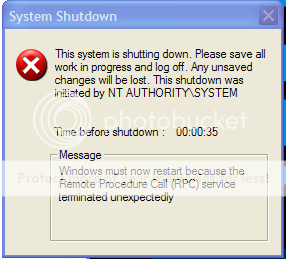
And on a side note, I've been getting this error too.
No clue why.
drtjhej.png
 
Last edited:
Oh sorry i thaught you were using vista woops

and yeah you do have a virus probably. last time i saw the RPC shutdown thing was back in the days of XP SP1 and the blaster worm

run the microsoft malicious software removal tool.
 
Oh sorry i thaught you were using vista woops

and yeah you do have a virus probably. last time i saw the RPC shutdown thing was back in the days of XP SP1 and the blaster worm

run the microsoft malicious software removal tool.

Ran a scan and came up with nothing.
 
go into control panel -> admin tools -> services

ensure that "network connections" and "RPC - Remote procedure call" are set to AUTO and started
 
Sorry about the delay, how has your system been running recently? A few things to do.

Please download Malwarebytes' Anti-Malware to your desktop.
  • Double-click mbam-setup.exe and follow the prompts to install the program.
  • At the end, be sure a checkmark is placed next to
    • Update Malwarebytes' Anti-Malware
    • and Launch Malwarebytes' Anti-Malware
  • then click Finish.
  • If an update is found, it will download and install the latest version.
  • Once the program has loaded, select Perform full scan, then click Scan.
  • When the scan is complete, click OK, then Show Results to view the results.
  • Be sure that everything is checked, and click Remove Selected.
  • When completed, a log will open in Notepad. please copy and paste the log into your next reply
  • You can also access the log in the Logs tab of Malwarebytes' Anti-Malware.


  • Open Notepad (Start -> Run -> type notepad in the Open field -> OK) and copy and paste the text present inside the code box below:

    Code:
    File::
    C:\WINDOWS\system32\sprint.dll
    C:\WINDOWS\system32\v2messen.exe
    
    DirLook::
    C:\Documents and Settings\All Users\Application Data\{0691F710-1ECA-4B5A-9727-25554F1BFDC6}
    
    Registry::
    R3 - URLSearchHook: Yahoo! Toolbar - {EF99BD32-C1FB-11D2-892F-0090271D4F88} - (no file)
    O3 - Toolbar: (no name) - {0BF43445-2F28-4351-9252-17FE6E806AA0} - (no file)
    O16 - DPF: {4871A87A-BFDD-4106-8153-FFDE2BAC2967} (DLM Control) - http://dlm.tools.akamai.com/dlmanage...ex-2.2.3.5.cab
  • Save this as CFScript.txt and change the Save as type to All Files and place it on your desktop.


    CFScriptB-4.gif


  • Referring to the screenshot above, drag CFScript.txt into ComboFix.exe.
  • ComboFix will now run a scan on your system. It may reboot your system when it finishes. This is normal.
  • When finished, it shall produce a log for you. Copy and paste the contents of the log in your next reply, along with a new HijackThis log.
CAUTION:
Do NOT mouse-click ComboFix's window while it is running. That may cause it to stall.
Also, please do NOT adjust your time format while ComboFix is running.
 
Back
Top