New GTX 260 black ed. problems

lovely?

Active Member
Hey all, yesterday i got my xfx GTX 260 Black Edition from newegg, but when i pop it into my pc, it is unstable to say the least. the factory clocks on this card are 666mhz core and 1150mhz mem.

The problems started when i tried to run crysis warhead. it was ok for a few minutes, and it runs fcking great! unfortunately, about five minutes after the game started, the screen artifacted and froze. this has happened five or six times since last night, on games, and a stability tester called furmark.

any ideas? could bad drivers cause this? im running 180.84 btw.
 
65c is good load temps...that's not the issue for sure.

PSU has more than enough juice to run it...that's not the issue.

This is what I would do...

1. Re seat card in the PCI-E slot
2. Try newer drivers
3. Try different PCI-E power connections from PSU (might have a weak 12v rail)
 
im on the latest drivers now, and i hope its not the 12v rail! i only have two pci-e cables lol, and i would hate to take power from molex connectors...

now i'm off to reseat the card. (it is a tight fit, i had to remove my dvd drive's sata connector just to get the damn thing to fit lol)
 
Give it a good hard run and see what happens...after that...RMA maybe? :(

*****EDIT*****

Maybe your res settings are too high? What res and game settings are you running?

Cyrsis = Computer killer:D Crysis Warhead takes less to run...but it's still tough when it's maxed.
 
Last edited:
im just running 1280/1024, i have reseated, turned up the fan, reinstalled drivers, now ill see if it wants to work yet :(

EDIT: no go, got a pixelated screen about two minutes into the game...
 
Last edited:
im just running 1280/1024, i have reseated, turned up the fan, reinstalled drivers, now ill see if it wants to work yet :(

EDIT: no go, got a pixelated screen about two minutes into the game...

Send that sucker back...

When I bought my BFG GTX 260...it was dead:mad: Then I RMA'd it and got another card from BFG...it was also dead:eek: I tested both in my system and a good friend's system...nothing!:confused:

I ordered the eVGA card I am running now...smooth as silk for 6 months;)

Needless to say...you could not give me a BFG product ever again:P
 
I can run Crysis Warhead on max with my standard GTX 260 at stock clocks and not get any problems...its not perfectly smooth but it doesn't crash. To double check its not temps, turn on the "Log to file" feature in GPU-Z and after it crashes check what max temps were.

Sounds to me like you got a bad one though, RMA it and if you can get the standard one, don't bother with Black Edition its just a waste of money when you can easily overclock it yourself.
 
i bought it on sale for $169.99 :D

and XFX gives very special customer service to people with black edition products.
 
BUMP

methinks there is a problem. My RMA has been approved by newegg, and the GPU is all boxed up and ready to go, but i found something out. at idle, my 12v rail is a meager 11.5V. idk what it goes down to on load, but im thinking it might be the culprit behind my GPU problems???

the issue right now (since i am definitely buying a new PSU either way) is whether or not i still send back the video card. since it is overclocked to 666mhz core, does anybody think that the voltage drop ingame might be enough to freeze my computer???

i need a few replies quickly lol. thanks.

EDIT: cpu-ID hardware monitor reports 11.38v minimum just doing little stuff, no real load.
 
Last edited:
That could be the issue...if your 12v rail is not strong that could be just enough to trip the sensors in the card for shutdown.

If my PSU had less than 12v on the rail...I'd be pissed.

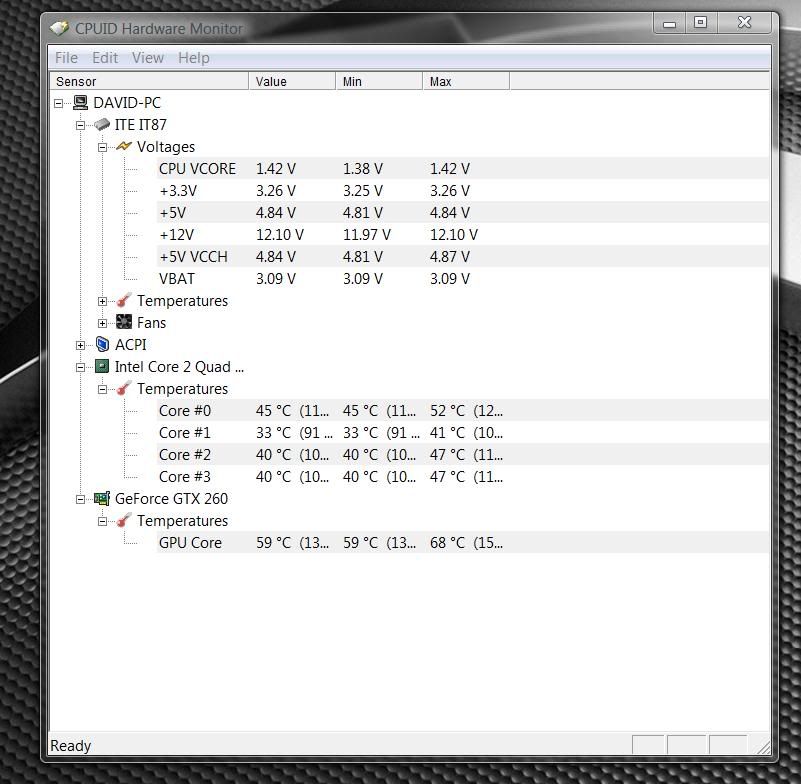
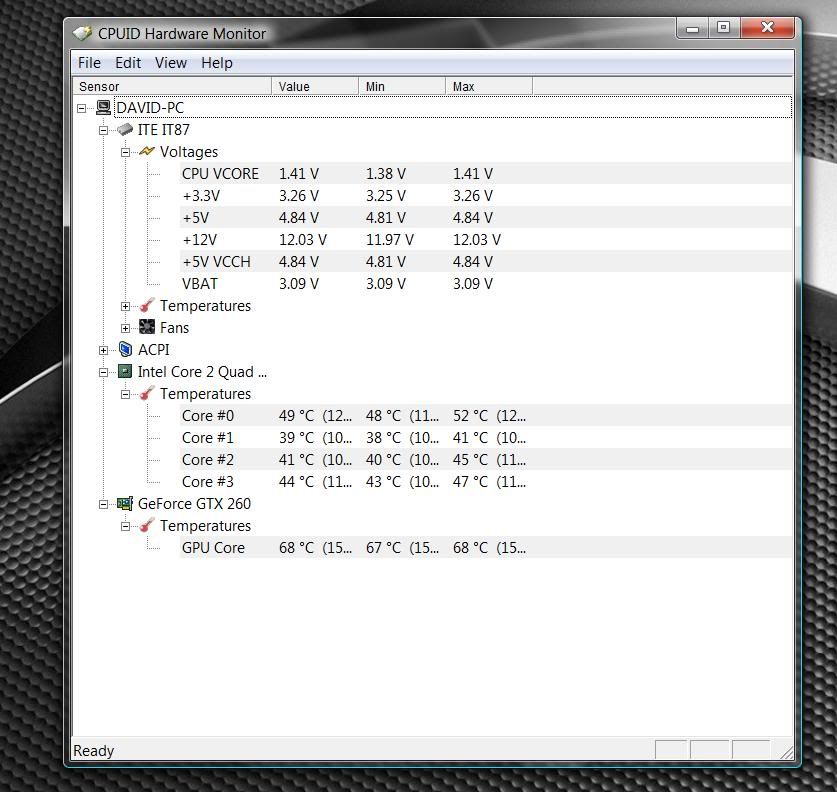
My Antec has 12.10 while idle and 12.03 on full load folding wide open:D Very little movement as load increases. you getting 11.38v not even under full load...that's garbage! That thing would be on a one way trip back to where it came!

Idle
Untitled1.jpg


Full load
Untitled-26.jpg
 
Last edited:
I wonder could you have to much on the GPU rail thus causing the low voltage? Personally I hate multiple rails I prefer a single rail.


You might want to look into buying a Corsair TX750 or higher...same price range and its a quality PSU.

http://www.newegg.com/Product/Product.aspx?Item=N82E16817139006&Tpk=TX750


It is seriously one of the best PSU I have ever owned then again I am a Corsair fanboy but with their RMA service + never having a PSU die from them (my oldest is going on 10 years old) there has yet to be a reason to hate them.
 
Last edited:
EDIT: cpu-ID hardware monitor reports 11.38v minimum just doing little stuff, no real load.
Fire up Prime95 for a sec. That should show a fluctuation.

Or open one of your games in Windowed mode so you can check
the voltage while under load.
 
I wonder could you have to much on the GPU rail thus causing the low voltage? Personally I hate multiple rails I prefer a single rail.

Yup...I am the same way:D

This is absolutely the best program for stress testing and benchmarking. It's called OCCT.

http://www.ocbase.com/perestroika/index.php

I know it's not in English but it will drop a hammer on your system. Run it and you will see what is inside. There are multiple types of tests (CPU, GPU, memory and a PSU test also) you will see the tabs on the left side. Hit "on" when you select a test and it will run it. It records your stuff on graphs while testing. When you hit off...you can look at all the graphs.

It's a really cool program...just gotta spend a few minutes getting to know it:D
 
I know you all are probably aware, but software based diagnosis programs are very prone to showing you false info... what does you're BIOS say about the 12v rail at idle?
I have an Antec TrueControl 2.0 550w that shows 11.6v in Sandra and MBM - yet my BIOS shows 12.2v - and when I manually increase the voltage on my 12v rail, some software doesn't even show a change!

I'm not familiar with the card you are using, but could the card's temp sensor be located off-die? Perhaps showing you temps from the heatsink and/or GPU socket rather than showing the true on-die GPU temp? Perhaps a bad die-heatsink contact?
Either way, I'd still RMA if it were mine, you shouldn't have to remount the heatsink/fan in the first place - even if that would fix it. Artifacting and the other graphical errors you're having are almost always started by heat and/or overclocking. Have you tried underclocking down the the Nvidia reference clock speeds and checked? (again, just to see if the factory OC could be the culprit).
Hope you get this straightened out - I hate seeing people buy brand new mid-range to top-end products and they be flaky.
 
Back
Top