
You are using an out of date browser. It may not display this or other websites correctly.
You should upgrade or use an alternative browser.
You should upgrade or use an alternative browser.
CPU shutting down every 5 mins
- Thread starter Banjara
- Start date

Are you getting any error messages like this computer will shut down in 60 seconds? If not, it sounds like you have a hardware problem, possibly heat issue, heatsink not attached to processor good enough. How old is your system, what processor are you running? We need more information please.
blazinjewel
New Member
yeah i agree. If your computer still prompts a message just before it shuts down, you just need to change some settings in the control panel. But if it doesn't give you any hint that it will turn off and this happens every 5 minutes, I'm sure that this is a hardware problem. It maybe with your harddisk, processor or power supply though I'm nit sure. You still have to define the exact problem. But hope my idea would be of some help to you. 

Aastii
VIP Member
to give you a ball park figure of temps (it isn't close to 100% accurate but close enough for what you need to know) download speedfan from here
It has the temperatures of your processor, graphics card, parts of your motherboard. Post the temps up after you have been doing what you normally do for 15-20 minutes or so.
It has the temperatures of your processor, graphics card, parts of your motherboard. Post the temps up after you have been doing what you normally do for 15-20 minutes or so.
do you mean your computer, not your CPU?
CPU=central processing unit. It is a part of a computer that does the processing of data, which is why it is often called a processor.
Your computer is just that, your computer, your setup, your rig, whatever, but not CPU
Yeah, I mean my computer.
Are you getting any error messages like this computer will shut down in 60 seconds? If not, it sounds like you have a hardware problem, possibly heat issue, heatsink not attached to processor good enough. How old is your system, what processor are you running? We need more information please.
No, not before it's shutting down but when it restarts it says "you want to run it in safe mode, regular etc' and then restarts.
I bought it brand new from the store and was 1 year old when started the problem.
Processor? What does that mean?

Last edited:
yeah i agree. If your computer still prompts a message just before it shuts down, you just need to change some settings in the control panel. But if it doesn't give you any hint that it will turn off and this happens every 5 minutes, I'm sure that this is a hardware problem. It maybe with your harddisk, processor or power supply though I'm nit sure. You still have to define the exact problem. But hope my idea would be of some help to you.
Thanks for your reply. Now I also think it's the hardware problem but what am I gonna do now?
to give you a ball park figure of temps (it isn't close to 100% accurate but close enough for what you need to know) download speedfan from here
It has the temperatures of your processor, graphics card, parts of your motherboard. Post the temps up after you have been doing what you normally do for 15-20 minutes or so.
It is not giving me the download link, it has just the info?
Currently I am online from another computer. YOu want me to post the figures after I download speedfan in that computer. It wont let me do it. Before I open internet it will suht down. 
Look inside and see if there is alot of dust build up.

mrjack
VIP Member
It is not giving me the download link, it has just the info?
You can download SpeedFan by clicking the "SpeedFan 4.38" in the Download section, it should be a different color and as such stand out from the rest of the text.
You can download SpeedFan by clicking the "SpeedFan 4.38" in the Download section, it should be a different color and as such stand out from the rest of the text.
I did click that many times but nothing happened.

AlienMenace
Well-Known Member
Open the case and then turn it on and see if the fan on top of the heat sink that sits on the processor keeps running. Also, maybe the thermal grease under the processor is a bit to thin too. Otherwise, it sounds like a Power supply problem. Do you still have a warranty on the system, if you do take it in and see what they say.
Open the case and then turn it on and see if the fan on top of the heat sink that sits on the processor keeps running. Also, maybe the thermal grease under the processor is a bit to thin too. Otherwise, it sounds like a Power supply problem. Do you still have a warranty on the system, if you do take it in and see what they say.
Thanks for replying, I will check it now.
No, I don't have the warranty.

2048Megabytes
Active Member
The fan at the center of this picture is the heatsink that sits on top of your processor. The fan should be spinning. Also check the heatsink to see if it is clogged with dust and or debris. Be cautious, the heatsink may be very hot to the touch.
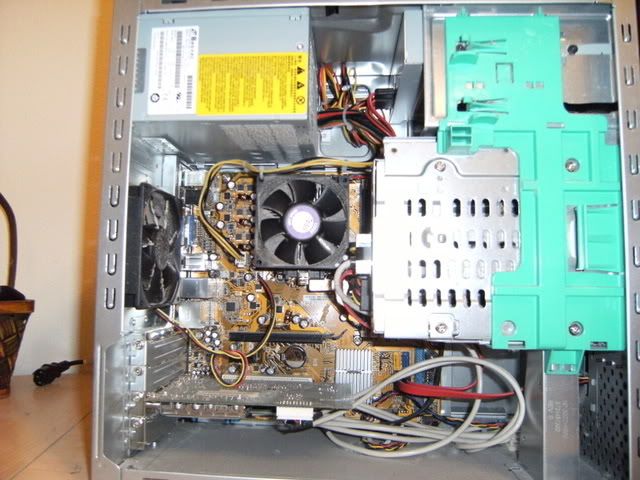
The fan at the center of this picture is the heatsink that sits on top of your processor. The fan should be spinning. Also check the heatsink to see if it is clogged with dust and or debris. Be cautious, the heatsink may be very hot to the touch.
Thank you so much for your clear reply. Now I know to look for which fan once I open my computer. I have attached the image of my computer. I don't know how to open it. I tried to open it but the fans got out. There are nothing on the sides. What should I open?
Last edited:
2048Megabytes
Active Member
Grab the right side panel on the back (you can see a place to grasp in the picture). Pull the panel toward the rear of the personal computer. The panel should come off.
Edit: Also be careful touching anything inside the computer. Be sure to touch the back of the case before touching any components to prevent electro static damage to any of your computer parts.
Edit: Also be careful touching anything inside the computer. Be sure to touch the back of the case before touching any components to prevent electro static damage to any of your computer parts.
Grab the right side panel on the back (you can see a place to grasp in the picture). Pull the panel toward the rear of the personal computer. The panel should come off.
Edit: Also be careful touching anything inside the computer. Be sure to touch the back of the case before touching any components to prevent electro static damage to any of your computer parts.
Thank you so much for your help. It is working for 8 hours now. I hope it won't shut down now. I guess the problem is solved now.