Problems with File Sharing in Windows 7

Joe2005

New Member
So here's my problem.

I tried to share a folder on my desktop (windows 7) so I went through the normal process and it appeared to work. However when I try and view that folder on my laptop (windows vista) it asks for a username and password. Even after I turn off the Password protected sharing on both of my computers.

My question is, how do I get it to work?
 
Already did.

You shared it or you changed the security settings?

Not trying to be difficult here, but I've recently went
through the same issue.

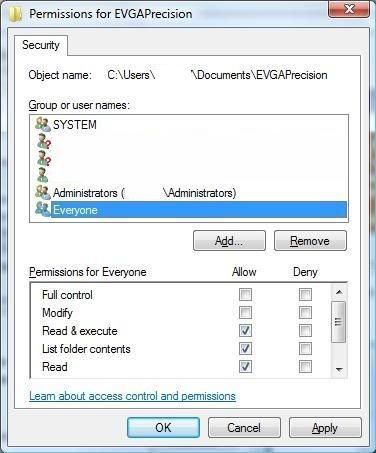
Right Click on the file, Properties, Security Tab.

There is an entry for "Everyone"? Just making sure I'm clear
about what I'm talking about.
Untitled-11.jpg
 
I shared it and changed the security settings to allow everyone to read the folder. I know this because I wanted to make sure I could only read the folder not modify.

Mine looks exactly like your screenshot.
 
Ok. Just making sure.

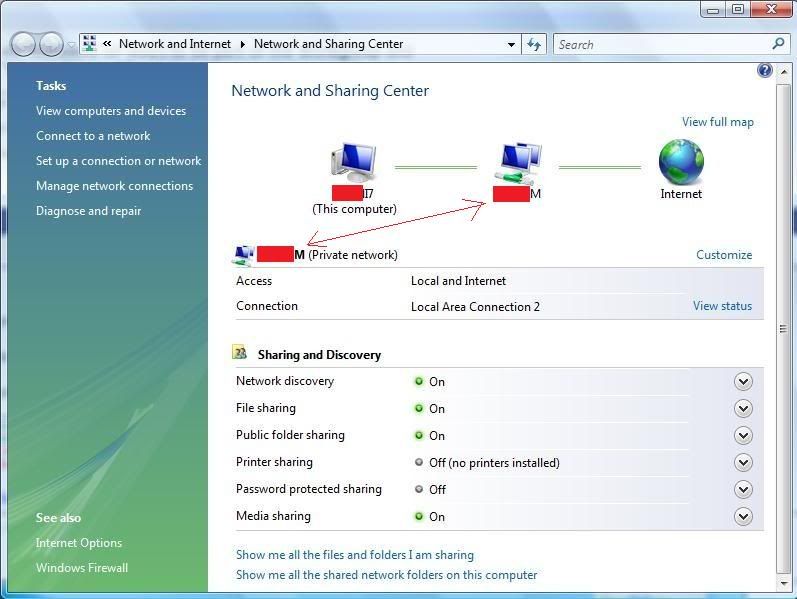
Another thing I tried was to make sure they were on the same Workgroup.

I forced them (the old fashioned XP way) to be part of the Workgroup and
also as part of the "Private Network".
 
I did that also.

I'm not sure what you mean by part of the private network.

Both computers are connected to the network. Meaning the only one I have. Both can long onto the internet and both can access the shared files on my moms computer (xp)
 
Last edited:
I know it's a bit confusing, and I'm not sure I understand it all either, but
I know what I did to get it to work.

Untitled2-2.jpg
 
I'm not sure why but this worked.

It didn't at first still asking for a password. Out of frustration I typed some obscene words to displace my anger and to my surprise...It granted me access.

It appears to have been a problem with my laptop, not windows 7.

Oh well, thanks for all the help.
 
Back
Top