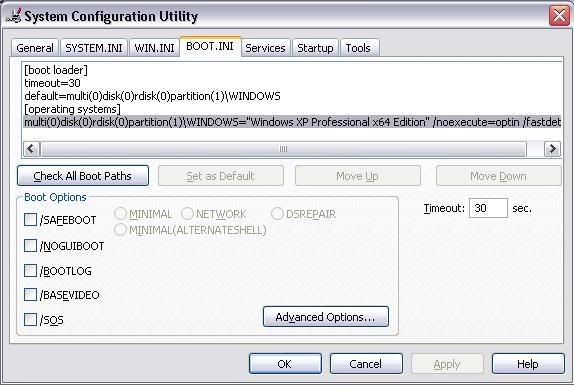
Click Start, Click Run, type in msconfig and Enter.
Click the BOOT.INI tab. You should see the two boot options listed.
Left Click on the one that you know is the one that triggers the Setup.
Remove it, Click Apply, Ok, Restart.
u cant edit boot.ini by running msconfig. If u want to edit it, go to Control Panel -> Performance and Maintenance -> System -> Advanced -> Startup and Recovery (choose Setting) -> Edit.
It will display a text file with something like this:
[boot loader]
timeout=30
default=multi(0)disk(0)rdisk(0)partition(3)\WINDOWS
[operating systems]
multi(0)disk(0)rdisk(0)partition(3)\WINDOWS="Microsoft Windows XP Professional" /noexecute=optin /fastdetect
I assume yb23's boot.ini look like this:
[boot loader]
timeout=30
default=multi(0)disk(0)rdisk(0)partition(1)\WINDOWS
[operating systems]
multi(0)disk(0)rdisk(0)partition(1)\WINDOWS="Microsoft Windows XP Professional" /fastdetect
multi(0)disk(0)rdisk(0)partition(2)\WINDOWS="Microsoft Windows XP Professional Setup" /fastdetect
where partition(1) and partition(2) is the partition of ur hard disk which contain Windows XP and Windows XP Setup respectively. Partition(1) is C: drive and Partition(2) is D: drive and so on.
If u dont want to display the Setup one, delete the line "multi(0)disk(0)rdisk(0)partition(2)\WINDOWS="Microsoft Windows XP Professional Setup" /fastdetect".
However, if u r not sure, dont do it. Leave it to someone who knows although Im pretty sure I showed u enough to edit the file urself.