Takes forever to load desktop

Shane

Super Moderator
Staff member
Hey guys,

Okay ive always had this problem since using Vista x64....on now on 7 x64.

When i boot mypc,It loads quite fast until i get to the Logon screen,Then i log on and my desktop appears...then it takes like 3-4 mins just to be able to click on Firefox.

It just sort of lags when im at that point,And then using firefox can sometimes be sluggish afterwards.

any ideas?

I have 46 processes starting with windows,not much realy?

Its fast and fine for anything else,gaming is great.
 
Oh come on man! You should know the routine reply to this question :)

Like bootup05 said, check startup and see what's running.
Check your task manager to see what's using all your processes/memory.
Defrag master hard disk drive.
Annul cleaning of programs.
Go to Run, type msconfig, go to startup tab and unselect everything that you don't want to be started at startup.
Under that same box (the msconfig box) go to boot > advanced options and select all four cores on startup instead of one..
Ya know, the usual.. I can't think of anything else at the moment..
 
Oh come on man! You should know the routine reply to this question :)

Like bootup05 said, check startup and see what's running.
Check your task manager to see what's using all your processes/memory.
Defrag master hard disk drive.
Annul cleaning of programs.
Go to Run, type msconfig, go to startup tab and unselect everything that you don't want to be started at startup.
Under that same box (the msconfig box) go to boot > advanced options and select all four cores on startup instead of one..
Ya know, the usual.. I can't think of anything else at the moment..

I have already done all those :rolleyes:

Thats the whole problem...i cant figure out what it is...even after a fresh install and installing my drivers its still slugish during logon.

nothing appears to be eating alot of ram...It uses 1.16Gb idle...out of 5gb.

Which i think is about normal for 46 processes running i think.

Its a weird one,My old Sempron 2800+ rig at 2ghz and 1gb of ram loads the desktop faster than my current rig:cool:
 

How many sticks of RAM do you have in your board?

Your sig says 5Gigs, so hopefully you have 2x 2Gig sticks and
2x 512Mb sticks.

If you have 2x 2Gig sticks and 1x 1Gig stick, your memory will only run in Single Channel mode.

That would = Turd.

RAM must be installed in pairs on Dual Channel motherboards.
Same as Triple Channel boards must have RAM installed in sets of 3.
 
How about anti-virus software? My mom's computer does that, and I built her a really fast PC. It gets to the desktop quick because she has my old Phenom II 710 CPU and 4gb of 1066 ram, but then the Norton kicks in and for 2-3 minutes you can't do anything.

46 processes on startup??? I have 10!
 
How many sticks of RAM do you have in your board?

Your sig says 5Gigs, so hopefully you have 2x 2Gig sticks and
2x 512Mb sticks.

If you have 2x 2Gig sticks and 1x 1Gig stick, your memory will only run in Single Channel mode.

That would = Turd.

RAM must be installed in pairs on Dual Channel motherboards.
Same as Triple Channel boards must have RAM installed in sets of 3.

Yes i have 2x 2gb and 2x 512mb sticks....In dual channel....timings are 5-5-5-15

How about anti-virus software? My mom's computer does that, and I built her a really fast PC. It gets to the desktop quick because she has my old Phenom II 710 CPU and 4gb of 1066 ram, but then the Norton kicks in and for 2-3 minutes you can't do anything.

46 processes on startup??? I have 10!

Well i had Kaspersky IS 2010...I thought that may be eating alot...so when i re-installed windows i decided to just use Avast...still slugish.
 
Okay so some progress....when i was using sparkyiv today (gta modding software) my cd drive started to click and make a reading sound as if the drive was been read.(It does this randomly btw at diffrent times!)

then my application froze up and still i could hear this clicking sound,i ejected the cd and bam my application was okay again and windows was responding.

I also noticed that,from switching the pc on if i have a disk in the drive it takes even longer to boot.

As weird as it may be...im actualy thinking my SATA cdrw is causing the problems as it might be faulty.
It plays up all the time,This is my second one that i had back from RMA.

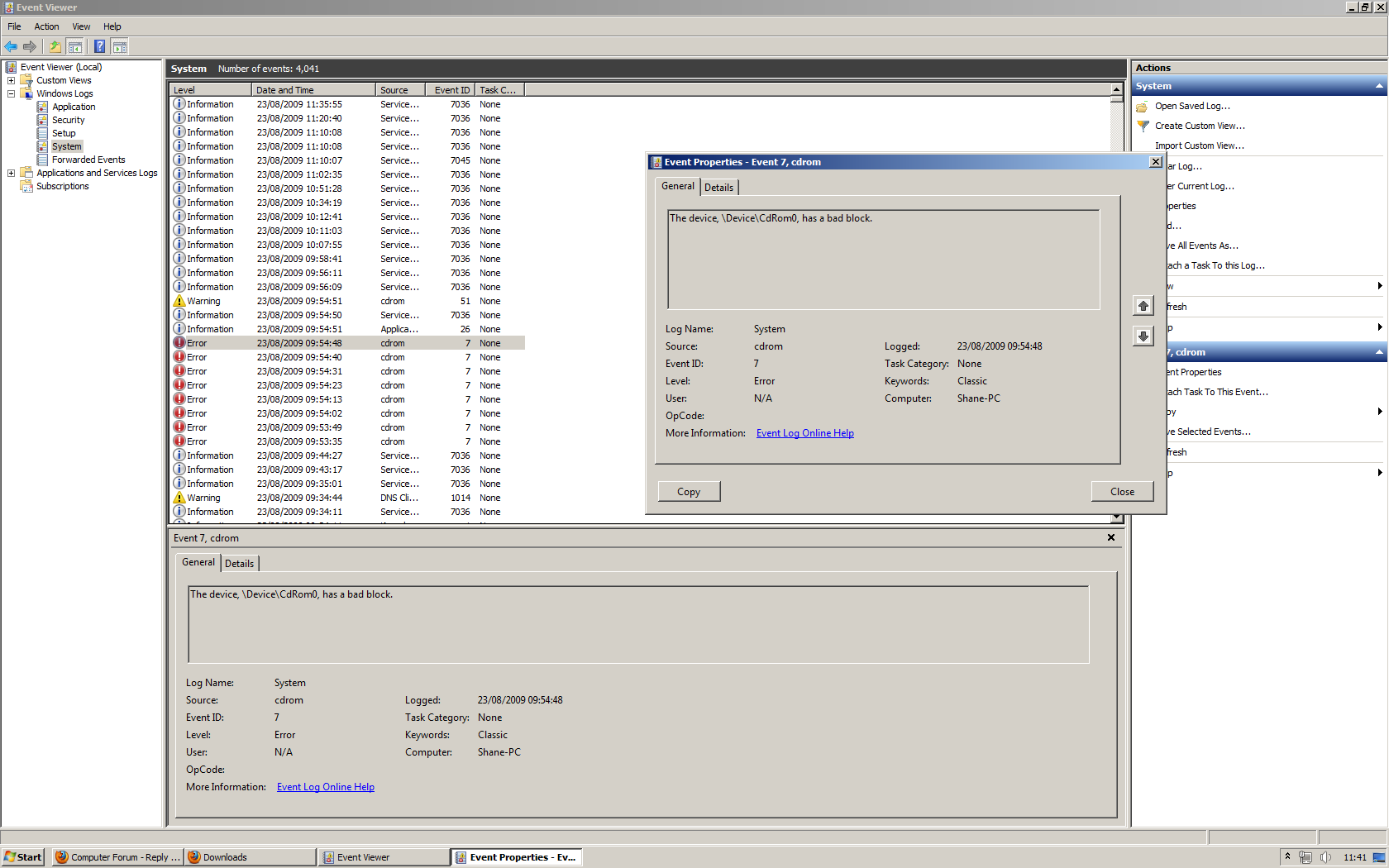
Looking in event viewer like mentioned...

event-1.png


cd rom drive? :rolleyes:

4014 events :eek:
 
Yup it must be that,At first i thought maybe my overclock isnt stable but in orthos for hours its fine.

I guess the only way to truly tell now is to remove the drive.

I actualy think i still have warrenty left on this drive,If i do its going back but this time im going to choose an alternative one...maybe il go LG.

My current one is a Sony btw.:cool:
 
Event viewer is the most unused program on a computer yet the most informative. I don't much like looking in mine as there's always an error somewhere :D
 
Event viewer is the most unused program on a computer yet the most informative. I don't much like looking in mine as there's always an error somewhere :D

Yeah i hardly use Even viewer...actualy come to think of it i think this may be the first time ive used in in windows 7 :D

Im shocked by how many errors are listed there....this is a 2 day old clean install of 7 and theres that many errors already :eek:
 
Back
Top