I have an older computer with an Intel mobo model RG84510 when you turn the power on, it boots up and says intel cmos/gpnv checksum bad press F4 to run. You click F4 it will take you to the bios I click on esc and it boots up. The comp. works but man does this suck. Any suggestions? I think the Mobo is bad or going bad I tried changing the power restore in the bios and save my setting when I go back in the bios, it doesn't keep my settings.... Guess I answered my own question.... bad mobo need new comp???

You are using an out of date browser. It may not display this or other websites correctly.
You should upgrade or use an alternative browser.
You should upgrade or use an alternative browser.
Old Intel Mobo question
- Thread starter Compequip
- Start date
aviation_man
New Member
No it's not a bad motherboard. You just might only need to change the CMOS battery inside, I believe that warning means it died.
This is the CMOS battery I'm talking about. You'll have to go inside your computer to change it, obviously.
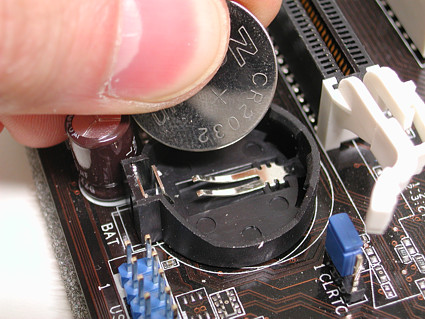
(Don't mind the yellow arrow, that's something else that isn't relevant in your case.)

This is the CMOS battery I'm talking about. You'll have to go inside your computer to change it, obviously.
(Don't mind the yellow arrow, that's something else that isn't relevant in your case.)
Last edited:
You can replace the battery, but that error doesn't necessarily mean the battery is bad. Post the model name and number of your computer. We'll see if you can flash the BIOS.
What do you mean by this. It's was a custom built computer 4-5 years ago it has an intel mobo I stated in the 1st post. I'm gonna try a new battery. Thanks

What do you mean by this. It's was a custom built computer 4-5 years ago it has an intel mobo I stated in the 1st post. I'm gonna try a new battery. Thanks
Sorry, I didn't realize it was a custom build. Try a BIOS update. Follow this link and click the blue "download" link. The program will update the firmware for your motherboard. That may get rid of the checksum error.

schw32m
New Member
Sorry, I didn't realize it was a custom build. Try a BIOS update. Follow this link and click the blue "download" link. The program will update the firmware for your motherboard. That may get rid of the checksum error.
Why would you need to do this? From the symptoms The OP described, it sounds like the CMOS isn't saving the settings. So unless something in the hardware was changed it is pretty self explanatory as to what to do..
Change the battery.
Re-boot the system, go into the BIOS and reload the default settings, save it and re-boot.
If it fixes the problem then you're done.
If not, do a pin clear of the CMOS and re-set.
You'll get the checksum error after you do this. Go into the BIOS and reload the defaults and save. It should solve the problem.
One thing to be aware of in this process. If you have a different video card in there doing a reset of the CMOS will change the default video to the onboard display. Be sure to change it back to AGP (or wherever your vid card is) as the default.
The absolute last resort (and even Intel recommends this) is to flash the BIOS.
From Intel's support pages:
Update the BIOS on your computer only if the newer BIOS version specifically solves a problem you have. We do not recommend BIOS updates for computers that do not need it.
Unless you need BIOS support that an update will address, messing with the BIOS in this manner is not recommended by the manufacturer.
One would have to assume that the computer worked fine before and the OP didn't say anything about a major hardware change that would warrant additional support of a updated BIOS.
Correct, nothing changed. The cpu sat for 2-3 months then I let my friend have it for internet searching and for word apps. When I set it up at his house everything worked fine. A week or two later this started happening. So this makes sense. The cpu is a few years old (4-5) and it sat unplugged for a couple of months boom battery is dead. I'm getting a battery today and will go over there by the weekend. I'll let you guys know if this worked. Thanks again...