Should I run 2 Windows 7 Operating Systems: 32bit AND 64bit??

dutchswan

New Member
Okay, so I am building a new machine. I want to run the 64bit version of Windows 7 so I can not only have more than 3GB of RAM running, but for various other reasons. I intend to also use this computer as the DVR for up to 8 security cameras in my home, only; no PCIe DVR maker currently supports the 64bit version of any operating system.

Herein lies my question: Should I just run both versions [32bit & 64bit] of Windows 7 on the same machine by partitioning the drive and using virtualization? ... then run the PCIe DVR on the 32 bit version?

Click Here to see the thread in this forum that contains the specifications for the new computer I am building if you need to know.
 
Unless you need anything in 64bit mode, I don't see any reason to install both versions. However, most programs work well with Windows 7 64bit. I feel certain the software would work, and pretty sure drivers would work.
 
There's really no reason to use 32 bit anymore. Win7 64 bit has excellent support for 32 bit programs.
 
Yeah i have to agree there. anything 32 bit i load onto my win7 works perfectly.

Each PCIe DVR card I see has in bold at the bottom of the specifications is: "THIS HARDWARE DOES NOT SUPPORT 64 BIT OPERATING SYSTEMS". Furthermore, in EVERY review I have read anyone who has attempted to run the card on a 64 bit operating system states they they cannot get it to work AT ALL. The QSee product line states they will have drivers for Windows 7 64bit "in early 2010".
 
Unless you need anything in 64bit mode, I don't see any reason to install both versions. However, most programs work well with Windows 7 64bit. I feel certain the software would work, and pretty sure drivers would work.

+1. Now days almost everything works on 64-bit versions too.
 
Okay, so I am building a new machine. I want to run the 64bit version of Windows 7 so I can not only have more than 3GB of RAM running, but for various other reasons. I intend to also use this computer as the DVR for up to 8 security cameras in my home, only; no PCIe DVR maker currently supports the 64bit version of any operating system.

Herein lies my question: Should I just run both versions [32bit & 64bit] of Windows 7 on the same machine by partitioning the drive and using virtualization? ... then run the PCIe DVR on the 32 bit version?

Click Here to see the thread in this forum that contains the specifications for the new computer I am building if you need to know.

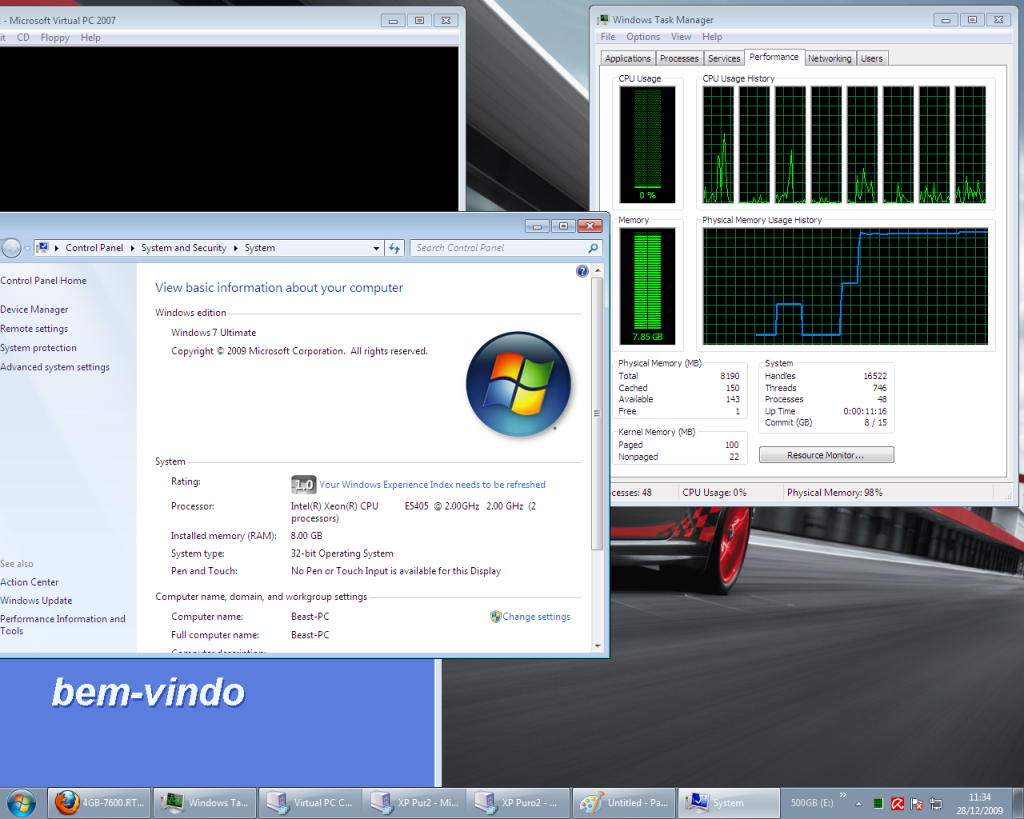
You can have more than 3GB of RAM in VISTA and Windows7 running in 32Bits:

Untitled.png


But it gotta be tested because a few drivers arent designed to work with more than 3GB and can give you BSODs.
Hope that helps with your decision.
 
Hello dutchswan,

There really is no reason for it.

I will tell you from first hand experience, all of my systems have been converted to Windows 7. I am not just saying it to say because I am affiliated with Microsoft. I can truly stand behind this product and tell you straight away it works very reliably, fast and extremely stable. The 64bit version is a real powerhouse as well.

Anyways, what to say about Windows 7?

There are several new features that are available with Windows 7 that will assist you with deployment and management of a large number of workstations. Enterprise IT infrastructures are increasingly complex to manage. The Microsoft Desktop Optimization Pack (MDOP) is a dynamic desktop solution that is available as a subscription for Software Assurance customers. The solution suite enhances application deployment and compatibility, increases IT responsiveness and end user uptime, and helps reduce total cost of ownership (TCO) of your desktop software and IT management. To learn more about this package, please go here: http://www.microsoft.com/windows/enterprise/products/mdop/default.aspx
Also now available is MDT 2010 (Microsoft Deployment Tool) which will help you create images and automate the OS and application installations, data migration, and desktop configuration process. To learn more, please go here: http://technet.microsoft.com/en-us/library/dd744519(WS.10).aspx
Microsoft does have an official Windows 7 Support Forum specifically for IT Pros located here http://social.technet.microsoft.com/Forums/en/category/w7itpro/ . It is supported by product specialists as well as engineers and support teams. You may want to also check the threads available there for additional assistance and feedback.
Also, if you would like to read what other users have said about their positive experience with Windows 7, you may want to check out the following sites: http://www.winsupersite.com/ and http://www.edbott.com/weblog/

John M
Microsoft Windows Client Team
 
Sure, most 32bit software works in 64bit Windows, but 32bit kernel mode drivers do not. So if you cannot find a 64bit driver, you have a problem with your hardware ...
 
pcie dvr card Windows 7 64

I posted this in another thread but Ill post it here too. I ran into the same problem with finding a pcie dvr card that worked with Windows 7 64. I finally just bought the q-see 8 channel pcie dvr card anyway (tigerdirect has them for 130 bucks). I figured I could possibly get it to work or if not just wait until the drivers came out. Anyway I installed it on my W7 64 os and it works fine. Only problems I had was it would not function if I tried to record to my system drive. So I have a pocket media drive I used and it worked fine. Also when you set up just one camera I found you have to leave the switch on camera 1 selected or it would not work. I know that doesnt make sense now but when your setting it up you will see what I mean. Ill check back so if you have any questions just post em.
 
Back
Top