salvage-this
Active Member
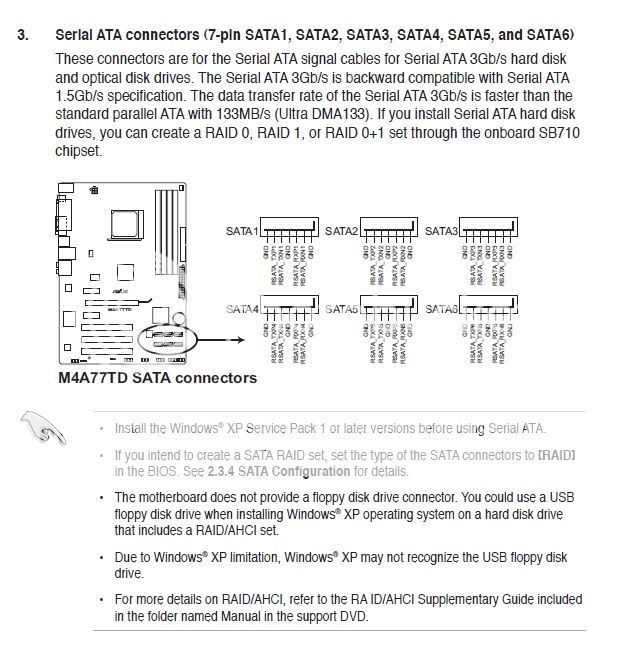
I am thinking about getting another tb hard drive to match the one that I ripped out of my external when it suddenly stopped working on any computer.  I have a 320gb WD that I have my os installed and all of the programs that I have installed as of now. I am looking at running my computer in either raid 0 or 1 with the two tb combined and not using the 320 or just keep it for extra storage with my os and programs installed but set the boot to my raid setup in my bios. Just in case of a failure I can still boot. I googled around for a while and read the raid 101 here but I still have a few questions about how it works/how to set it up.
1. Software or Hardware for configuring raid?
2. My motherboard says that it supports raid, but I can't find any other evidence of that other than the picture that rays raid on the box. I tried to install a program to configure it but it said that the program could not support my hardware. Any ideas? This might just mean that I need to get a raid controller.
I have a Asus M4A77TD
http://www.newegg.com/Product/Product.aspx?Item=N82E16813131603
3. With a controller that plugs into a pci slot, do i need to use the sata ports on the card or can I leave them in my motherboard? With that will I be able to notice a difference between using a sata l or sata ll ports?
4. I saw on other web pages that there is almost no benefit to using raid 1 other than having a fault tolerance. I have seen elsewhere that there is a huge benefit in read speeds, like almost double vs. a standard drive.
5. Is there a problem with running 2 hdd's in raid and another hdd alone?
6. just to check how the memory and performance stacks up
2x1tb RAID 0 = 2tb space w/increased read and write, no fault tolerance
2x1tb RAID 1 = 1tb space w/increased read, 1 fault tolerance
7. This may be a noob question, but if I have the 2tb in raid with the 320gb set aside for backup can I have the 320gb read off of the raid configuration to make essentially an auto backup? I guess kinda like a mock raid 5 but without having my raid be conformed to the lowest storage
I know that is a lot to ask but any help is appreciated!
I have a 320gb WD that I have my os installed and all of the programs that I have installed as of now. I am looking at running my computer in either raid 0 or 1 with the two tb combined and not using the 320 or just keep it for extra storage with my os and programs installed but set the boot to my raid setup in my bios. Just in case of a failure I can still boot. I googled around for a while and read the raid 101 here but I still have a few questions about how it works/how to set it up. 1. Software or Hardware for configuring raid?
2. My motherboard says that it supports raid, but I can't find any other evidence of that other than the picture that rays raid on the box. I tried to install a program to configure it but it said that the program could not support my hardware. Any ideas? This might just mean that I need to get a raid controller.
I have a Asus M4A77TD
http://www.newegg.com/Product/Product.aspx?Item=N82E16813131603
3. With a controller that plugs into a pci slot, do i need to use the sata ports on the card or can I leave them in my motherboard? With that will I be able to notice a difference between using a sata l or sata ll ports?
4. I saw on other web pages that there is almost no benefit to using raid 1 other than having a fault tolerance. I have seen elsewhere that there is a huge benefit in read speeds, like almost double vs. a standard drive.
5. Is there a problem with running 2 hdd's in raid and another hdd alone?
6. just to check how the memory and performance stacks up
2x1tb RAID 0 = 2tb space w/increased read and write, no fault tolerance
2x1tb RAID 1 = 1tb space w/increased read, 1 fault tolerance
7. This may be a noob question, but if I have the 2tb in raid with the 320gb set aside for backup can I have the 320gb read off of the raid configuration to make essentially an auto backup? I guess kinda like a mock raid 5 but without having my raid be conformed to the lowest storage
I know that is a lot to ask but any help is appreciated!

 ) So to sum it all up I would be left with a raid configuration with 640gb allocated to it and 680gb of space that I could use for backup storage. just to be clear, I would not be using the extra partition for files that the raid configuration will be using. I would put a a clone of the raid for a backup in case if a failure of the wd drive. I know that if the seagate fails I will be screwed no matter what :'(