
You are using an out of date browser. It may not display this or other websites correctly.
You should upgrade or use an alternative browser.
You should upgrade or use an alternative browser.
help in overclocking
- Thread starter darbz1987
- Start date

well, first off, what are your temps now for the cpu? you have to make sure your heatsink can handle it 'cause if you overclock and it heats way up you will really shorten the life. what heatsink are you using and what are your temps now?
hi mate sorry for the late reply are temps are at 25c at full load
 and im using the stock heatsink but have added fans to my case to keep it cooler

Geoff
VIP Member
It's not unheard of, but at full load unless your room is pretty cold 25C (77F) is pretty cool. How are you determining the full load temps?What did you use to test your CPU temps? I highly doubt that your CPU is running at full load at only 25C.
[-0MEGA-];1454019 said:It's not unheard of, but at full load unless your room is pretty cold 25C (77F) is pretty cool. How are you determining the full load temps?
hi im just going by my conputer case monitor it has a digital temputure clock
Geoff
VIP Member
Where is the temperature probe located? If it's just the temp of your case that is nowhere near accurate, if it's on your CPU it still won't be that accurate, but it would be closer. Go into the BIOS to see your temps at idle, and/or download a program that works with your processor to monitor the temps when you use stress testing programs, I personally use SpeedFan, but there are better ones out there.hi im just going by my conputer case monitor it has a digital temputure clock
[-0MEGA-];1454086 said:Where is the temperature probe located? If it's just the temp of your case that is nowhere near accurate, if it's on your CPU it still won't be that accurate, but it would be closer. Go into the BIOS to see your temps at idle, and/or download a program that works with your processor to monitor the temps when you use stress testing programs, I personally use SpeedFan, but there are better ones out there.
hi mate i went into the bios and my cpu temp is 37c and my system temp is 29c after running for a hour
and i have set it to warn me if the temps ever hit 70c
Last edited:
FULL LOAD temps are not to be measured while your cpu idles. You need a program like Orthos to full stress the cpu to see what load temps are. Coretemp or Speccy will tell you the temps in windows.
To overclock the cpu you'd have to go into bios, and up the FSB and maybe volts to stabilize. I'm not familiar with your mb though.
Without trolling, I highly recommend you visit this site:
http://www.overclock.net/
Or at least this thread:
http://www.overclock.net/intel-cpus/225371-intel-cpu-essentials-collected-guides.html
Here is a cpuz link to my q6600 with a mild 3.2 ghz (from 2.4 ghz)
http://valid.canardpc.com/show_oc.php?id=1095362
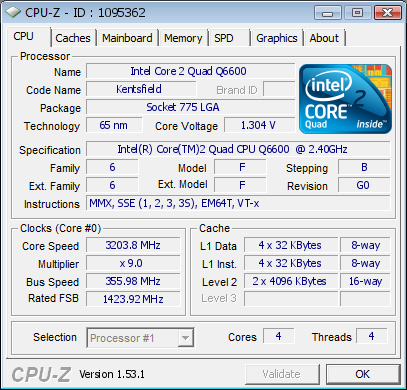
and my E6400 from 2.13 ghz to 3.6 ghz

To overclock the cpu you'd have to go into bios, and up the FSB and maybe volts to stabilize. I'm not familiar with your mb though.
Without trolling, I highly recommend you visit this site:
http://www.overclock.net/
Or at least this thread:
http://www.overclock.net/intel-cpus/225371-intel-cpu-essentials-collected-guides.html
Here is a cpuz link to my q6600 with a mild 3.2 ghz (from 2.4 ghz)
http://valid.canardpc.com/show_oc.php?id=1095362
and my E6400 from 2.13 ghz to 3.6 ghz
Last edited: