
Wireless driver for laptop

matty6660

Member
Had to re-install windows xp on my laptop and lost all the new drivers. Managed to install the audio/video etc but can't find the driver to enable my wireless network card.

In device manager the 'network controller' and 'pci simple communications controller' say that the drivers for them devices are not installed.

What drivers do I need and where can I get them.

Laptop is an EasyNote B3 series - WinXP prof.

Checked packard bell site but dunno what drivers i need. Cheers.
 
Had to re-install windows xp on my laptop and lost all the new drivers. Managed to install the audio/video etc but can't find the driver to enable my wireless network card.

In device manager the 'network controller' and 'pci simple communications controller' say that the drivers for them devices are not installed.

What drivers do I need and where can I get them.

Laptop is an EasyNote B3 series - WinXP prof.

Checked packard bell site but dunno what drivers i need. Cheers.

Did your laptop not come with a CD of drivers?
 
downloaded the driver but there's still no wireless network in the network connections.

I am assuming you actually ran and attempted installation as well? Just downloading it won't do a thing. Could you maybe tell us the exact model of your wireless card?
 
Last edited:
Had to re-install windows xp on my laptop and lost all the new drivers. Managed to install the audio/video etc but can't find the driver to enable my wireless network card.

In device manager the 'network controller' and 'pci simple communications controller' say that the drivers for them devices are not installed.

What drivers do I need and where can I get them.

Laptop is an EasyNote B3 series - WinXP prof.

Checked packard bell site but dunno what drivers i need. Cheers.
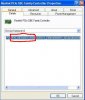
On each of those devices in device manager, right click and click on properites, click on the details tab and give me the 4 digit vendor and device ID numbers. They look like the items circled in the attached image.
 

Attachments

  • device.JPG
    device.JPG
    31.8 KB · Views: 346
On each of those devices in device manager, right click and click on properites, click on the details tab and give me the 4 digit vendor and device ID numbers. They look like the items circled in the attached image.

devices.png
 
Back
Top