So everything is plugged in but there are a few things I want to check. These are mostly retarded questions and I'm pretty sure it's alright but this thing makes me nervous 
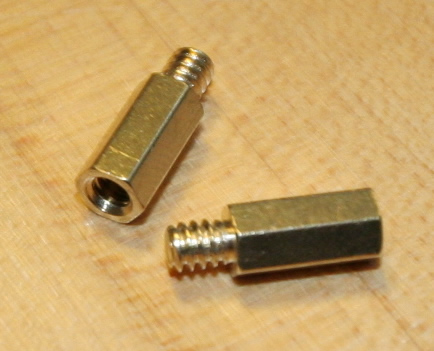
1 - I forgot a gold extender, is that a problem ? Also there was cardboard circles with the screws I put them between the screws and the motherboard, I assumed that's where they belong, was I right ?
2 - The case has firewire & audio ports on the front panel. I'm not going to use them so I didn't plug the connectors to the motherboard, is that OK ? (I made sure they don't lay around fans)
3 - On the big photo below :
3.1 - Circle 1 : This is the ATX 12V connector, there's only one way to plug this, right ?
3.2 - Circle 2 : Main power cable, can't go wrong either ?
3.3 - Circles 3 : These are the power cable of the case on the left (I assume) and on the right the massive fan (on the side of the case) power cable. Are they plugged alright ?
3.4 - Circle 4 : Rear fan cable connected to the CHA_FAN_2 connector of the mobo, that's where it belongs, right ? (it doesn't fit in CHA_FAN_1)
3.5 - From this photo, does everything else look OK ?
4 - On the 2 other blur photos : these are the 2 sides of the Asus Q-connector to which I plugged the HDD led, power switch, reset switch on 1 side and the tiny speaker on the other side, if I can see the text on the black connector, they're plugged in properly, right ?
Here are the specs in case it matters :
Case : Max In Power Bigmax
Mobo : Asus M4A79XTD EVO
CPU : Phenom II x4 955
RAM : 2 x 2 Gb G Skill PC 12800
GPU : Sapphire Radeon HD 5670
PSU : Corsair VX550W
HDD : WD Caviar Blue 500 Go


1 - I forgot a gold extender, is that a problem ? Also there was cardboard circles with the screws I put them between the screws and the motherboard, I assumed that's where they belong, was I right ?
2 - The case has firewire & audio ports on the front panel. I'm not going to use them so I didn't plug the connectors to the motherboard, is that OK ? (I made sure they don't lay around fans)
3 - On the big photo below :
3.1 - Circle 1 : This is the ATX 12V connector, there's only one way to plug this, right ?
3.2 - Circle 2 : Main power cable, can't go wrong either ?
3.3 - Circles 3 : These are the power cable of the case on the left (I assume) and on the right the massive fan (on the side of the case) power cable. Are they plugged alright ?
3.4 - Circle 4 : Rear fan cable connected to the CHA_FAN_2 connector of the mobo, that's where it belongs, right ? (it doesn't fit in CHA_FAN_1)
3.5 - From this photo, does everything else look OK ?
4 - On the 2 other blur photos : these are the 2 sides of the Asus Q-connector to which I plugged the HDD led, power switch, reset switch on 1 side and the tiny speaker on the other side, if I can see the text on the black connector, they're plugged in properly, right ?
Here are the specs in case it matters :
Case : Max In Power Bigmax
Mobo : Asus M4A79XTD EVO
CPU : Phenom II x4 955
RAM : 2 x 2 Gb G Skill PC 12800
GPU : Sapphire Radeon HD 5670
PSU : Corsair VX550W
HDD : WD Caviar Blue 500 Go