Dual monitor help

killercripple

New Member
So about a week ago I decided I wanted Dual monitors. So I ordered A new monitor and wall bracket. I got them Friday and went to hook up my 2nd monitor and the screen just stays black.

I'm 95% sure I can run dual monitors. My Video Card is a ATI Radeon HD 2400 Pro. It has both plug ins ( vga & dvi ). Now what one is what i don't know.

I did the display properties, Then checked " Extend My Windows Desktop onto This Monitor " didn't work.
Tried turning my computer off then turning it back on, still nothing.


I'm totally computer illiterate, So any help would be greatly appreciated

P.S If there is any other info about my couter that might help, Please ask. I'll be happy to let anyone know.
 
Last edited:
Certainly not trying to insult your intelligence or anything, just want to double check because I've made silly mistakes before; is your extra screen plugged in to a power supply/turned on?
 
Certainly not trying to insult your intelligence or anything, just want to double check because I've made silly mistakes before; is your extra screen plugged in to a power supply/turned on?

Yeah it is lol. When I hit the power button it goes green for a few seconds (2-3). Then back to orange, Like it's in stand by

I know the monitor works since I was using t less than a week ago.

I'll try again today and write down everything I do or happens/ pops up. Maybe I'll get a few more peoples input.
 
OK, So i tried hooking up my second monitor again. I followed step by step instructions, still didnt work.

So from the little I know about computers. I tried restarting my computer.
When I did this came up on my 2nd monitor (one im trying to add)

" This computer has an add-in graphics card, But the monitor cable is plugged into the integrated video connector. To attach the monitor cable to the add-in graphics card:

1. shut down the computer

2. Plug the monitor cable into the add-in graphics card connector. This requires a video adapter or video adapter cable.

3. Turn on the computer. "

This comes up on my old dell (19") monitor. It's the one im trying to make my 2nd monitor.

My main monitor Acer g235h (23") just stays off/stand by.

Once I turn off my computer all the way by hitting the power button. I just unplug the dell monitor and turn my computer back on and it's like nothing even happened.

So i don't know what im doing wrong. only thing I can think to do know is post my system info and see if I'm wrong in think I can run dual monitors


Hopefully this info will help anyone looking at this thread, Because I'd really like dual monitors.
 
Does your computer have an integrated or a dedicated video card? And are you trying to use one or the other or both?

I understand what you mean by wanting to run dual monitors, I do it and it's awesome.

Just make sure both monitors are plugged into the same card.

It might also help to know your system specs... especially what graphics card you have.
 
That message means that you have the monitor plugged into the output jack for your integrated video, instead of your graphics card. You should have jacks on your graphics card, and somewhere on your motherboard. Unplug the monitor cord from the motherboard jack and put it in the open plug on your graphics card. Then you should be good to go. :)

EDIT: I'm guessing you plugged it into the VGA jack on the motherboard because the monitor only has a VGA input, right? You might have to get a DVI to VGA converter from ebay to run a second monitor. Here's a link:
http://cgi.ebay.com/New-DVI-Male-9-...550?pt=LH_DefaultDomain_0&hash=item2c588ff97e
and another link for the same kind of thing (probably better quality) on Newegg:
http://www.newegg.com/Product/Product.aspx?Item=N82E16814999201&cm_re=DVI_VGA-_-14-999-201-_-Product
 
Last edited:
Ok after reading spynoodle. I can see I only have one plug-in

So I broke down and looked at the owners manual. It says I need a DMS-59 to DVI or VGA y cable adapter.

my computer is a XPS 210, Windows XP, 2.00 GB of ram, 2.20GHz

Does anyone know if the DMS-59 to DVI y cable adapter will work for me?
 
Hmm, so you're saying that you have one cord plugged into the motherboard's VGA jack, and one plugged into the video card, but the other plug on the video card is a DMS-59 port? In that case, then I guess you should get either a DMS-59 to VGA adapter, or a DMS-59 to DVI adapter (if your monitor supports DVI.)

Although.....

I just realized something (I use dual monitors) when I looked up my display settings. So do you have XP? If so, then plug the second monitor into the jack on your motherboard (if there is one). After you do the "extend desktop onto this monitor" thing, then go to the drop-down box under the pictures of the screens. Select your Radeon card from the list.

Also, if I'm being extremely confusing and your setup is nothing close to what I picture it being, you might want to send us a pic of the back of your PC. ;)
 
I'll get a picture tomorrow and yes I am running XP

I'll take a couple pictures of back of my computer and my plug-ins.
anything to help out
 
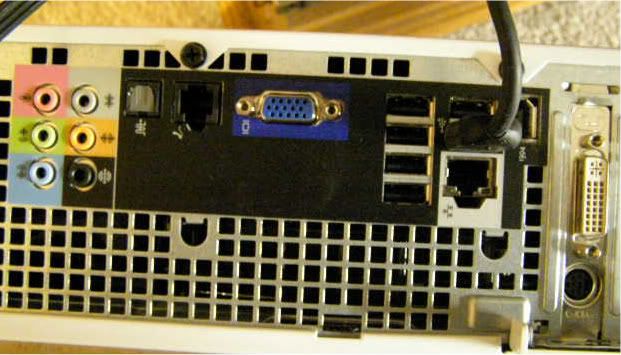
OK, So this is the back of my computer.
From what wiki says. it's some type of dvi plugin.
take a look

PC020726.jpg
 
This is correct, sauce.


Also correct, sauce.

Doesn't look cheap by any means, but thats Dell for you. And considering there is difficulty in obtaining a "slim" gpu, this cable might be your only option.

Best of luck with your dual monitors.

Wait you're telling me a DMS-59 will plug into the white plug-in, in the picture I posted? I know I said i know nothing about computers, But I dont see those two pluging into each other.
 
Wait you're telling me a DMS-59 will plug into the white plug-in, in the picture I posted? I know I said i know nothing about computers, But I dont see those two pluging into each other.

Yes, the DMS 59 will plug into the the white (DVI as it's better known) plug and give you two separate blue vga connections. With which, you can connect two separate monitors.
 
OK I'll take you're word for it.

Should I get dual DVI or VGA?

Depends on your monitor(s). Technically DVI is supposed to be a better pictures because its a digital signal. So if you have DVI cables already and your monitors support DVI go that route.

But VGA is indistinguishable in quality (so I'm told, never tested this) and if your monitors don't support DVI or if you don't have DVI cables, just go with VGA.
 
OK, So this is the back of my computer.
From what wiki says. it's some type of dvi plugin.
take a look

PC020726.jpg
Now I see what's happening. You usually have your monitor plugged into the main video card, right? And then you tried to plug the second monitor into the blue plug? Well, I guess your only current option is to try that one idea I had, where you select the card output from the drop-down box after you plug the second monitor into the blue plug.
 
Now I see what's happening. You usually have your monitor plugged into the main video card, right? And then you tried to plug the second monitor into the blue plug? Well, I guess your only current option is to try that one idea I had, where you select the card output from the drop-down box after you plug the second monitor into the blue plug.

Don't you have to disable the Onboard graphics in the BIOS if you install a graphic card? I don't think that would work.

OP: I think you can buy low-profile cards with DVI and HDMI on them.
HDMI = DVI (well... they have the same digital signal, but DVI does not carry an audio signal.)
 
I think I'll go with the DMS-59 to dual DVI. That seems the easiest.
Installing or disabling things is something I want to avoid at all cost.

Well thanks for all the help guys. I'll try finding the DMS y cable this weekend. If it doesnt work I'll be back.
 
I think I'll go with the DMS-59 to dual DVI. That seems the easiest.
Installing or disabling things is something I want to avoid at all cost.

Well thanks for all the help guys. I'll try finding the DMS y cable this weekend. If it doesnt work I'll be back.
WAIT!!!! Unless you have a secondary video card, then you don't have a DMS-59 plug. Just DVI. Does your card have VGA pins on the inside? This would be 15 pins arranged in a rectangle.
You'll probably need something like this:
http://cgi.ebay.com/nVidia-ATI-Vide...033?pt=LH_DefaultDomain_0&hash=item255f4d8dc1
that is, if your graphics card came with an external VGA plug for if you needed it. Idk if it would.
 
WAIT!!!! Unless you have a secondary video card, then you don't have a DMS-59 plug. Just DVI. Does your card have VGA pins on the inside? This would be 15 pins arranged in a rectangle.
You'll probably need something like this:
http://cgi.ebay.com/nVidia-ATI-Vide...033?pt=LH_DefaultDomain_0&hash=item255f4d8dc1
that is, if your graphics card came with an external VGA plug for if you needed it. Idk if it would.

What you see in the picture is what I got. So you'll have to tell me, Because I have no idea.

I can't even tell if the DVI plug is on my motherboard or graphics card.
I've always used my DVI plug for my monitors, Since both have it.

So what ever you people tell me I'll try, Because I'm pretty much shooting in the dark know.
 
Back
Top