Freeing up disc space, please help if you can.

Chester Draws

New Member
New to the forums so hello everyone and many thanks in advance for all your help, I have a problem at the moment with disc space, my computer has two drives as follows: my local disc C has a total space of 7.85GB but I only have 204MB free, my other one is Storage E which has a total size of 76.6GB and 63.3GB of this is currently free, please can you advise the best way for me to utilise this space and free up room on my C drive, please note that I am no tech-head but once shown I am pretty good at using a computer and carrying out tasks, please can you also advise what types of files and programmes can and can't be swapped from C to E and please can you tell me how to carry out what I presume to be a fairly simple task once one knows how to do it, many thanks in advance.

Chester Draws
 
Go into disk management and tell me if it shows 2 physical hard drives or just 2 partitions on one hard drive. Click on start, click on run and type "diskmgmt.msc" without the quotes and click on ok. If you only have one hard drive then you will only see where it says Disk 0 on the bottom part of the page. If you have more than one hard drive it will show disk 0, disk 1 and so on.

If you only have one hard drive then when you installed windows, you made the first partition way too small.
 
Dear John, thank you so very much for your reply and very kind assistance I appreciate it very much, I did what you said and have found the following:

VOLUME
C
STORAGE E
LAYOUT
PARTITION FOR BOTH DRIVES
IE C & E
TYPE
BASIC FOR BOTH DRIVES
FILE SYSTEM
NTFS FOR BOTH DRIVES
STATUS
HEALTHY
CAPACITY
C = 7.86GB E = 76.68GB
FREE SPACE
C = 200MB E = 63.36GB
% FREE
C = 2 % E = 82 %
FAULT TOLERANCE
NO- FOR BOTH DRIVES
 
Last edited:
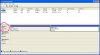
The thing I really needed to know was if you it lists only one physical drive or 2. Look at the attached image and tell me if your disk management only shows the disk 0 in the bottom part ot the screen. Or does it show disk 1 as well. This tells me if you have one or two physical hard drives in your system.
Look at the area that I have circled, that is where it tells you if you have only 1 hard drive or more than one. If you have more then one, then there would be another row underneath that, that would say disk 1 with its information.

If you have 2 hard drives then then your C drive is way too small and you need to buy a bigger drive for storage and then install windows to the 80 gb drive.

Can you post a screenshot of your diskmanagement for me. Do this by opening disk management and make the drag the window bigger a little bit. Then press alt and print screen on your keyboard at the same time, then open ms paint and hit ctrl and v on the keyboard at the same time. Then save the picture as a jpg, not bmp. then attach it to your next post by clicking on the paper clip up in the toolbar where you type messages for this forum.
 

Attachments

  • disk manage.JPG
    disk manage.JPG
    74.5 KB · Views: 50
Last edited:
Basically what you need to do then is buy another hard drive and install windows on it. Or use drive E to use for windows but you would have to move any data that is on it to a different drive temporarily and then install windows to the 80gb drive and then buy a larger driver for just your personal files such as office documents, pictures, music and such. I'm actually surprised the 8gb drive is still working as that is a very old drive.
 
Thanks for all your help and advice John, short term is there any solution I could use to free more space until such time as I can do what you suggest ?.
 
Thanks for all your help and advice John, short term is there any solution I could use to free more space until such time as I can do what you suggest ?.

No there isn't unfortunately, your OS is ~7GB alone, so even though that is all that is on there, you can't cut it down unfortunately
 
You could call around to different computer shops and ask them how much it would be to clone a hard drive. A new larger capacity hard drive will likely cost you about $60. Cloning your data to the new hard drive should not cost more than $30 in my opinion. If they wanted more than $90 for the drive and cloning I think it is an unfair price.
 
Why not just resize the second partition and add it to the first?

Edit: Nvm just realized there's two drives
 
Thank you all so much for your help so far, all you chaps are very kind to offer your assistance in this way, I take on board everything you all advise however I am open to any options regarding this problem so if anyone has any more ideas please keep them rolling in.

Regards
Chester Draws
 
There is nothing else you can do but either use the 80 gb drive to install windows on and get a new drive for your data or just buy a new bigger drive and partition it into 2 for windows and data.
 
2 Drives are better than 1. Why ? Because it is unlikely that both will die silmultaneously, and if you keep copies of that which is important to you on both drives, you are fairly safe.
 
Back
Top