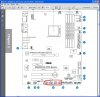
Problem....

Monitor display turns off when i try using the front ports of my case.

the cable for my case says "USB" but there are 4 ports on my motherboard so im not sure were to put it.

motherboard is the m4a89gtd pro
 
The cable from the case gets plugged into any one of these ports that are circled in red.

If you have it plugged into one of those ports then you have problems with the wiring of the usb ports most likely.
 

Attachments

  • usb ports.jpg
    usb ports.jpg
    83 KB · Views: 122
yeah ive had it plugged into one of those and as soon as i tried putting my hard drive into one of the front usb ports the display turns off.

im using hdmi, tried vga and now i cant get my computer working on my tv.

works on the downstairs monitor with vga but now upstairs i cant see the display on my tv from the computer.

pissing me off now, was working earlier using hdmi
 
Funny story. My daughters does the same thing (or close to it) when she was plugging in her camara. Thought it was a driver or USB port problem. Turns out it was just a static electricity problem. Every time she went to plug anything into a USB port static would jump to the metal part of the port and cause the computer to shut down or restart. Told her to just touch a metal part of the case first before plugging it in. Problem went away.

Might not be your problem, just a thought.
 
just tried the monitor from downstairs again nothing is coming on screen.

what's the problem ?


everything is running, fan lights etc. nothing is showing on screen though.
 
You can leave the ports at the front with no connection, and no functionality. What happens when you plug the HDD into the rear ports?

You were having problems in another thread with hdmi. Perhaps it's time to dig out the MB manual and work through all the connections and settings.
 
its the same thread, all the connections are fine.

dont know what happened but everything is working now apart from front usb ports.

read that other people have the same problem with antec 900 front ports
 
This sounds like it could possibly be a result of the 'Ground Looping' (AKA Additional Earthing) problem that the Antec **00 series is know for. The problem is usually characterized by a high pitched buzzing sound coming out of any headphones attached to the front audio jack. For some reason, Antec decided to ground their front panel components together in series to the chassis, which is not necessary as the audio jacks are ground to the motherboard.

There are several accounts of people modding their chassis to remove this extra audio ground, so I would suggest starting there.

Here are the links to the forum posts I found:

Overclockers.com
incrysis.com

Good luck, and let us know how it goes.

-Chris
 
Last edited:
This sounds like it could possibly be a result of the 'Ground Looping'.....There are several accounts of people modding their chassis to remove this extra ground
Edit: Comments removed. With the shield connected to the case of the socket, that could cause problems but the extent would depend on the receiving circuit. If the MB end of the shield is connected to chassis ground there would be no ground loop. I don't know if that is the case.
 
Last edited:
Edit: Comments removed. With the shield connected to the case of the socket, that could cause problems but the extent would depend on the receiving circuit. If the MB end of the shield is connected to chassis ground there would be no ground loop. I don't know if that is the case.

For clarification, the nine hundred has a wire attached to the chassis as a ground for the front panel devices. Currently they have it soldered between the USBs, then to the audio jacks. The problem is that the audio jacks are already ground to the motherboard, so this creates interference. When done this mod, your USBs should still be ground to the chassis, but they will no longer be connected to the audio jacks (which have their own ground).
 
For clarification, the nine hundred has a wire attached to the chassis as a ground for the front panel devices. Currently they have it soldered between the USBs, then to the audio jacks. The problem is that the audio jacks are already ground to the motherboard, so this creates interference. When done this mod, your USBs should still be ground to the chassis, but they will no longer be connected to the audio jacks (which have their own ground).
I did some more research to try and find any conventions for grounding USB systems since some will be mains grounded (printer) and others not (iPod). Not a lot of information out there.

As far as I can determine the shield for USB is grounded to chassis via a ferrite choke for ESD protection. If it is also grounded at the Antec front, it makes no difference. Both are connected to the same chunk of metal; both at the same potential so no ground loop. If that is also connected to the audio shield, it makes no difference either as that is now also at chassis potential. I would have thought the same applies to the audio. If the sound card and the shield are grounded to chassis, there can be no ground loop. The chassis is essentially a grounding bar at the same potential all over.

Perhaps in the linked issues, the sound card ground was not at chassis ground. That would cause a ground loop.
 
Back
Top