

Harmfulseth
New Member
Hello,
Recently my old socket 939 Motherboard died and went to motherboard heaven ( or rather hell I had so many problems with that piece of crap) and I decided to purchase a new motherboard with a Nice Cpu and some added ram. I ended up with quite the nice build for the price.
Now before I go on id like to state that I am rather new to computers, and forgive me if I seem naive with this. Anyway on my old build I had 2 hard drives on it; One for the operating system and other programs (80gb) and one 250gb Data in which I had all of my Music, pictures, documents and such. All that good juicy stuff. This worked out pretty well, and I never had any problems.
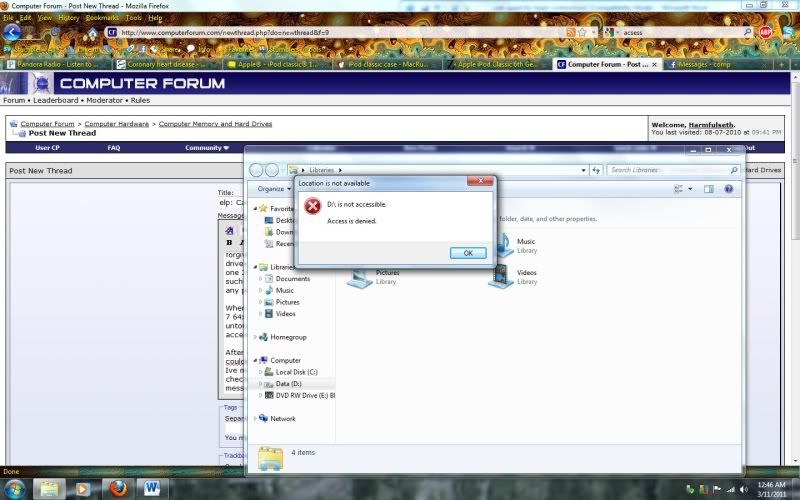
When I started up my new build, I wiped my C:/ drive and installed windows 7 64x bit flawlessly. When I went to go access my D:/ drive which was left untouched from my previous 32x bit build, I found it said ' D:/ is not accessible. Access is denied."
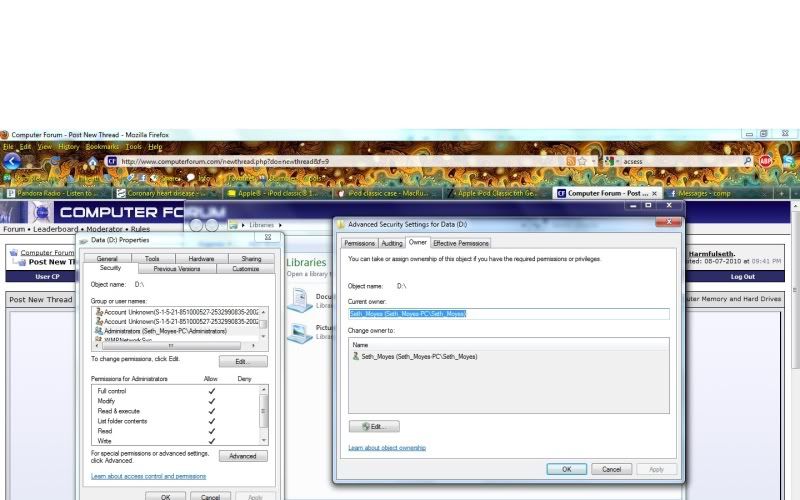
After scanning multiple forums and consulting other computer geeks, I couldnt find a solution. I tried giving myself full access and still got no where. Ive messed around with just about every setting I could find, and quadruple checked the cables to the drive. it all seems right but I still get that message.
Here is the error:
Proof of "ownership" of drive and full access
Im about to just wipe the damned thing clean in getting so frusterated. Any Help is much appreciated!
Recently my old socket 939 Motherboard died and went to motherboard heaven ( or rather hell I had so many problems with that piece of crap) and I decided to purchase a new motherboard with a Nice Cpu and some added ram. I ended up with quite the nice build for the price.
Now before I go on id like to state that I am rather new to computers, and forgive me if I seem naive with this. Anyway on my old build I had 2 hard drives on it; One for the operating system and other programs (80gb) and one 250gb Data in which I had all of my Music, pictures, documents and such. All that good juicy stuff. This worked out pretty well, and I never had any problems.
When I started up my new build, I wiped my C:/ drive and installed windows 7 64x bit flawlessly. When I went to go access my D:/ drive which was left untouched from my previous 32x bit build, I found it said ' D:/ is not accessible. Access is denied."
After scanning multiple forums and consulting other computer geeks, I couldnt find a solution. I tried giving myself full access and still got no where. Ive messed around with just about every setting I could find, and quadruple checked the cables to the drive. it all seems right but I still get that message.
Here is the error:
Proof of "ownership" of drive and full access
Im about to just wipe the damned thing clean in getting so frusterated. Any Help is much appreciated!


