SSD not in Bios but in Windows

ChrisUlrich

Active Member
I can't make my SSD my primary boot drive in the bios but the SSD shows up in Windows.

Also, I installed Windows onto it and it just fails once it says it is completed.
 
In the bios, try changing whatever the Sata port the drive is connected to, to /achi if it's ide/ or /ide if it's achi/.
The not booting sounds like you have it set to achi without the driver or correct driver.
Did you load the Intel achi driver before restarting the pc for the 1st time after Windows was installed?
 
Last edited:
Connect the SSD to SATA port 0/1 (the first one) so it's detected first and make sure your boot order is properly set up in the BIOS. You might also need to align the drive, I'd also recommend installing updated firmware if any is available, because if you need to do it later, it will wipe all data on the drive.

Also set the SATA mode to AHCI instead of IDE. Try unplugging all other hard drives during windows installation as well.
 
In the bios, try changing whatever the Sata port the drive is connected to, to /achi if it's ide/ or /ide if it's achi/.
The not booting sounds like you have it set to achi without the driver or correct driver.
Did you load the Intel achi driver before restarting the pc for the 1st time after Windows was installed?

Install the Intel ACHI Driver? How? I also thought that my P67 Extreme6 was ready to go?
 
Last edited:
Install the Intel ACHI Driver? How? I also thought that my P67 Extreme6 was ready to go?

Alot of boards come default with the SATA ports in IDE mode. But that doesnt have anything to do with it showing in the bios. You said you could not pick it as first in the boot order. Does the drive show at all in the bios?
 
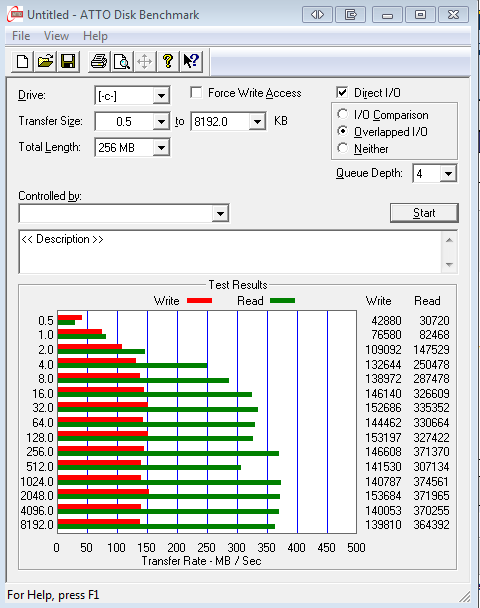
Ok. Because i'm a dipshit it didn't work. I unplugged the other harddrives and then installed it. Now it's in. BUT! How do I make sure that I am getting all the SSD has to offer? Because the port/cable can slow it down, right?
 
I think the difference in the cables is some have a metal keeper and some don't. It's more about port speed.

Install the Intel ACHI Driver? How? I also thought that my P67 Extreme6 was ready to go?
The ACHI driver for your Intel SSD needed to be loaded during setup of the OS. Then the mb can run the drive in that mode. Aside for other features, ACHI mode will most always be higher perf than IDE for SSD.

If you did'nt load the driver and set the Sata port to ACHI in the bios, prior to the freshly installed OS restart,,then you are in ide mode. See the links at the bottom here Setup and Manage SSD

And check this out:
"In the storage options, the two Marvell controllers can only be jointly turned off and on—there’s no option to select one or the other. This motherboard defaults the SATA controllers (PCH and Marvell) to IDE mode rather than AHCI, so bear this in mind if you have to press that reset CMOS button and install the OS in AHCI mode, as the board will fail to load into the OS. Also by default, the Marvell based SATA ports are not bootable—this decreases boot time by 5-10 seconds as these do not need to be pre-initialized before the boot sequence. If you want to boot from the Marvell SATA 6 Gbps ports rather than the PCH SATA 6 Gbps ports, expect a longer boot time."

ref: http://www.anandtech.com/show/4323/p67-190-part-2-msi-asrock-and-ecs/7
 
Last edited:
Capture-1.png
 
I think so too. Sometimes not enough diff in ide vs achi to worry about.
And those numbers look good since i think the manuf's mostly use ATTO for thier specs.
 
Back
Top