
You are using an out of date browser. It may not display this or other websites correctly.
You should upgrade or use an alternative browser.
You should upgrade or use an alternative browser.
Why is my ram dissapearing?
- Thread starter Sdot
- Start date

DCIScouts
VIP Member
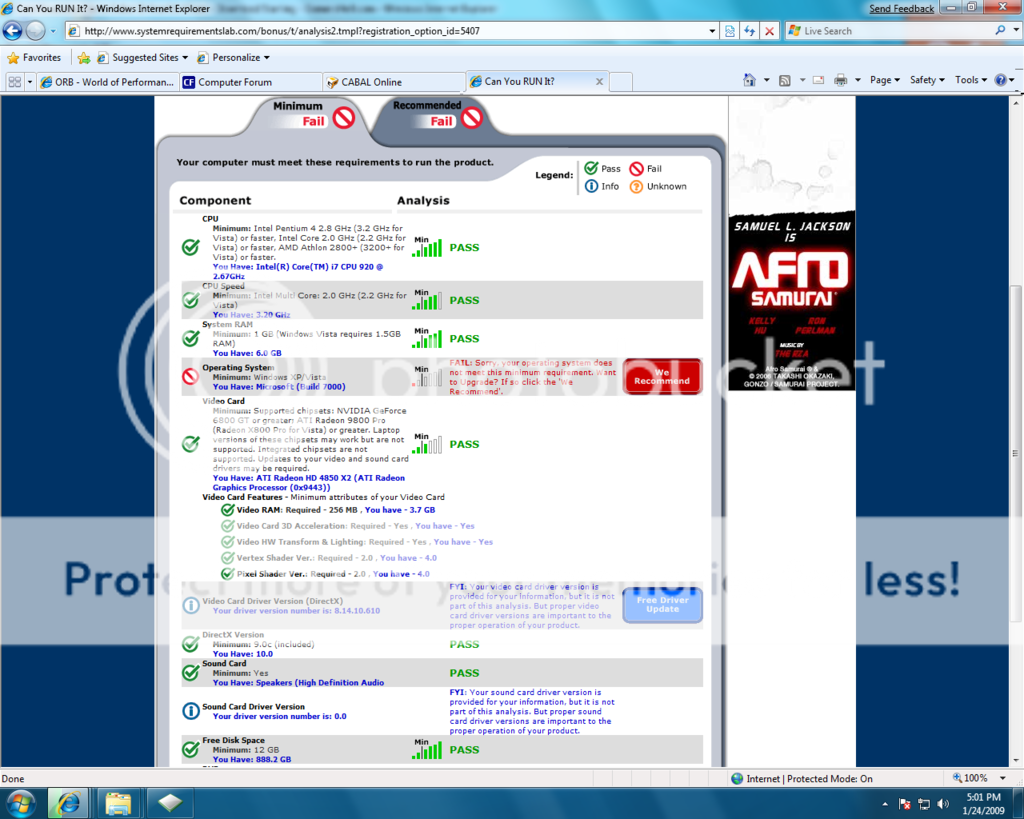
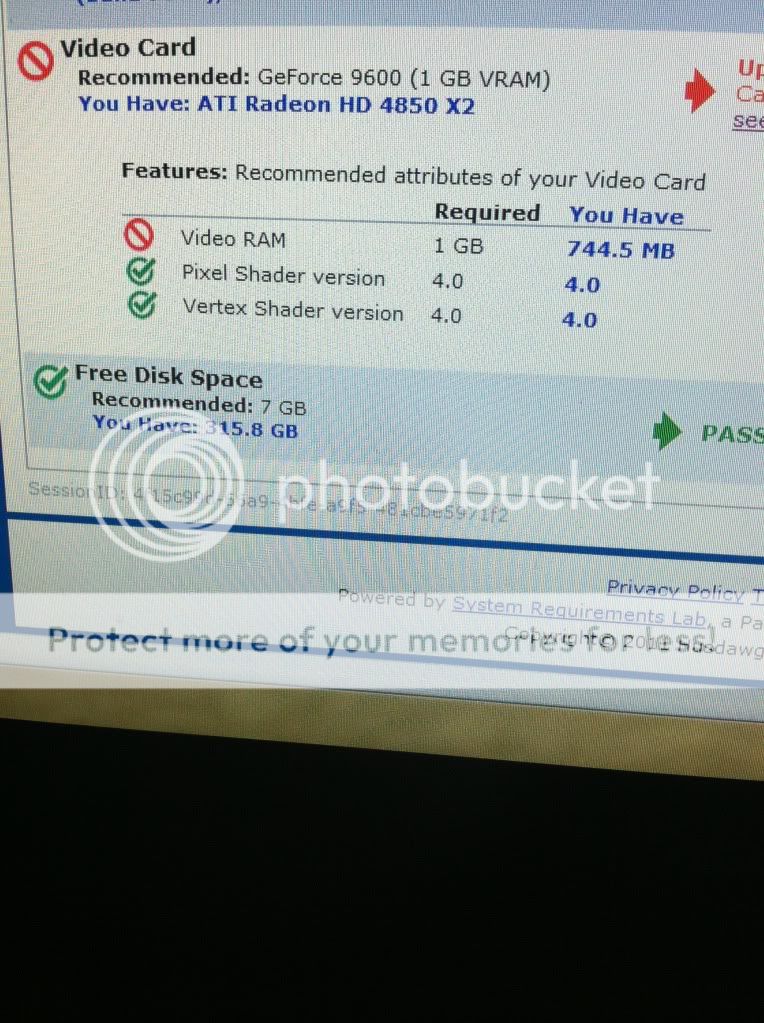
That's the amount of video RAM between the dedicated (which is probably 512MB) and the shared system RAM that is being used for graphics at that time. Therefore, that number may come out different every time you run that test as Windows is constantly adjusting how much that it allocates to graphics depending on what is being run at the time...
That's the amount of video RAM between the dedicated (which is probably 512MB) and the shared system RAM that is being used for graphics at that time. Therefore, that number may come out different every time you run that test as Windows is constantly adjusting how much that it allocates to graphics depending on what is being run at the time...
Well i ran that a lot 2 years ago and always got 3.7 gigs, and i ran it a lot today and always got 744 mbs, so im not really sure whats going on.
Even Dxdiag thinks i only have 744 mbs of dedicated video memory.
Last edited:
DCIScouts
VIP Member
Hmm..., ok, I looked up the specs on that card and it had 2GB of onboard RAM. So depending on how that card was built, some of the RAM may have gone bad or something, not sure - getting beyond my knowledge of how the boards are manufactured. Have you tried rebooting the computer and rerunning the scan?
Hmm..., ok, I looked up the specs on that card and it had 2GB of onboard RAM. So depending on how that card was built, some of the RAM may have gone bad or something, not sure - getting beyond my knowledge of how the boards are manufactured. Have you tried rebooting the computer and rerunning the scan?
I am going to try restarting now because I don't like losing 3 gigs of dedicated ram. It was one of those double cards so it was supposed to have 2 gigs per card, which is why 3.7 is what im supposed to have.
I just did a quick run on mine which only has 512MB of onboard RAM and it says that I have 2.2GB of RAM, so I wonder if there's something a little messed up with how the site detects the video RAM...
what does your dxdiag say though on the display tab?
DCIScouts
VIP Member
2287, so that's probably where they get the info from and it could cause some incorrect reporting because I do believe that particular screen does pull both physical and virtual video RAM. As for the X2 part of your card, I believe that took it from 1GB to 2GB which is what specs say that card has. Might want to do a disk error check and see if that corrects the issue if the reboot doesn't.
2287, so that's probably where they get the info from and it could cause some incorrect reporting because I do believe that particular screen does pull both physical and virtual video RAM. As for the X2 part of your card, I believe that took it from 1GB to 2GB which is what specs say that card has. Might want to do a disk error check and see if that corrects the issue if the reboot doesn't.
disk error check? how do i do that?
If its the same one im thinking about that windows provides, won't that only check my hard drive for errors?
Last edited:

I don't understand why it's low. When I first built it, it was very accurate. 3.7 was for both cards because it's supposed to be 2 gigs each card.
I've heard of something called memory leaks. Maybe this is an example of it.
I'm over here failing can you run it's because of this. I loved being able to throw all my settings on max with a new game, but maybe those days are coming to an end till I get a new card.
I guess it's okay because I can throw this card in an antec skeleton build that I wanted to make and get one of those eyefinity cards for my main build.
I've heard of something called memory leaks. Maybe this is an example of it.
I'm over here failing can you run it's because of this. I loved being able to throw all my settings on max with a new game, but maybe those days are coming to an end till I get a new card.
I guess it's okay because I can throw this card in an antec skeleton build that I wanted to make and get one of those eyefinity cards for my main build.

kobaj
VIP Member
Lets get some stuff straight here.
The 4850 x2 has 2gb shared between both cores. 2gb total. You never had 4 gigs of GPU memory.
A memory leak is a programming term for a program that slowly eats up your available ram. Once the program is terminated and the system restarted, the ram is freely available again. You do not have this.
Can you still run your games on max? If so, don't worry what some test says.
Now, for as actually seeing whats going on with the problem. Do you have the latest drivers? Have you checked your bios ram allocation? You can usually dedicate system ram towards the GPU. Perhaps a bios reset occurred on your hardware and that number was reset. Go into your bios and set it back.
Do a "chkdsk c: /f" in administrator command prompt as well.

The 4850 x2 has 2gb shared between both cores. 2gb total. You never had 4 gigs of GPU memory.
A memory leak is a programming term for a program that slowly eats up your available ram. Once the program is terminated and the system restarted, the ram is freely available again. You do not have this.
Can you still run your games on max? If so, don't worry what some test says.
Now, for as actually seeing whats going on with the problem. Do you have the latest drivers? Have you checked your bios ram allocation? You can usually dedicate system ram towards the GPU. Perhaps a bios reset occurred on your hardware and that number was reset. Go into your bios and set it back.
Do a "chkdsk c: /f" in administrator command prompt as well.
Last edited:
kobaj
VIP Member
Alright thank you, I'll try it when I get home. Which disk will that check?
Your C: drive. You can change it to another if you need.
Your C: drive. You can change it to another if you need.
when i type that in, the black box pops open and closes really fast. guess im just havin all sorts of bad luck lmao
Last edited:

claptonman
New Member
Right click on your C: drive in My Computer, properties, tools, error-checking - This option will check the drives for errors. There's another way to it. You'll probably have to restart your system.