windows xp will not install on blank hard drive

magnumbtb

New Member
Hello all. This is my first post and I couldn't find an answer in another thread, so here it goes:

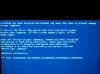
I had a computer that caught a virus so I used the DBAN program to wipe the hard drive. I am trying to use the factory disc that came with the computer to re-install windows xp but I haven't had any luck. I boot from CD, it loads all the drivers on the disc and as it goes to launch windows and begin installing, the computer crashes. I ran the factory hard drive diagnostics test and it passed that. The CD-Rom drive is in good condition and the CD has never been used before and has no scratches. I'm all out of ideas. Any help? :)
 
When it crashes, what does it do exactly? Does it give you an error code or anything?
 
What type of Harddrive is it installed on? Is it IDE or SATA? If it is SATA, you need to go into the BIOS and change the harddrive mode from RAID or AHCI to IDE or Compatibility.
 
If it's SATA you may need to load the SATA driver before installing XP depending on what board and SATA controller you are using.
 
It is a sata drive. the computer is a dell xps 710 and no other modifications have been made to it. The only options I have for it is: (off) (on) (RAID on) and I have been trying with it set to (on). Additonal info: BIOS version 1.4.1 Dual core processor 6600 @ 2.4 ghz.
 
I don't think this has anything to do with the sata setting. If it did you wouldn't get past where to install windows to. You may have a bad stick of ram or other hardware.

You still have answered my question on when it crashes does it give you any type of error message?
 
Set raid to off and try reinstalling windows. Is this a Dell reinstall cd or is it an actual microsoft XP install cd?
 
Dell re-install cd. tried with raid off and thats the error screen that comes up. everthing i try brings me to that screen. :mad:
 
Double check the bios to make sure there is no ahci/IDE setting. If so, set it to IDE. But I still say there is a hardware issue here.
 
Theres no option for that. Could it be possible the CD doesnt contain all of the drivers needed? I would hate for this to be a hardware problem. :(
 
When the install starts does it detect the hard drive? Because if it was a raid/ahci setting then setup would say it couldn't detect any hard drives. You say that it copies files over for the install then reboots and then it crashes. You wouldn't get past the reboot if it didn't detect the hard drive. How old is this hard drive you are trying to install it on? There could be an issue with it.
 
All components were made in 2007. when i boot from disc it says setup is detecting your computers hardware configuration, goes to blue screen, begins loading drivers, then that error screen. :( is it possible a virus could corrupt something? everything was working fine with the computer until i got it and the computer wasnt used or about 3 years during that time.
 
All components were made in 2007. when i boot from disc it says setup is detecting your computers hardware configuration, goes to blue screen, begins loading drivers, then that error screen. :( is it possible a virus could corrupt something? everything was working fine with the computer until i got it and the computer wasnt used or about 3 years during that time.

If it wasn't even touched in 3 years anything could have happened to the system. Could be bad ram or even a bad hard drive. You could try running memtest to test the ram.
 
Back
Top