Bsod from bad ram?

So I have been experience bsod when trying to record gameplay with fraps on my new pc. With some research a possible solution was bad ram. I ran windows memory diagnostic, basic scan met no errors standard scan also met no errors however extended scan is sitting at 21% for the passed 20 mins. I've decided to go to sleep and check it when I wake. I would assume that if it is still at 21% or not done in a few hours that I have bad ram. Is that safe to assume?

I can also post the dump files and the whocrashed diagnosis after I wake too if anyone has other suggestions.
 
Test your RAM with memtest86 (free version).

One stick at a time and scan for like 7 hours per stick should be enough.
 
Ok, so the memory diagnostic finally finished. I can't figure out if there were any errors or not. I apparently have no idea how to read the event log. Here are the 4 windows_memory_diagnostic results from event viewer and a dump files causing my errors. The other dump file is 773.mb I can upload that too but that is huge for a dump file. I figured I wouldn't since it seems like a waste of time. I uploaded these files via mediafire because I couldn't figure out skycloud.

http://www.mediafire.com/download/4bk129e6dzoz8d1/Event_Mem_Test.evtx

http://www.mediafire.com/download/n6mb0oqbcmv3dp5/020614-35521-01.dmp

WhoCrashed says the problem is probably caused by ntoskrnl.exe for the provided dump file. The other dump file ie memory.dmp, WhoCrashed says the error is probably caused by rtkvhd64.sys
 
Last edited:
Do as Punk suggested and download and create a memtest bootable cd and test the memory with it. The rtkvhd64.sys file is from your network card. Try updating the driver.
 
Alright, memtest86+ is running now on the first stick of memory. I've never used this before. Will it finish or do I have to end it? If it will finish on its own how long will it roughly take (i7-4770k 4gb stick). If I have to end it do i let it go for the 7 hours that Punk suggested or longer or what?
 
Alright, memtest86+ is running now on the first stick of memory. I've never used this before. Will it finish or do I have to end it? If it will finish on its own how long will it roughly take (i7-4770k 4gb stick). If I have to end it do i let it go for the 7 hours that Punk suggested or longer or what?

Yes let it run for about seven hours per stick, you'll need to end it.
 
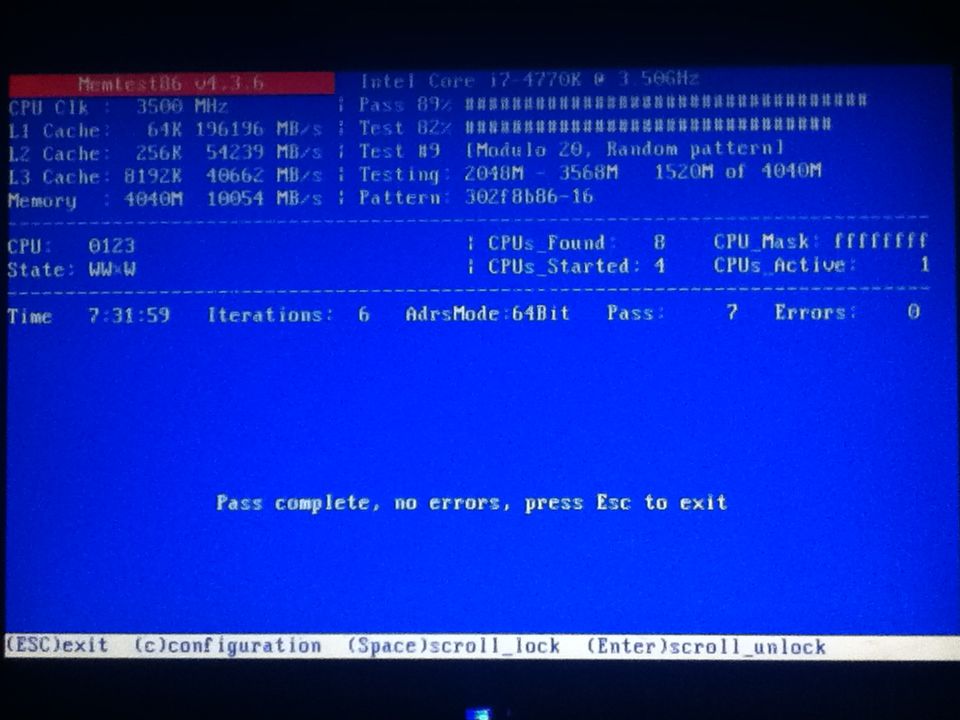
Ok so I don't think it's my ram. I did not run both sticks however, the stick I did test for 7.5 hours, prior to testing I had in the machine alone (without the other stick) and the bsod occurred. Anyways 7.5 hours an 0 errors. Is there something else that it could be? Hdd, bad windows install?
 
Not over clocking. Maybe I should explain exactly what I'm trying. The computer works flawlessly however I am trying to record gameplay. The bsod has been happening while running fraps. Sometimes it'll happen while recording others it will wait until I stop recording and close the program to desktop ten it will bsod. All the parts are brand new oldest part was bought 12/02/13 the computer was assembled 01/25/14. I can give a break down of all the components if needed.

Also here is a screen shot of the memtest if its important.
37F33B6F-6FA0-4999-A83C-ED48D53A0844_zpsk9erbppp.jpg
 
Did you run it on all the sticks? I know it takes time but you'll rule out RAM if it's all ok.

What file crashed this time? All the time the same one?

EDIT: Re-read your post and yeah it doesn't look like RAM...
 
Last edited:
I'm going to try a fresh install of Win7 64. I'm just hoping its not hardware related. Dropped so much money and having problems less than a month old, lol if its a hardware problem I'm going to flip. I HOPE so much that its just a bad install.

Also I was playing Left 4 Dead 2 (not recording) and it BSOD. This time it was 2 System_Service_Exceptions 1 related to ntfs.sys and the other due to ntoskrnl.exe.
 
Last edited:
I'm going to try a fresh install of Win7 64. I'm just hoping its not hardware related. Dropped so much money and having problems less than a month old, lol if its a hardware problem I'm going to flip. I HOPE so much that its just a bad install.

Also I was playing Left 4 Dead 2 (not recording) and it BSOD. This time it was 2 System_Service_Exceptions 1 related to ntfs.sys and the other due to ntoskrnl.exe.

You can try that and keep us up to date if you're experiencing more problems :)
 
Ok so... I found something that I need some help with. I researched the crash and i found this post: http://social.technet.microsoft.com...with-windows-7-home-sp1?forum=w8itprohardware

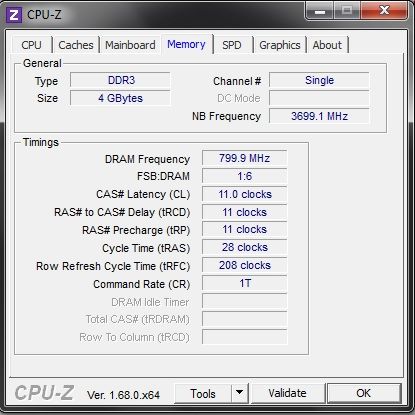
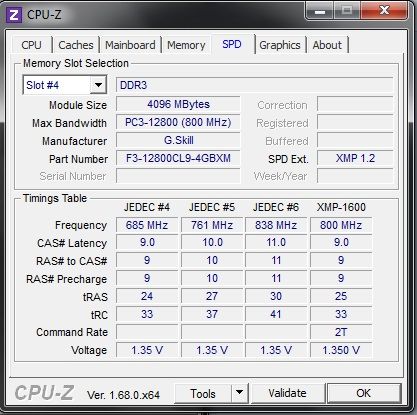
in there the guy replying suggests to "If the memtest tells no error, please download CPU-Z [4], look in the memory and SPD tab and verify that the current RAM Speed and the Timings match to the values that you see in the SPD tab. If your RAM run at CR (Command Rate) 1T, change the value into 2T in the BIOS." Now I opened CPU-Z and my CR is at 1T that is all I could decipher I have no idea what else I'm looking at or what is supposed to match. Here are the 2 screen shots.

Memory_zps7b8df14c.jpg

SPD_zps277ef660.jpg
 
One of your timings is a little different than SPD. Shouldn't be a big deal though, from the XMP profile it can handle it.

You mentioned that you only ran the test on one stick, is that still the case? If so run it on the second one.
 
One of your timings is a little different than SPD. Shouldn't be a big deal though, from the XMP profile it can handle it.

You mentioned that you only ran the test on one stick, is that still the case? If so run it on the second one.

Yes I only ran it on one stick because before running the test on the one stick I ran only that stupid and replicated the BSOD which would conclude that the BSOD is not caused from ram.

How do I configure my ram in the BIOS properly? I've never had to do that before?
 
Yes I only ran it on one stick because before running the test on the one stick I ran only that stupid and replicated the BSOD which would conclude that the BSOD is not caused from ram.

How do I configure my ram in the BIOS properly? I've never had to do that before?

that doesn't make much sense.
 
In short you are getting various blue screens off of core windows files. Very often this is a RAM problem. It could be another driver acting up. Lack of windows updates. We're stuck on RAM because it has all the right signs.

It could be a bad install, if you've got a fresh install anyway, there's not much hurt in redoing it. Some lost time.

You can try swapping the slots the RAM is in. It's unlikely the processor is bad. If it boots, it's probably not a seating problem either. Do you have a second machine to try the RAM in?
 
Back
Top