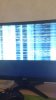
Computer screen looks strange

Need help fixing screen

  • Graphix card

    Votes: 0 0.0%
  • New monitor screen

    Votes: 0 0.0%

  • Total voters
    0

TimRonsse

New Member
Hi


I have a problem with my pc screen I have 2 screens btw.
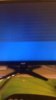
When I'm playing a game and I alt-tab for opening skype sometimes my screen looks weird (look at image below.)
I dont know what it is, please help me.


Tim
 

Attachments

  • 11911478_991092954246738_11937183_n.jpg
    11911478_991092954246738_11937183_n.jpg
    32 KB · Views: 6
  • 11823959_981572848532082_1180976746_n.jpg
    11823959_981572848532082_1180976746_n.jpg
    49.4 KB · Views: 6
So its fine until you do the alt tab? Do both screens screw up or just one? Have you tried updating video driver?
 
well I dont know its because of the alt-tab but it just happend again like 5mins before the forum post.
And just 1 the main screen.
 
try updating the video driver first. Then if it still happens, try a different monitor.
 
As I said, try updating video driver. Also may be a ram issue, other than that last option would be a bad monitor or cable.
 
It just happend again but its disapeared after 10sec
its when I go to my other screen and do something on that.
It trips again
 
You will have to open the side panel to get the model number as it won't be listed in system anywhere. Would also need to know the exact model of video card, you just list the series of card.

Do this to get model number. Go into the C:\windows\system32 folder and find and open dxdiag.exe.

It will take a little time to collect information, then go to the display tab and tell me what is listed in the circled area i have below.


GPU-Z would probably be a better bet on specific model.

https://www.techpowerup.com/downloads/SysInfo/GPU-Z/

For power supply it's the box looking thing with the sticker on the side of it.

power-supply-installed.jpg
http://www.slcentral.com/ahanix-dbox-silver-pc-case/power-supply-installed.jpg
 
Back
Top