Upgrade or buy new desktop?

I've heard that windows 10 is free to download and install, should i try to install the 64 bit version of that to fix the load up problem? I'm not really comfortable using this computer to play games because it's pretty old, but i might use it for other things. It seems like most of the parts are going to get outdated soon, mainly, the motherboard. After 3 years, dont most electronics start to break. I also didnt really take care of it that well. There were many times when it got super hot while i played games. I almost never cleaned the dust that piled up near the vents for it to be vetilated well. I also of course didnt defrag or scan often for viruses. I do want to fix it and maybe give it to someone who needs a computer for other uses other than playing games.
 
Last edited:
In all honesty, you should be backing up your data, wiping the drive and reinstall windows fresh on this machine. It was and still is infected and giving that it takes over 6 minutes to start up is a big issue. I'll give you some fixes to run and see if it helps any though.

1.
1. Go to Start > Run > type Notepad.exe and click OK to open Notepad.
It must be Notepad, not Wordpad.
2. Copy the text in the below code box

Code:
File::

c:\program files\GUM147A.tmp

Driver::

vtany
XDva399
XDva402
xhunter1
EagleXNt

Reglock::

[HKEY_LOCAL_MACHINE\system\ControlSet001\Control\Class\{4D36E96D-E325-11CE-BFC1-08002BE10318}\0000\AllUserSettings]
[HKEY_LOCAL_MACHINE\system\ControlSet001\Control\Class\{4D36E96D-E325-11CE-BFC1-08002BE10318}\0001\AllUserSettings]
[HKEY_LOCAL_MACHINE\system\ControlSet001\Control\Class\{4D36E96D-E325-11CE-BFC1-08002BE10318}\0002\AllUserSettings]
[HKEY_LOCAL_MACHINE\system\ControlSet001\Control\Class\{4D36E96D-E325-11CE-BFC1-08002BE10318}\0003\AllUserSettings]


3. Go to the Notepad window and click Edit > Paste
4. Then click File > Save
5. Name the file CFScript.txt - Save the file to your Desktop
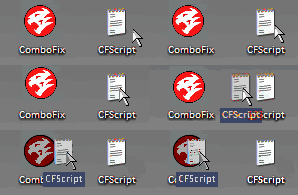
6. Then drag the CFScript (hold the left mouse button while dragging the file) and drop it (release the left mouse button) into ComboFix.exe as you see in the screenshot below. Important: Perform this instruction carefully!


CFScript-1.gif


ComboFix will begin to execute, just follow the prompts.
After reboot (in case it asks to reboot), it will produce a log for you.
Post that log (Combofix.txt) in your next reply.


2.

Run OTL again, but this time copy and paste the following text into the custom scans/fixes box at the bottom and then click on the run fix button up top.

Code:
:OTL

DRV - (xhunter1) -- C:\Windows\xhunter1.sys File not found
DRV - (XDva402) -- C:\Windows\system32\XDva402.sys File not found
DRV - (XDva399) -- C:\Windows\system32\XDva399.sys File not found
DRV - (vtany) -- C:\Windows\vtany.sys File not found
DRV - (EagleXNt) -- C:\Windows\system32\drivers\EagleXNt.sys File not found
O3 - HKLM\..\Toolbar: (ALToolBar) - {38FBE93D-4CA1-4414-AF6A-94920C5BD8DA} - C:\Program Files\ESTsoft\ALToolBar\ALToolBar_2240.dll (ESTsoft Corporation)
O4 - Startup: C:\Users\kim\AppData\Roaming\Microsoft\Windows\Start Menu\Programs\Startup\모니터 잉크 경고 - .lnk =  File not found
O6 - HKLM\Software\Policies\Microsoft\Internet Explorer\Restrictions present
O8 - Extra context menu item: 알툴바 빠른검색(&Q) -  File not found
O8 - Extra context menu item: 이미지 EXIF 정보 보기 -  File not found
O15 - HKCU\..Trusted Domains: abchina.com ([]* in 신뢰할 수 있는 사이트)
O15 - HKCU\..Trusted Domains: bankcomm.com ([]* in 신뢰할 수 있는 사이트)
O15 - HKCU\..Trusted Domains: bankofbeijing.co ([]* in 신뢰할 수 있는 사이트)
O15 - HKCU\..Trusted Domains: bankofshanghai.com ([]* in 신뢰할 수 있는 사이트)
O15 - HKCU\..Trusted Domains: boc.cn ([]* in 신뢰할 수 있는 사이트)
O15 - HKCU\..Trusted Domains: cbhb.com.cn ([]* in 신뢰할 수 있는 사이트)
O15 - HKCU\..Trusted Domains: ccb.com ([]* in 신뢰할 수 있는 사이트)
O15 - HKCU\..Trusted Domains: cebbank.com ([]* in 신뢰할 수 있는 사이트)
O15 - HKCU\..Trusted Domains: cgbchina.com.cn ([]* in 신뢰할 수 있는 사이트)
O15 - HKCU\..Trusted Domains: cib.com.cn ([]* in 신뢰할 수 있는 사이트)
O15 - HKCU\..Trusted Domains: citibank.co.kr ([]* in 신뢰할 수 있는 사이트)
O15 - HKCU\..Trusted Domains: cmbc.com.cn ([]* in 신뢰할 수 있는 사이트)
O15 - HKCU\..Trusted Domains: cmbchina.com ([]* in 신뢰할 수 있는 사이트)
O15 - HKCU\..Trusted Domains: cu.co.kr ([]* in 신뢰할 수 있는 사이트)
O15 - HKCU\..Trusted Domains: czbank.com ([]* in 신뢰할 수 있는 사이트)
O15 - HKCU\..Trusted Domains: ecitic.com ([]* in 신뢰할 수 있는 사이트)
O15 - HKCU\..Trusted Domains: egbank.com.cn ([]* in 신뢰할 수 있는 사이트)
O15 - HKCU\..Trusted Domains: hanacard.co.kr ([]* in 신뢰할 수 있는 사이트)
O15 - HKCU\..Trusted Domains: hxb.com.cn ([]* in 신뢰할 수 있는 사이트)
O15 - HKCU\..Trusted Domains: icbc.com.cn ([]* in 신뢰할 수 있는 사이트)
O15 - HKCU\..Trusted Domains: kcp.co.kr ([]* in 신뢰할 수 있는 사이트)
O15 - HKCU\..Trusted Domains: keb.co.kr ([]* in 신뢰할 수 있는 사이트)
O15 - HKCU\..Trusted Domains: pingan.com ([]* in 신뢰할 수 있는 사이트)
O15 - HKCU\..Trusted Domains: psbc.com ([]* in 신뢰할 수 있는 사이트)
O15 - HKCU\..Trusted Domains: sdb.com.cn ([]* in 신뢰할 수 있는 사이트)
O15 - HKCU\..Trusted Domains: spdb.com.cn ([]* in 신뢰할 수 있는 사이트)
O15 - HKCU\..Trusted Domains: unionpaysecure.com ([]* in 신뢰할 수 있는 사이트)
@Alternate Data Stream - 134 bytes -> C:\ProgramData\Temp:373E1720
@Alternate Data Stream - 127 bytes -> C:\ProgramData\Temp:430C6D84
@Alternate Data Stream - 104 bytes -> C:\ProgramData\Temp:DFC5A2B2

:commands
[resethosts]
[purity]
[emptytemp]
[emptyflash]
[emptyjava]
[reboot]


Also please uninstall the following programs.

'Full Speed' Internet Booster + Performance Tests
µTorrent
Advanced SystemCare 5
Browser Defender 4.0
Java 7 Update 55
Java Auto Updater
Java(TM) 6 Update 31
JavaFX 2.1.1

Please post the new combofix log and the OTL fix log.

Looks like you have a lot of unnecessary software installed. I'll try and get a list together and have you figure out if its really needed. Some of it I don't know what it is so will ask you.

Also, at this time please run the following.

Please download and run the ESET Online Scanner
Disable any antivirus/security programs.
IMPORTANT! UN-check Remove found threats
Accept any security warnings from your browser.
Check Scan archives
Click Start
ESET will then download updates, install and then start scanning your system.
When the scan is done, push list of found threats
Click on Export to text file , and save the file to your desktop using a file name, such as ESETlog. Include the contents of this report in your next reply.
If no threats are found then it won't produce a log.

 
In all honesty, you should be backing up your data, wiping the drive and reinstall windows fresh on this machine. It was and still is infected and giving that it takes over 6 minutes to start up is a big issue. I'll give you some fixes to run and see if it helps any though.
I was a little busy today, so I will run the virus programs and post the logs as soon as i can when i get the chance.
 
In all honesty, you should be backing up your data, wiping the drive and reinstall windows fresh on this machine. It was and still is infected and giving that it takes over 6 minutes to start up is a big issue. I'll give you some fixes to run and see if it helps any though.
I'm not sure if the computer was scanned successfully with the 2 programs you told me to scan with. The first couple of times i tried I got some error message from my virus program I used for years that it was going to prevent the program from tampering with the host file or something. I was busy with something else when the programs were scanning again for the 3rd or the 4th time, with my main virus program off this time, so I'm not sure if the error message popped up again or not when it was starting up again after the reboot. I couldn't upload the OTL log because the website wouldn't let me. I will scan with the ESET program another time because it takes a really long time to scan.
 

Attachments

In all honesty, you should be backing up your data, wiping the drive and reinstall windows fresh on this machine. It was and still is infected and giving that it takes over 6 minutes to start up is a big issue. I'll give you some fixes to run and see if it helps any though.
ESET log. Anyway, why did you tell me to uncheck "Remove found threats"? I just thought it was kind of waste to not remove the threats because the scan took a really long time, about 4 hours and half.
 

Attachments

Unfortunately, the more logs you give me, the more you need to back up your data and reinstall windows. You have installed so much crap software its unbelievable. There are even entries listed that don't even show up in the add-remove programs list.

Please perform this combofix script to get rid of those entries from ESET scan.

1. Go to Start > Run > type Notepad.exe and click OK to open Notepad.
It must be Notepad, not Wordpad.
2. Copy the text in the below code box

Code:
Folder::

c:\program files\GUM147A.tmp
E:\Program Files\Mozilla Firefox 4.0 Beta 7  
E:\Program Files\PC Health Optimizer Free Edition
E:\Program Files\PoweroffManager  
E:\Program Files\emoneypoint2    
E:\Program Files\JuminCheck
E:\Program Files\krnavigator2
E:\Documents and Settings\Joe\Application Data\Sun\Java\Deployment\cache\6.0\54\6e49cf76-32172b86

File::


C:\Windows\System32\config\systemprofile\AppData\Local\Microsoft\Windows\Temporary Internet Files\Content.IE5\2DJXSEO3\upgrade[1].cab  
E:\Documents and Settings\Administrator\Local Settings\Temporary Internet Files\Content.IE5\FG79RAPY\read[1].htm  
E:\Documents and Settings\Administrator\Local Settings\Temporary Internet Files\Content.IE5\R71E928N\photo[1].htm  
E:\Documents and Settings\LocalService\Local Settings\Temporary Internet Files\Content.IE5\PWUSKL95\upgrade[1].cab  
E:\Documents and Settings\LocalService\Local Settings\Temporary Internet Files\Content.IE5\PWUSKL95\upgrade[2].cab  
E:\Documents and Settings\LocalService\Local Settings\Temporary Internet Files\Content.IE5\XVKRRBOY\upgrade[1].cab  
E:\Documents and Settings\NetworkService\Application Data\internet dart\Forview.exe  
E:\Documents and Settings\Sarah\My Documents\Downloads\AresSetup.exe  
E:\Documents and Settings\Sarah\My Documents\Downloads\setup.exe  
E:\Program Files\Mozilla Firefox\components\AdVComponent.dll


3. Go to the Notepad window and click Edit > Paste
4. Then click File > Save
5. Name the file CFScript.txt - Save the file to your Desktop
6. Then drag the CFScript (hold the left mouse button while dragging the file) and drop it (release the left mouse button) into ComboFix.exe as you see in the screenshot below. Important: Perform this instruction carefully!


CFScript-1.gif


ComboFix will begin to execute, just follow the prompts.
After reboot (in case it asks to reboot), it will produce a log for you.
Post that log (Combofix.txt) in your next reply.


I still haven't had time to go through the list of installed programs to verify what needs to be removed yet. I have a kind of busy life. I work full time, have my own computer repair business and then a personal life just so you understand. But as I said before, it would be so much quicker and beneficial to you to back up your data and reinstall windows due to all this crap software installed slowing the system to a crawl. If you don't feel like doing that then its just gonna take some time to try and figure out what needs to be deleted.

Also, if you haven't done so I highly recommend that you run Ccleaner. I see that you have it installed already. Just open the program and click on run ccleaner. Do not run the registry cleaner part of it.
 
Unfortunately, the more logs you give me, the more you need to back up your data and reinstall windows. You have installed so much crap software its unbelievable. There are even entries listed that don't even show up in the add-remove programs list.

I still haven't had time to go through the list of installed programs to verify what needs to be removed yet. I have a kind of busy life. I work full time, have my own computer repair business and then a personal life just so you understand. But as I said before, it would be so much quicker and beneficial to you to back up your data and reinstall windows due to all this crap software installed slowing the system to a crawl. If you don't feel like doing that then its just gonna take some time to try and figure out what needs to be deleted.

Also, if you haven't done so I highly recommend that you run Ccleaner. I see that you have it installed already. Just open the program and click on run ccleaner. Do not run the registry cleaner part of it.
Yes i do want to get rid of all the viruses and unnecessary programs on this computer, but it's okay if it will take a while because I'm only planning to use this computer to surf the web. I found out that my computer doesn't have an extra slot to fit extra ram, and i needed more ram if i was going to use this computer for gaming. I feel like the cpu won't last long either. Well, i really thank you for your help till now.
 

Attachments

Back
Top