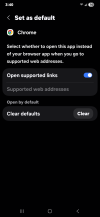
Go to settings and then apps and then Firefox see if you the clear defaults at the bottom and tap it. That should stop it from opening pdf automatically. See example.
Go to settings and then apps and then Firefox see if you the clear defaults at the bottom and tap it. That should stop it from opening pdf automatically. See example.View attachment 12046
I couldn't find a clear defaults option in the Foxfire settings. Chrome isn't apart of this issue. Ultimately though just uninstalled Firefox, reassociated to Acrobat, then reinstalled that browser.