How come it says I have 0.98GB of ram?

Shootothrill

New Member
Ok so I have 1GB of ram in my system(its 1 stick) When go to view System info it says I have 0.98Gb of Ram. Shouldnt it say I have 1024?

 
What make is this stick?

If its cheap it may just be that the producer hasn't totalled up the chips.

Just put some slightly uneven chips on there.
Because you have to remember its really hard for the manafacturer to get exactly the right amount of memory onto a chip.
 
That is the amount of ram available after the intial chunk reserved by the system is subtracted. With the firts 512mb of memory installed on the system the board will commonly grab up to 196mb right off of the top. On a system with 2,048mb total installed I see 1,580mb as available. When you add a new hardware on the system that number will drop slightly.

You should see four different figures in the system information window with the totals for total physical memory, available physical memory, total virtual memory, and available vitual memory. Look for the total physical memory value. If that shows 1,024mb then the accurate amount of memory is being reported there.
 
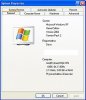
Ok I see what ya mean. in the system Info it says 1,024 but I was looking in the system properties and thats where it says 0.98GB
 
Ok I see what ya mean. in the system Info it says 1,024 but I was looking in the system properties and thats where it says 0.98GB

Do you have integrated graphics? If so, 32MB-128MB is allocated for it in the normal system memory.
 
Maybe the manufacturer of your ram is not using 1024 but 1000 instead which would give you the .98GB number after converted.
RAM's never like this, just hard drives and what not... It's almost got to be shared video. Though I have seen some computers that showed .99GB RAM even without shared memory.
 
One thing to note here is when right clicking on the MyComputer desktop icon the memory total there is only seen in a rounded figure. With a 1gb dimm you will see 1gb not 1,024mb. That is seen in the general tab of the system properties there. With the .99gb seen that's most likely the total counted after the board reserves it's own "piece of the pie" so to speak.
 
That's what TOO said, HDDs are labeled as 200GB but they are really 200,000,000,000 bytes (@1000 bytes per KB) vs 214,748,364,800 bytes (@1024 bytes per KB)
 
Funny, my system isn't reserving any pie....;)

I never said that I was a baker! :P

systempropertiesiu8.jpg


That's what TOO said, HDDs are labeled as 200GB but they are really 200,000,000,000 bytes (@1000 bytes per KB) vs 214,748,364,800 bytes (@1024 bytes per KB)

Now now don't forget the mbr takes a little space as well as the partition table and other information. It's when you have a partition ready and formatted that you boot from a flopy and change from A to C and type in "C:>dir" or "C:>dir/w" and press enter there you will see a total drive space figure larger then what you will see while in Windows. At the dos prompt you will a figure over the 200,000,000,000 byte mark easily there. The manufacturer simply round off the figures rather then getting technical.
 
That is true, you aren't ever going to get a drive that's exactly 200,000,000,000 but thats the figure HDD manufacturers use when claiming a 200GB drive.
 
That's what TOO said, HDDs are labeled as 200GB but they are really 200,000,000,000 bytes (@1000 bytes per KB) vs 214,748,364,800 bytes (@1024 bytes per KB)
Yes, this is why you see that in hard drives, then on top of that the file system takes up space too, and if you have a journaling file system it takes up even more on the partition.
 
Although the master boot record is little item the boot sector takes from 100nb to 400mb immediately off of the front of the drive. Besides the partition information there is some 2gb of drive space hidden by XP for storing backup information for everything installed onto the system. Here the Window directory itself takes up only 4.5gb of drive space.
 
Back
Top