sli memory

jimmyjames

New Member
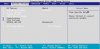
There is an option in my bios that says sli memory followed by not detected. My memory is sli certified and I was curious to how i enable it as it doesnt allow me to change it?

 
If you installed both dimms seen in your sig on one channel namely the first two dimm slots on the board the board is running in single not the dual channel mode. The second dimm should be in the B1 slot not A2 there. This is probably why you are running into this. The user manual for the board itself will always provide information on how to enable dual channel when installing ram. This would be the first thought there.
 
i have them in the correct slots as its showing up as running in dual channel mode.. i only have the one graphics card tho this is to do with the memory slots.... or do you require it to be running in sli mode to enable this option on the memory?
 
Check your memory channels in your motherboards manual. My friend had this problem before. There is a special configuration
 
What is meant by SLI support there is when running an SLI setup the memory will still perform on it's own. You won't find any memory SLI mode switch in the bios or anywhere else since this would be something automatic by how the memory itself works. The term someone stuck on the product page sounds good but lacks reality and is more of a selling point. This is simply something added to the description on performance memory.
 
see attached picture for the option in the bios...

also if i want to change the timings to 4-4-4-12 would the following be correct

tCL Cas Latency - 4
tRCD - 4
tRP - 4
tRAS - 12

however do i need to change the voltage if I do this?
 

Attachments

  • bios.JPG
    bios.JPG
    32.1 KB · Views: 44
Last edited:
SLI RAM is about having an EPP programmed into it, it doesn't matter if you have video cards in SLI. It's still a gimmick though :)

You only need to change the voltage if it isn't stable at those timings. The specs say it was tested at 4-4-4 @ 2.1V
 
Just remember that when raising the voltage you only more in 1/10 of a volt increments to like 2.2v or 2.3v there. If you decide to crank things up fast you can easily damage the memory. For older memory that was default at 2.4v the highest seen would be 2.7v if stable there. Often the second 2.6v saw far more stability.
 
What is meant by SLI support there is when running an SLI setup the memory will still perform on it's own.

Where did you come up with that, SLI memory is no more than EPP Memory, they just slap the SLI logo on it to show they guarantee the EPP settings. Has nothing to do with if you have a SLI board and run SLI setup or not.
 
Back
Top