Right so, bought a computer a few weeks ago, had no problems untill a few days ago.
I'm taking a wild guess that its my graphics card. The only 2 games I play are Unreal Tournament 2004 and Last Chaos (free MMO), both ran fine, full settings, absolutely no issues.
2 days ago I was play UT2k4 when in the middle of the game I saw some random "polygons" in the sky. Then after, I looked at a person (my team or the other) and a whole bunch of these "polygons" hit me. When I would have my curser over something else it was fine, but every time I bought it back I would get them again. Now, I only had 30 seconds left in the game, so I finished and turned off my computer, thinking this would solve it.
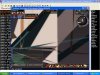
When I turned it back on, I opened Last Chaos up, all the loading screens looked fine, but then I got into the game, I was hit with these "polygons" (image)
The funny thing is, I can move the camera around and find a certain angle where I can play the game fine, none of the polygons or anything, but every other angle I am being hit with 100's of these things moving around the screen, some just sitting in place.
I have an EVGA 7600GT card, installed all the latest drivers. The only thing Ive installed in the last few days is Starcraft, which I quickly uninstalled when this happened.
Anyone have any ideas?
I'm taking a wild guess that its my graphics card. The only 2 games I play are Unreal Tournament 2004 and Last Chaos (free MMO), both ran fine, full settings, absolutely no issues.
2 days ago I was play UT2k4 when in the middle of the game I saw some random "polygons" in the sky. Then after, I looked at a person (my team or the other) and a whole bunch of these "polygons" hit me. When I would have my curser over something else it was fine, but every time I bought it back I would get them again. Now, I only had 30 seconds left in the game, so I finished and turned off my computer, thinking this would solve it.
When I turned it back on, I opened Last Chaos up, all the loading screens looked fine, but then I got into the game, I was hit with these "polygons" (image)
The funny thing is, I can move the camera around and find a certain angle where I can play the game fine, none of the polygons or anything, but every other angle I am being hit with 100's of these things moving around the screen, some just sitting in place.
I have an EVGA 7600GT card, installed all the latest drivers. The only thing Ive installed in the last few days is Starcraft, which I quickly uninstalled when this happened.
Anyone have any ideas?