
Changing Icons in My Computer Windows XP Home

Adventure Man

New Member
Hi guys, I have windows xp home service pack 2. Wanted to know how to change this icon (see photo below) in My Computer. In particular the "My Book" hard drive icon. I do not like this icon and wish to change it to anything else. I tried a suggested registry change but it didn't work. Any suggestions?
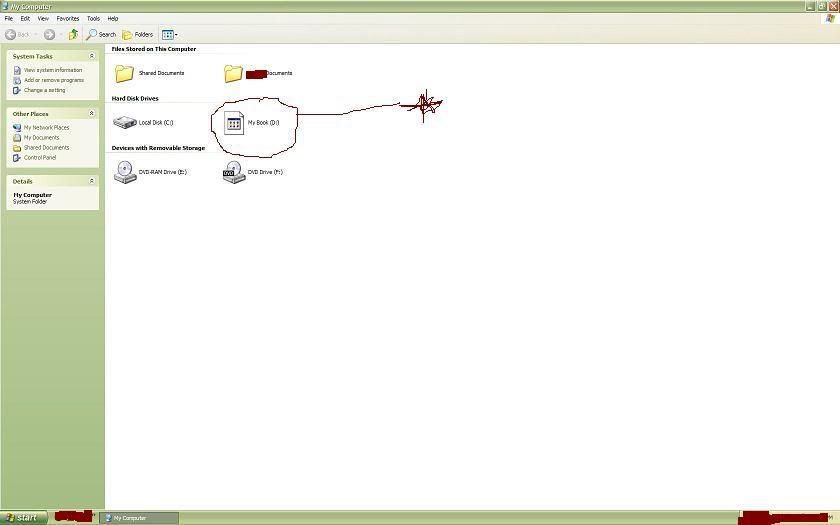
Clipboard02.jpg
 
Go to the drive D: and right click on it. Now select Properties.
In the window that appears, select Customize. Under the category Folder Pictures, select, "Choose File".

Please note : I'm telling this with respect to Windows Vista. I've not done this on an XP system. But it must be something similar to this.

Hope this helps
 
Go to the drive D: and right click on it. Now select Properties.
In the window that appears, select Customize. Under the category Folder Pictures, select, "Choose File".

Please note : I'm telling this with respect to Windows Vista. I've not done this on an XP system. But it must be something similar to this.

Hope this helps

I don't believe that option is available if it is a HD icon, this site tells you how
http://www.pcmag.com/article2/0,1759,1847172,00.asp
 
I checked it first before posting. The option is available on Vista. I'm not too sure about XP though.
 
I checked it first before posting. The option is available on Vista. I'm not too sure about XP though.

xp doesn't have that option. Alright I'm upgrading to Vista right now!!...kidding

I'm gonna check that site out tft.
thanks guys, i'll report back with my results
 
Ended up being this:
There is more than likely a hidden file on the drive, probably autofun.inf and a .ico in there to go along with it. If you delete the icon thats in the drive, it will stop trying to overwrite the default one and it will look like a normal icon.

Unhide all the folders in the drive and delete all the extra files and miraculously the normal windows hard drive icon popped back up.
 
Back
Top