
You are using an out of date browser. It may not display this or other websites correctly.
You should upgrade or use an alternative browser.
You should upgrade or use an alternative browser.
MSConfig Startup
- Thread starter Vizy
- Start date

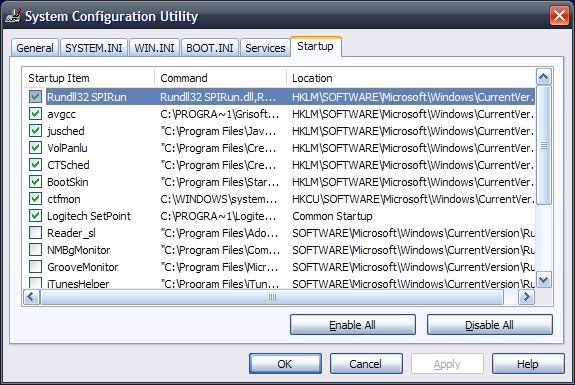
From what is seen there disabling any more would lose some of the antivirus protection by disabling one of AVG's processes, certainly knock out the volume control panel for audio, and disable the setpoint for the keyboard/mouse combo.
But you can always go back in to re-enable anything previously put out of commission easy enough. You just have to reboot after each session to see any changes put into effect.
But you can always go back in to re-enable anything previously put out of commission easy enough. You just have to reboot after each session to see any changes put into effect.


hermeslyre
VIP Member
If you want to take the extra step further, and disable uneeded services, go to the elder geek and search for the services you wish to know about. They give an in depth explanation on all the ones I've ever searched for, and whether you can or should turn them off. I'll also recommend you start -> Run -> "services.msc" to do this, as this program is the one that is intended for such work.
you can go to services and stop whichever services you think you won't need.
Providing you know what you're doing, but on the "startup" tab, most programs can be stopped, just see who runs it
Provided you first check off the "hide all Microsoft services" box so you don't disable any essential background services that is.
Meanwhile the link for Elder Geeks there is for the artcle seen on XP SP3 at the present time. You would have dig around for the older one a little. Another called TweakXP.com has a good list of things to improve XP's performance overall seen at http://www.tweakxp.com/performance_tweaks.aspx
hermeslyre
VIP Member
It's the front page. The site is a repository of sorts, Op would of course have to use the search bar to locate singular service definitions.
Not all microsoft services are needed, it's a case to case basis, I would research each service specifically, to see if it's essential for specific levels of operation
Not all microsoft services are needed, it's a case to case basis, I would research each service specifically, to see if it's essential for specific levels of operation
Once you go into the services and use the hide all MS option you will see AVG and all the other startup like those for the video as well as sound card found there. You may follow a reference thinking one service isn't needed and then find some program actually depends on it being set as automatic or manual not disabled.
Like hermeslyre pointed out it's a service by service risk whenever going to disable any Windows services or functions.
Like hermeslyre pointed out it's a service by service risk whenever going to disable any Windows services or functions.