
You are using an out of date browser. It may not display this or other websites correctly.
You should upgrade or use an alternative browser.
You should upgrade or use an alternative browser.
8600GTS Fan Problem
- Thread starter speedyink
- Start date

speedyink
VIP Member
Wow, this thing is awesome. So far any game maxed except for Crysis(Which looks incredible now), and thats at stock speeds. I can't overclock it at the moment because (I'm guessing) I'm using the newest beta drivers. Temperature is SO much cooler on this one, and it actually listens to Rivatuner!!
Only downside is I had to take out my tuner card to get it to fit(along with new wiring and hard drive placement), but I never used the tuner anyway, so it's more than worth it
Only downside is I had to take out my tuner card to get it to fit(along with new wiring and hard drive placement), but I never used the tuner anyway, so it's more than worth it
Last edited:

speedyink
VIP Member
That's awesome, Glad you like it!
169.44 are by far the best drivers to use, BTW.
When you do OC it, fasten your seatbelt!
Really? Just for overclocking? So you'd recommend it over 175.12?

Kornowski
VIP Member
I didnt know there was a 175.**
I thought the latest was the 174.**'s and they sucked!
I found them the best for everything. FPS and image quality, I also had the same OC on all different drivers I tried.
I guess you could compare them yourself? I would, but my comp won't even post
I thought the latest was the 174.**'s and they sucked!
I found them the best for everything. FPS and image quality, I also had the same OC on all different drivers I tried.
I guess you could compare them yourself? I would, but my comp won't even post
Kornowski
VIP Member
Yeah. They're beta ones, but they're excellent.
When you're OC'ing and you find it's unstable, lower the memory to 1,000! As apparrently that's the most some can take. Unless you got lucky and have the Samsung chips, which can do 2,000+
Also, I find that anything above 61% on the fan is too loud, for me at least.
What are your temps?
Good Luck!
When you're OC'ing and you find it's unstable, lower the memory to 1,000! As apparrently that's the most some can take. Unless you got lucky and have the Samsung chips, which can do 2,000+
Also, I find that anything above 61% on the fan is too loud, for me at least.
What are your temps?
Good Luck!
speedyink
VIP Member
My temps now are ~47 idle and up to 60 load. This is at a constant fan speed of 70%. I can barely hear the fan at that level, because my computer is behind a 32" LCD TV. Not to mention the surround sound drowns it out quite nicely
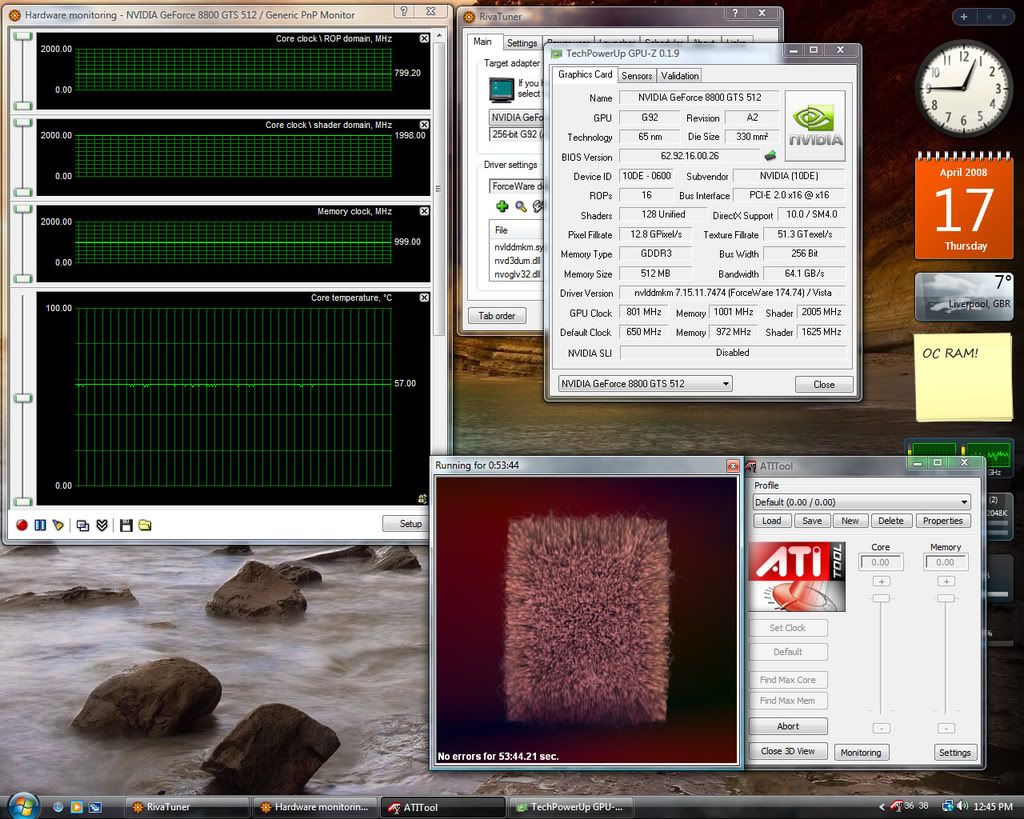
Anyway, All the games are working great except for Crysis. I'm not sure whats happening, it was running good for a while (though even then I thought it should be running better). Settings are not maxed, they are on high for the most part with a couple settings on medium @ 1360x768, and it just chugs really slowly, like I'm talking down to ~4fps. I've overclocked to 800/1000/1000, and am still using the 175.12 drivers (downloaded the new Rivatuner which works now). Other games such as Hellgate London I can max with AA and it runs beautifully, but the speed of Crysis has changed very little since my old video card. Any ideas?
Anyway, All the games are working great except for Crysis. I'm not sure whats happening, it was running good for a while (though even then I thought it should be running better). Settings are not maxed, they are on high for the most part with a couple settings on medium @ 1360x768, and it just chugs really slowly, like I'm talking down to ~4fps. I've overclocked to 800/1000/1000, and am still using the 175.12 drivers (downloaded the new Rivatuner which works now). Other games such as Hellgate London I can max with AA and it runs beautifully, but the speed of Crysis has changed very little since my old video card. Any ideas?
Kornowski
VIP Member
You can probably go a fair big higher on the shader, I have mine at 800/2000/1000.
Crysis is a stupidly demanding game, I saw maybe, 1 - 2 more FPS with my Overclock, so I really wouldn't expect anything great from Crysis. But, Like you said, other games are great!
I really recommend the 169.44 drivers, that may see your FPS in Crysis go up!
Crysis is a stupidly demanding game, I saw maybe, 1 - 2 more FPS with my Overclock, so I really wouldn't expect anything great from Crysis. But, Like you said, other games are great!
I really recommend the 169.44 drivers, that may see your FPS in Crysis go up!
speedyink
VIP Member
I think I made a mistake there. The shader is linked to the core speed (is it ok to unlink it?), and I think it's around 1800 or something. I'll have to try the drivers, cause I'm pretty sure Crysis should be running better than it is. It's a damn slideshow most of the time!

MosIncredible
New Member
What happened with this thread? lol
Kornowski
VIP Member
What happened with this thread? lol
Haha! Went a little off-topic, right?


