It's me again with a few "newbie" questions for my build...
1) I have this card reader - Koutech IO-ROM620
http://www.newegg.com/Product/Produc...82E16820162016
and this MOBO: Gigabyte GA-EX38-DS4
http://www.newegg.com/Product/Produc...82E16813128089
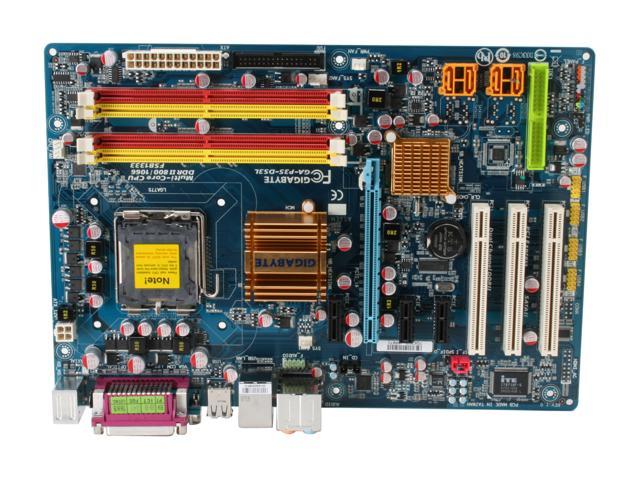
The instructions for the card reader are....well, there aren't any. The MOBO has a decent manual but I guess I'm spoiled from the manuals we use to work on aircraft. For the life of me, I can't figure where the cable for the reader connects to the MOBO. The reading doesn't address it nor does just searching for a connector on the board that might fit. The only one on the board that DOES look close is marked "COM" but the reader's connector has the one pin hole plugged for orientation and the two - the MOBO and the reader - are off by 180 deg - if that makes any sense. (There's no way to conect it even if I wanted to.)
So that's my "I'm a little lost" problem. Number 2 is more of a "am I doing this right or not?" kind of thing...
2) I have this power supply: PSU: OCZ Game X Stream 700 watt
http://www.newegg.com/Product/Produc...82E16817341002
And for putting power to the MOBO I'm not 100% sure of what the manual is saying. The PSU has two 4-pin connectors that are "buddied" together that are marked "CPU1" and "CPU 2." I also have a 2X10 connector marked "MAIN" with a second (buddied) 4-pin connector that's marked "24." The instructions make it sound like they want you to use either the 2X10 AND one of the 4-pin "CPU" connectors or just the two "CPU" connectors after first removing a black cover on the MOBO to gain access to be able to use the "CPU 2" connector. Just for orientation, the two 2X4 sockets are in the upper LH part of the MOBO and the 2X12 socket is on the RH side, near the top. (BTW - The MOBO only has a 2X12 socket for power and the manual talks of a PSU's 2X10 connectors being compatible but "to prevent system instability or failure to boot" use a 2X12 connector.)
2.1) I'll assume that any power cords/connectors that aren't used are just neatly tied up and kept away from the cooling air stream?
Thanks in advance for the help. All in all this is quite interesting and fun - it's like a big puzzle and I'm enjoying the experience and learning a lot as I go.
Jon in American Fork
1) I have this card reader - Koutech IO-ROM620
http://www.newegg.com/Product/Produc...82E16820162016
and this MOBO: Gigabyte GA-EX38-DS4
http://www.newegg.com/Product/Produc...82E16813128089
The instructions for the card reader are....well, there aren't any. The MOBO has a decent manual but I guess I'm spoiled from the manuals we use to work on aircraft. For the life of me, I can't figure where the cable for the reader connects to the MOBO. The reading doesn't address it nor does just searching for a connector on the board that might fit. The only one on the board that DOES look close is marked "COM" but the reader's connector has the one pin hole plugged for orientation and the two - the MOBO and the reader - are off by 180 deg - if that makes any sense. (There's no way to conect it even if I wanted to.)
So that's my "I'm a little lost" problem. Number 2 is more of a "am I doing this right or not?" kind of thing...
2) I have this power supply: PSU: OCZ Game X Stream 700 watt
http://www.newegg.com/Product/Produc...82E16817341002
And for putting power to the MOBO I'm not 100% sure of what the manual is saying. The PSU has two 4-pin connectors that are "buddied" together that are marked "CPU1" and "CPU 2." I also have a 2X10 connector marked "MAIN" with a second (buddied) 4-pin connector that's marked "24." The instructions make it sound like they want you to use either the 2X10 AND one of the 4-pin "CPU" connectors or just the two "CPU" connectors after first removing a black cover on the MOBO to gain access to be able to use the "CPU 2" connector. Just for orientation, the two 2X4 sockets are in the upper LH part of the MOBO and the 2X12 socket is on the RH side, near the top. (BTW - The MOBO only has a 2X12 socket for power and the manual talks of a PSU's 2X10 connectors being compatible but "to prevent system instability or failure to boot" use a 2X12 connector.)
2.1) I'll assume that any power cords/connectors that aren't used are just neatly tied up and kept away from the cooling air stream?
Thanks in advance for the help. All in all this is quite interesting and fun - it's like a big puzzle and I'm enjoying the experience and learning a lot as I go.
Jon in American Fork