Slipstreaming Windows XP Upgrade

jkcampbell730

New Member
Is it possible to slipstream a Windows XP Upgrade version with SP2?

Or

My wife's laptop has Windows XP OEM on it. Can I take the OEM CD and copy the files off that disc to the computer, slipsteram it and use it? I wouldn't think that would work.
 
Yes you can Slipstream SP2 to a Upgrade XP, theres SP3 out now. You cant install a OEM from a laptop on another computer.
 
Yes you can Slipstream SP2 to a Upgrade XP, theres SP3 out now. You cant install a OEM from a laptop on another computer.

Yes, well apparently you can't slipstream SP3 unless you have a setup disk with SP2 already. So I will just have to slipstream SP2 onto my SP1 XP CD.
 
I was just going by what this guy said:

http://www.winsupersite.com/showcase/xpsp3_slipstream.asp
"A Windows XP Home or Professional with SP2 Setup CD. This one's important: You cannot slipstream SP3 into an original XP Setup CD or an XP with SP1 Setup CD: Only SP2 will do. I have tested retail and volume license versions of the CD, but you may have luck with OEM CDs from PC makers as well, depending how much the company changed the disc layout. Full or Upgrade CDs work just fine. But I've only tested this with versions of XP that include just a single Setup CD: Media Center and Tablet PC users are out of luck."
 
nLite just makes it alot easier, you can add other drivers, your pin number to do a unattended install plus it will make a bootable ISO that you just have to burn a image of.
 
Last edited:
Do I have to create an image in the end in order to burn to a CD or can I burn all the files seperately like they came off the CD?
 
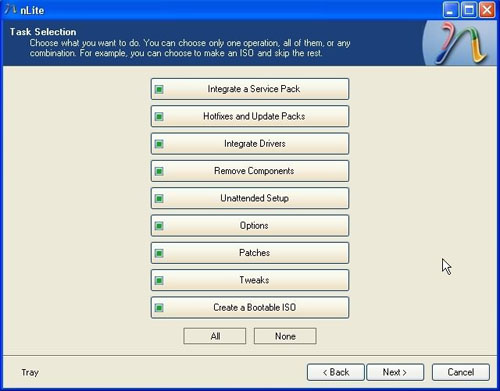
If you have your Sata driver instead of putting them on a floppy you can add them to the slipstream and SP3. That way you will know there on your XP CD. See where it says Intergrate Drivers. The first few times you try use a RW, that way if you mess up you can just erase it and start over till you get it right. Then copy the RW onto a R to keep.

a6.jpg
 
Last edited:
Where do I download the SATA drivers? I was under the impression that they were in the SP itself. Do I have to take them off my MOBO Drivers CD or download them?
 
You should not even have a problem with SP2, not even sure any Sata drivers were added to SP3. But yes they should be on you mobo driver CD.
 
I figured that SP3 would have all the same drivers as SP2 (including SATA). On my MOBO drivers the files are located under Vista 32 or Vista 64 =/

How do I recognize what driver file I need to integrate?

By the way, thanks for all your help.
 
I was just going by what this guy said:

http://www.winsupersite.com/showcase/xpsp3_slipstream.asp
"A Windows XP Home or Professional with SP2 Setup CD. This one's important: You cannot slipstream SP3 into an original XP Setup CD or an XP with SP1 Setup CD: Only SP2 will do. I have tested retail and volume license versions of the CD, but you may have luck with OEM CDs from PC makers as well, depending how much the company changed the disc layout. Full or Upgrade CDs work just fine. But I've only tested this with versions of XP that include just a single Setup CD: Media Center and Tablet PC users are out of luck."

Exactly!! Sp's require the previous service pack in order to work and install correctly. You will have to slipstream sp2 first and then slipstream the sp3 in there if you want it. OEM cd's are way harder to slipstream and to use as they have more protection on them and are designated for a certain pc but, it prob can be done with a little "messing" around.
 
Exactly!! Sp's require the previous service pack in order to work and install correctly. You will have to slipstream sp2 first and then slipstream the sp3 in there if you want it. OEM cd's are way harder to slipstream and to use as they have more protection on them and are designated for a certain pc but, it prob can be done with a little "messing" around.

Thanks. It's a good thing you mentioned this because I went straight from SP1 to SP3. Now I'm starting all over again... yay.
 
It says in nLite that when integrating drivers they must be .inf files. The SATA drivers that i downloaded contain 4 different files.

jgogo.sys
jraid.cat
jraid.sys
jraid_i.inf

Should I only be putting the jraid_i.inf in the drivers selection and it should work?
 
Back
Top