
2nd Hard Drive

TechCom0018

New Member
I'm going to be putting a 2nd Hard Drive into my Dell Dimension 4600 desktop. I just need figuring out the the other specs for 2nd HD so I get the right kind, like SATA or EIDE, what RPM speed is the right kind for my desktop, etc... . My thought was that I need a EIDE HD and I was thinking of getting a 250 GB HD or a 320 GB HD, o and but the way this 2nd is going to store mostly recored TV shows. I going to go on newegg.com and a good priced HD. so if anybody can help I would greatly appreciate it.
 
7200 RPM is good, unless you want like a 10k RPM drive, but those make more heat than the 7200RPMS... look at the read/write speed and the buffer mem...personally ive had most luck with western digital, seagate.
 
im pretty sure it is a pata drive you need so ide hard drive if you go for 300gb
look for 16 mb cache and 7200 rpm and that will do fine. configure it as slave via the jumper on the back install in the pc and boot the pc up,
you will proberbally not see the hdd in my computer so right click my computer and select manage then click disk management file down untill you see the new hdd and format in ntfs not fat 32 when it has finished you should see it in my computer and be able to use it hope this helped.
 
You could add a sata drive as well as a second ide for storage since both would be 7,200rpm unless you went with a WD Raptor drive that is the only one seen with two sizes that runs at 10,000rpm there. The gain with a sata over an ide drive for storage is the faster access time for a storaga device. Once installed you simply make sute the needed sata drivers for the board are installed and the drive is partitioned properly. The disk management tool foudn in XP doesn't format drives in Fat 32 only NTFS.
 
You could add a sata drive as well as a second ide for storage since both would be 7,200rpm unless you went with a WD Raptor drive that is the only one seen with two sizes that runs at 10,000rpm there. The gain with a sata over an ide drive for storage is the faster access time for a storaga device. Once installed you simply make sute the needed sata drivers for the board are installed and the drive is partitioned properly. The disk management tool foudn in XP doesn't format drives in Fat 32 only NTFS.

So are you saying IF my motherboard supports SATA, Ican use a SATA hard drive? And how do I know if my computer can use EIDE, SATA, or both?
 
look at your motherboard if you see a little port thats usually orange that a sata cable can fit in (not that you know what it looks like) you can use a SATA though if you don't know what Serial ATA is then your best bet is to get an IDE hard drive its the same type of cable going to your CD drive. if you look into your computer and you see a skinny orange cable going to your old first hard drive you have SATA if you have a grey wide cable you have IDE.

I suggest a 7200RPM hard drive. remember that when you buy a 200GB hard drive its not really 200GB its 180GB
 
The best way to know what your board will run is to look over the specifications on it under storage. The diagram in the manual will show where each is located. What make and model is that? That will make it easier to look up the board itself.
 
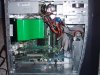
Here's some pictures of my desktop motherboard.

Can anybody tell what HD I can install in my computer and which HD slot I need to put the 2nd HD, in my Dell Desktop. And which is the Master HD and which is the Slave HD.
 

Attachments

  • P6040014.JPG
    P6040014.JPG
    48.2 KB · Views: 46
I think that motherboard doesnt have sata. So I would go with a 7200rpm, 16mb cache, ide hard drive. You might want to get a western digital or seagate hard drive.
 
You have a side mounted drive case at the bottom front by the looks of it. On some models the removable drive bay will be facing towards the right side while that one is pointing to the left there. But that should be the 3 1/2" standard seen there. On the average custom build the drives are generally found facing forward with the power and ide data cables plugged in at the rear of the drive which faces the rear of the case.

You should have room for one if not two other drives. Most will leave a bay open to allow air cooling between two drives. The master would be the top drive or at least the one plugged in with the end of the ide cable. It's a little awkward trying to twist a cable to place a slave above the master but has been done at times. There your master HD simply is placed above the second and possible third drive. A third drive would be plugged into the secondary ide cable along with the cd or dvd drive installed. Sata drives are see on separate cables for each drive pliugged directly into separate ports on the board.
 
Back
Top